

For suppliers
Shops can search published products by name, brand, category or GTIN. Your public business profile gives them a way to understand who supplies the goods.
For suppliersPosMasr comes with more than 52,000 products ready — names, barcodes, categories, and pictures for over 18,000 of them — so you pick what you sell, type your prices and open. The receipt printer sets itself up, the till sells with no internet, and everything you enter you can take out any day. On your own PC, or online from any computer, phone or tablet.
 Printer found
Sold offline
Stock updated
Printer found
Sold offline
Stock updated
Your shop lives in your account at app.posmasr.com: you manage it from a computer, a tablet or your phone, and you sell on a computer or an Android tablet with the free till app, connected with a 6-digit code. The till app drives the printer and the drawer and keeps selling when the internet drops.
Plenty of cashier programs cost nothing on day one. The bill comes later — in weeks of typing and learning, and in data you cannot take with you when the service changes or closes.
Your time is the most expensive thing in the shop. What “free” really costs → · Your data is yours →
Each one has a page or an article that explains exactly how it works — read the ones that matter to your shop. The full list is on the features page.

Names, barcodes and categories for Egyptian shops, over 18,000 with a picture. Pick yours, type your prices, open. A pack you don't have yet is added by scanning it.
PC: every package · Online: every plan

Since 5.1 the installer sets up the common USB receipt printers by itself — no driver to hunt for. The Devices tab lists what is plugged in, for the rest.
The program on your PC, every package, from 5.1

Bring your products and customers from Excel or CSV with any column names, from another program's database, or from an old PosMasr — with a preview before anything is saved.
On your PC and online, every package and plan

Export every product, sale and customer any day. On your PC the data is in files you hold; online you download a copy on every plan, even after you stop paying.
On your PC and online, every package and plan

The program on your PC never needs the internet. The online till keeps selling and printing through a cut, and syncs every receipt, in order, when the line is back.
On your PC and online, every package and plan

Products that came without a barcode get one generated (new in 5.1): print it on a label and scan it like any pack. Weighed goods sell from the label a label-printing scale prints.
Barcodes: every package · labels and scale: Silver and up / Shop and up

The ETA e-receipt is sent from the till, with the authority's QR printed on every receipt — no second program, no typing twice.
PC: Platinum · Online: Business and Chain

Orders reach the kitchen the moment they are sold, on a screen or a ticket printer. Online, guests scan a QR on the table, order and call the waiter.
PC: Gold and up · Online: Business and Chain (table ordering is an add-on on Cashier and Shop)

Today's sales, profit, stock and who owes what — from anywhere. Online on every plan; on the PC with the Platinum package.
PC: Platinum · Online: every plan

Shifts with an X and a Z report, the drawer counted at close, rights per cashier, and a manager card for voids and discounts.
PC: Silver and up · Online: Cashier and up

Put a sale on a customer's name, see who owes what, record payments and print a statement for any customer.
PC: Silver and up · Online: Cashier and up

Supermarket, pharmacy, café, restaurant, clothes or bakery: pick your shop type and the program switches on what you need.
On your PC and online, every package and plan
The till was always the heart of it. Now the rest of the shop lives next to it: the invoices and the bank, the appointment book, the team's hours and pay — and a long list of everyday helpers. Every one says where it runs and in which plans.

Quotes, invoices, supplier bills, the bank and the 14 % VAT summary, with the till's sales flowing in by themselves. Plain words for you; the journal for your accountant.
Online: Business and Chain

Your own booking page: the customer picks the service, the person and the time. No double bookings, reminders you send in one tap, and the visit ends as a sale at the till.
Online and the till app: Business and Chain

Files and papers, leave, attendance by PIN, card, phone or fingerprint device, a weekly roster, and Egyptian payroll with income tax and social insurance.
Online: Shop and up · PC: Silver and up (payroll: Business / Gold)

Ask ChatGPT or Claude about your own sales and stock, with a key you make and revoke. Read only: no AI can sell, refund or change anything.
Online: Business and Chain

Owner alerts for voids, refunds, big discounts and a drawer that does not add up — and “Ask your shop”: type “how much did we sell today?” and get the figure.
Online: Shop and up · PC: Silver and up

A loyalty stamp card on the customer's phone, instalments and deposits on the customer's account, and job tickets for repairs, laundries and tailors.
Online: Cashier and up (stamp card: Shop and up)

Your WhatsApp answers from your real menu, prices and stock — texts, voice notes, photos, bookings — and the order lands on the till when the customer says yes.
Coming with the next update · add-on on Business and Chain

A Google-review QR on every receipt, “order the same again” from the receipt's link, and returns or questions sent from it to your till.
Every plan

A warning when a supplier's cost rises, with the price that keeps your margin; slow stock with what to do about it; and the supplier's price list from a photo.
Online: Shop and up · PC: Silver and up

A one-minute voice note on last week every Saturday, and Ask your shop answering any question from the shop's own reports.
Online: Shop and up · switching on shop by shop

The same online till on an Android tablet or handheld, selling offline, with USB, Bluetooth or built-in printers.
Every online plan · Android 9 and up

Fill a new shop with sample data in one click to see every report working, take it out in one click — and the team's top sellers on the café's TV.
Online: every plan · the TV slide: Business and Chain

Settings → Modules: stock, customers, Books, HR, bookings, the online shop, procurement, warehouses — one card each, one switch each. Off hides the pages; nothing is deleted.
Online: every plan

Purchase requests approved by the right people, quotes from several suppliers by link, delivery notes, and the supplier's invoice matched with the order and the delivery.
Online: Business and Chain · Shop: add-on 300 EGP a month

A store room, a central warehouse, a van: each location with its stock and bins; transfers picked by scanning and tracked on the road; batches, serials and recall.
Online: Business and Chain · Shop: add-on 300 EGP a month

Your companies and shops on one dashboard, without the sales between them; the group's P&L and balance sheet; stock between them at an agreed price.
Online: Chain · any plan may join

The day's sales and your credit customers go to your accountant's program by themselves; the online shop takes cards and wallets with your own Paymob account.
Coming soon · Business and Chain

It answers from your own notes, asks you once about what it did not know, remembers each customer briefly and follows open matters as cases.
Coming with the next update · add-on on Business and Chain

For contractors, fit-out, maintenance, agencies, workshops, events and printing: phases and a budget, tasks on a board, the team's hours from the phone, costs from expenses and stock, budget against actual and the margin.
Online: Business and Chain · Shop: add-on 300 EGP a month

Milestone, progress (% of the contract) or time and materials; retention held and released at the end, advances recovered; a preview first; through Books or the customer's account.
Online: with Projects

Every machine, shelf and van on a register with a tag label; depreciation posted to Books each month after a preview; sales with the gain or loss; counts by scanning the tags.
Online: Business and Chain (needs Books)

Requests, approvals, the order from the request, the supplier's invoice matched with the order and the deliveries, invoices to check and supplier ageing — on one PC, offline.
On your PC: Gold and Platinum, from 5.7.0
Everything new in October → From till to ERP Free tools for any shop
Connect your PosMasr Cloud shop to Claude Desktop (1-Click .mcpb bundle), ChatGPT, Gemini and Cursor with a read-only key you control. Download SKILL.md or connect via /.well-known/mcp.json and ask about today's sales, cashier voids, expiring stock and real net margins.

.mcpb) & ChatGPTDownload your ready .mcpb bundle for Claude Desktop, paste one connector URL into ChatGPT or claude.ai, or run the ready command in Gemini CLI and Cursor.

“How much did we sell today across every branch?”, “Which cashier voided receipts?”, “Which items are expiring soon?”, “What are our top 10 highest-margin items this week?”

SKILL.md & 100% Read-Only SafetyDrop https://api.posmasr.com/mcp/skill.md into your assistant; auto-discover via /.well-known/mcp.json. 19 read tools, 0 write tools.
Every detail that leaks money or slows service in an Egyptian supermarket, pharmacy, restaurant, café, gaming lounge, laundry, salon, mobile shop or clothes store is handled right on the till and on your phone — 100% in-house.
Stops reused or fake transfer screenshots at the counter by checking the transfer reference number across shifts and history before printing the receipt.
On your PC and online · every plan
Compares your live simplified turnover tax bracket (0.4% to 1.5% under Law 6/2025) against 22.5% net-profit corporate tax and tracks 14% VAT readiness.
Online: Shop and up · PC: Silver and up
Hides expected cash so the cashier counts bills and coins blind by denomination; records exact over/short variance on the Z-report and alerts the owner.
On your PC and online · Cashier and up / Silver and up
No coins in the drawer? Save the customer's remaining change (2, 3 or 4.50 EGP) on their phone number in one tap and redeem it automatically on their next visit.
On your PC and online · Cashier and up / Silver and up
When individual pieces hit zero at the till while full cartons or shrinks are in stock, PosMasr automatically breaks 1 carton into pieces with exact unit cost.
On your PC and online · Shop and up / Silver and up
Scan a single 20–29 barcode sticker from your deli, butcher or roastery scale and PosMasr auto-detects the item code, weight/price digits and checksum.
On your PC and online · Shop and up / Silver and up
Logs every no-sale drawer pop, cleared cart line after showing the total, price override, return and void — ranked per cashier with instant Telegram/phone alerts.
On your PC and online · Cashier and up / Silver and up
Dispatch orders to your delivery riders, record their change float, calculate delivery fees by zone, and settle every rider's cash wallet at shift end.
On your PC and online · Shop and up / Gold and up
Switch price lists for Dine-In, Takeaway, VIP and In-House Delivery, calculate true net margin after packaging and delivery costs with the Menu Engineering Matrix, and route call-center orders across branches.
Online: Business and Chain · PC: Gold and Platinum
Flags any supplier cost increase at receiving, shows how much your margin dropped, and updates your selling price and label queue in one tap.
Online: Shop and up · PC: Silver and up
Track electronics IMEIs and warranty dates per receipt, build clothes Size×Color barcode grids in one screen, and take Layaway/Deposit orders.
On your PC and online · Silver and up / Cashier and up
Bring your products, barcodes, categories, prices, stock and customer balances from Foodics, Daftra or any Excel/CSV sheet with an instant preview before saving.
On your PC and online · every package and plan
Tracks prep seconds per stage from ticket arrival to plating and pickup, and plots fastest/slowest garçon and chef leaderboards with dual monetary (EGP) and time Y-axes.
Online: Business and Chain · PC: Gold and Platinum
Rings the waiter's tablet when dishes are ready, flips vacated tables to “Needs Cleaning”, and splits checks by seat or even divides 1 shared dish across 3 guests (1/3 each).
Online: Shop and up · PC: Gold and Platinum
Guests order and pay from the table QR while watching live kitchen prep status, and open their Instant Mobile Browser PWA Digital Stamp & VIP Card with Cashier QR — updating stamps and points immediately with zero apps.
Online: Shop and up · PC: Gold and Platinum
Deducts grams and milliliters of raw ingredients automatically on every sale, and compares theoretical recipe usage against actual physical counts to catch kitchen waste and theft automatically.
Online: Business and Chain · PC: Gold and Platinum
Stream live shop metrics to Power BI or export natively to Excel, CSV, Zoho Books and QuickBooks with exact Date + Hour/Minute (HH:mm) filtration for any shift or rush window.
On your PC and online · Shop and up / Silver and up
Pharmacy FEFO & active-ingredient substitutes, BOGO/Happy-Hour promos, central kitchen commissary, supplier RTV claims, smart Auto-PO, Hourly Table/Gaming Lounge & Minimum-Charge Timer, Laundry Conveyor & Electronics Repair Tag Tracker, Salon Multi-Chair Commission & Tip Split, Prepaid Digital Coupon Book, Cold-Chain Log & USB Flash Backup, conflict-free barcode minting, safe drops, B2B credit gates, gram pricer, paperless receipts, auto-clock-in, and universal cash drawer (Seethings/ESC-POS) diagnostic.
On your PC and online · across all retail, hospitality & service plans
See all Instant-Win Features → Kitchen SLA, Digital Stamp Card & Recipe BOM Blind Close & Delivery Captains
The same screens and the same receipt. Start with one; your products and sales move to the other whenever you want.


Not sure? On your PC or online: which one fits your shop · Start small, upgrade later
Two ways to use the same market. Choose the route that fits your business.
Shops can search published products by name, brand, category or GTIN. Your public business profile gives them a way to understand who supplies the goods.
For suppliers
Browse the public directory by product, brand, category or GTIN. Check the supplier profile and compare currency, unit and pack size together.
For shopsExplore the connected products, their plans and add-ons. Each page explains what it does, what it costs and how to use it.

Work orders, technician scheduling, equipment history and recurring maintenance.

Support tickets, team assignments, response deadlines and shared knowledge articles.

Internal forms with versioned fields, validated submissions and team review.

Turn module events into support tickets or service orders, with optional approval.

Bills of materials, work orders, consumption, output, waste and recorded costs.

Equipment reservations, deposits, handovers, returns and condition reports.

Saved dashboards, daily activity and CSV exports for sales and your add-ons.

A private place for customers to find purchases, documents, support and service updates.

Know who comes back, who has gone quiet, and who needs a call.

From a receipt on a phone to an approved claim and a recorded reimbursement.

Sell a membership, a monthly service or a regular delivery from the same customer account.

Run business-to-business orders with agreed prices, pack sizes, credit controls, partial deliveries and returns, using the customers and stock you already have.

A shared product directory for shops and suppliers: search products, compare unit prices and delivery terms, then turn an agreed request into a purchase order.
What the cashier and the owner see every day. Click a screenshot to enlarge it.
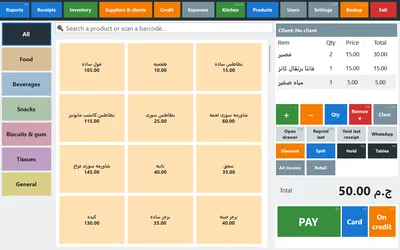
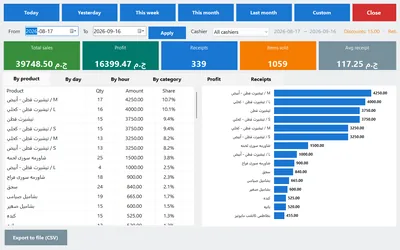
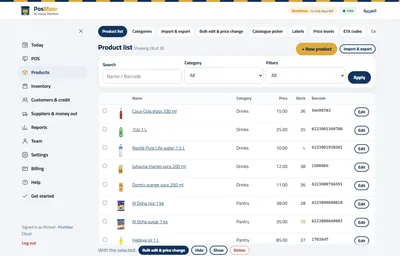
The program on your PC: never — it works completely offline and your data lives on your PC. PosMasr Online: the till keeps selling when the line drops and syncs when it is back; the internet is needed for the online pages, the phone and the reports.
Under an hour for most shops: install the program (or sign up online), pick your products from the ready catalogue of more than 52,000, type your prices, plug in the printer. Coming from another program or Excel? Import your list with a preview first.
Yes, any day. On your PC the data is yours in files, with Excel exports and backups; online, Settings → Data → “Download a copy” gives you everything in one file, in the desktop program's own backup format — on every plan, even after you stop paying.
Your choice. The program on your PC is a one-time licence per till, from 2,450 EGP. PosMasr Online is by the month, from 499 EGP, with the first year 20% off every plan with the code AHLAN20.
Thermal receipt printers of 58 or 80 mm and cash drawers connected to the printer or to the PC. Since 5.1 the installer sets up the common USB receipt printers by itself; any other with a Windows driver works too.
Yes — the program runs on Windows 7 and up and is light on older PCs. Online, any recent browser works for the management pages.
Search by feature, screen or task. Open a guide and share its link with your team.

The program on your PC: 14 days free, then a one-time licence. PosMasr Cloud: 14 days free, then by the month — the first year 20% off with the code AHLAN20. Your products and sales move with you either way.