Built on the credit book you already have
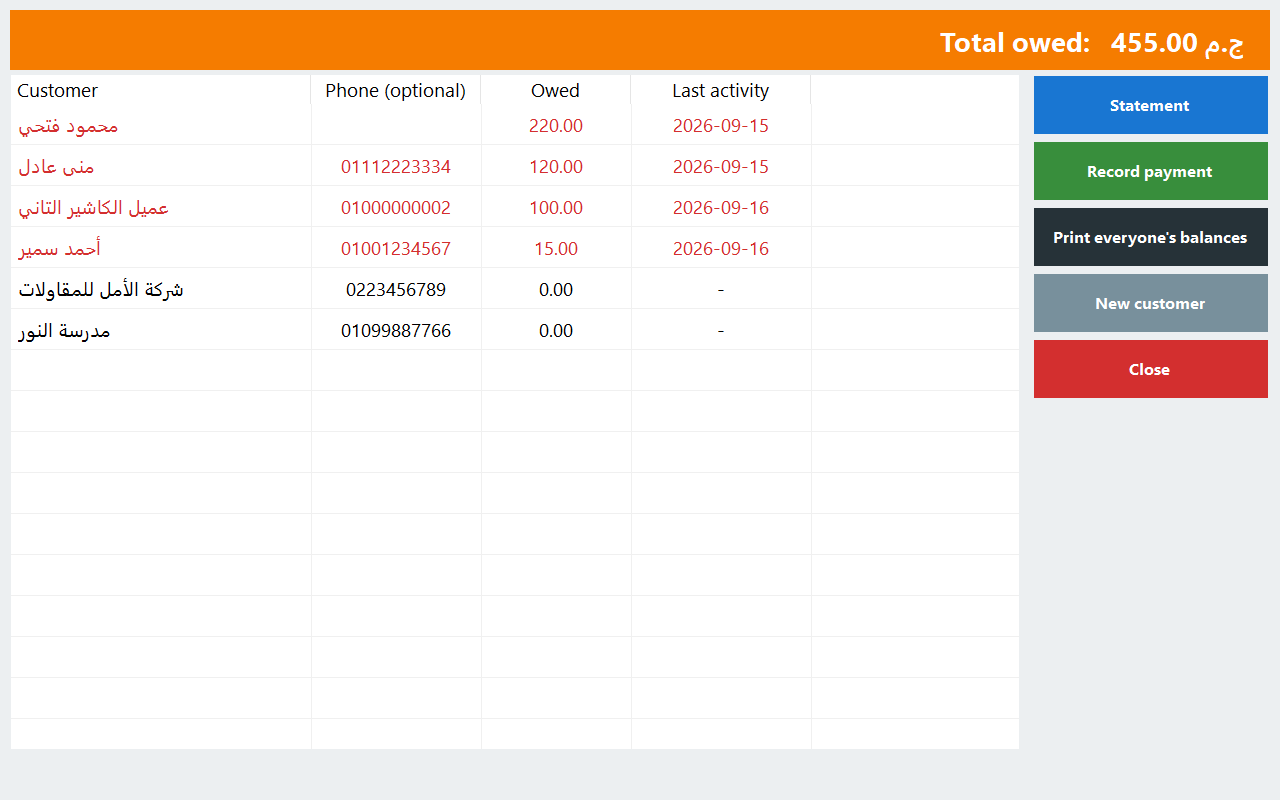
An instalment sale in PosMasr is not a separate world. It is an ordinary sale on the customer's account (the credit book, الأجل), with a schedule attached to the part that is not paid yet. So the customer's statement, his balance and his payments are the same ones you already use; the schedule only says when each part is due. If you sell on credit today, read selling on credit without losing money first: everything there still holds.
Nothing shows until you switch it on: Settings → Instalments. A shop that never sells this way sees no new buttons.

A sale on instalments, step by step
An appliance shop in El Mahalla. Om Karim buys a fridge at 22,800 EGP. She pays 4,800 now, and the rest over twelve months.
- The cashier rings up the fridge and picks Om Karim as the customer.
- On Sell he presses Credit → “Instalments / deposit”.
- He types the down payment (4,800, cash or card), picks any open deposit she already paid, then the number of instalments (12), weekly or monthly, and the first due date.
- The till shows the schedule: twelve instalments of 1,500. They always add up exactly to what is left; if it does not divide evenly, the odd piastres go on the last one.
- The receipt is the full sale, 22,800, with its VAT like any sale. The down payment is a payment on her account, not a second sale.
- Up to 24 instalments by default; a manager can change that limit in the settings.
- A mark-up for paying later (a fixed amount and / or a %) is possible, but it is off by default; you switch it on only if your shop charges one. It shows as its own line.
- Making a plan at the till needs its own right; a cashier without it asks for a manager's approval.
Paying the instalments
Om Karim comes back on the first of the month. Any payment on her account counts toward the schedule — taken at the till's credit screen, on her customer page, or on the Instalments screen. It pays the oldest instalment first; a short payment pays part of it; an extra one becomes her credit. Her slip shows what she paid, what is left on instalments, what is overdue, the next instalment and the balance.
- The Instalments screen has three parts: due payments (today and overdue, so you know whom to call), deposits held, and a report.
- Reschedule: if she loses her job for two months, a manager spreads the rest again; paid instalments stay paid.
- A return takes the last instalments off first, so the schedule gets shorter, not cheaper each month.
- A void of the sale cancels the plan (and the mark-up). What she already paid stays as her credit: you pay it back or keep it for her next purchase.
- A card payment is never counted as drawer cash; the X and Z reports show customer payments by card and the deposits in their own lines.
Deposits (عربون) and holding an item
A furniture showroom on the ring road. A young couple choose a dining set at 22,800 EGP and pay a 2,280 deposit so nobody else buys it before the flat is ready. The cashier takes the deposit on the Instalments screen or the customer's page, cash into the drawer or by card. Until it is used, a deposit is money you hold for the customer — a liability, not a sale — and the Deposits list and the report show exactly how much of it you are holding.
- Holding an item (lay-by) is simply 0 instalments: on the day they collect, the final sale is paid by the deposit and the rest in cash.
- A deposit can be paid back in part or in full, never more than you hold.
- “Keep the deposit”: if they walk away, the shop keeps it; the liability goes and nothing moves in the drawer.
The 14% VAT on a deposit
Under Egypt's VAT law, a down payment is itself a taxable event: the VAT on the money received is due in the period it was received, not on the day the goods leave. Many shops do not know this, and declare everything on the final sale. With the setting “Charge VAT when a deposit is taken” on (Settings → Instalments), PosMasr does it the way the law reads:

| What happens | The document | In our example |
|---|---|---|
| The deposit is taken | An advance tax invoice with its own number (AV-…): the amount before VAT, the VAT, the total received. The VAT is inside what the customer pays | 2,280 = 2,000 + 280 VAT |
| The final sale | The full receipt with its full VAT, then below the total: “Less advance already invoiced”, the VAT already invoiced, and the VAT due on this invoice | 22,800 with 2,800 VAT; less 2,280 (280 VAT); VAT due now 2,520 |
| The deposit is paid back | A tax credit note (CN-…) naming the advance, reversing its VAT in the refund's period | — |
| “Keep the deposit” | No new tax document; the VAT charged on the advance stays charged | — |
| A refundable security deposit | No VAT: the cashier chooses it explicitly, with a manager's right | A rented costume's insurance |
Reports → Tax gets its own section for advances and mark-ups, already included in the period's totals, so the VAT of a period is never counted twice and never dropped. A mark-up, when you allow one, has its own VAT choice in the same settings: by default only the part above the Central Bank rate you type carries VAT, and with no rate typed all of it does. A new shop starts with deposit VAT on; a shop that already took deposits is asked once, and nothing changes until a manager answers. To check the arithmetic on any amount, use the free VAT calculator.
The ETA e-receipt
If your shop sends e-receipts to the Egyptian Tax Authority, the advances go on the same chain as your receipts: the deposit as a one-line receipt when it is taken, and its use or refund as a return that references it, so that what the Authority sees each period equals your own tax report. Two things to know before you rely on it:
- It has not been tried against the Tax Authority yet. No advance has been submitted to the ETA's system so far; confirm with your tax adviser, and watch Reports → E-receipts for the first ones.
- Your shop must register two item codes on the ETA portal once (one for advances, one for instalment mark-ups), the same way you registered the service charge's.
More on the e-receipt itself in the ETA e-receipt, simply and on the e-receipt page.
What it does not do
• No interest calculations. The mark-up is what you type, a fixed amount or a %; there is no interest rate that grows with time.
• No automatic reminders by SMS or WhatsApp for instalments. The due list tells you whom to call.
• No automatic late fees.
• No guarantors or ID documents on the plan.
• Taking a deposit on the web pages, and a sale that uses a deposit, need the internet.
Which plans include it
| Edition | Instalments and deposits |
|---|---|
| PosMasr Cloud | Cashier (999 EGP a month), Shop (1,999), Business (2,500) and Chain (5,000); not in Basic |
| The program on your PC | Silver and up (where the credit book is), one-time licence; see prices |
Every new online shop starts with 14 days of Business, no card. The steps are in the manual; the full plan comparison is on the PosMasr Cloud page.


Quick answers
Is the down payment a second sale?
No. The sale is one receipt for the full amount; the down payment and every instalment are payments on the customer's account.
The customer paid more than the instalment. What happens?
It pays the next instalments; anything over the whole debt becomes his credit.
Can I add interest?
You can allow a stated mark-up (a fixed amount and / or a %), shown on its own line. There is no interest that grows with time.
I am not registered for VAT. Does any of the tax part apply?
No. A shop without VAT charges nothing on deposits, whatever the setting says.
Do instalments work on the program on my PC?
Yes, from Silver, on its own Instalments screen.
Close the notebook
Start the 14-day trial of Business, no card, switch instalments on and sell your first fridge in twelve parts.
First year 20% off every plan and add-on — with the code