The customer books from the phone, and the visit ends as a receipt at the till
Appointments at the salon, the clinic and the car wash, classes at the studio, tables at the restaurant — all built into PosMasr Cloud, on the same products, customers and team as your till. Your shop gets its own booking page that customers open without an account, the calendar never gives the same chair to two people at once, and every visit ends as a normal sale at the till, with its own receipt. No notebook, and no more “who told you five o'clock?”.
First year 20% off every plan for the first 12 months with the code

Any shop whose work runs by appointment
If your customers ask “when are you free?” before they come, Bookings is made for you. The first time you switch it on, a setup wizard asks what kind of business you run — salon, clinic, car wash, repair, studio, restaurant tables or something else — and prepares the rest: the services, the resources and the hours, ready for you to adjust.
Salons and barbers
Haircut, colour, beard — each service with its time and price. The customer picks the barber, or “anyone free”, and the minutes to clean the chair between two customers are counted by themselves.
Clinics and dentists
Consultations, follow-ups and sessions, each doctor with a room or a chair, and prepaid packages of sessions. A doctor can be set to see only his own visits.
Car washes
Every washing bay takes one car at a time, and each service has its own length: outside, inside and out, polish. The cars that turn up without a booking get the next free slot.
Repair and maintenance
Phones, air conditioners or cars: a time to hand the device in, on a technician or a workbench, with a deposit first if you want one.
Studios, gyms and classes
Yoga, dance or a photo studio: a class timetable with a number of places, the customer sees how many are left, and a full class has a waiting list. Memberships and packs of classes paid in advance.
Tutors and training centres
One-to-one lessons by appointment or groups with a number of seats, and the weekly fixed lesson repeats by itself.
Restaurants and cafés
A table for the size of the party: the smallest table that fits is chosen, and two tables are joined only if you said they can be. A seating preference and the occasion come with the booking.
And any other work by appointment
A private trainer, a photographer, a consulting office… choose “other” in the wizard and set up your services and resources yourself.
A booking page for your shop, with no account to make
Every shop gets its own page at posmasr.com/menu/your-shop/book, made for the phone first. The customer does not sign up and installs nothing: he opens the link and books in under a minute.
- Picks the branch, then the service — or several services in one visit.
- Picks the team member he likes, or “anyone”.
- Sees only the times that are really free, and taps one.
- Types his name and phone, and confirms.
- While he types, the slot is held for him for 10 minutes, so nobody takes it from under his nose halfway through.
- After booking he gets a “manage my booking” link: see the visit, move it or cancel it within your shop's policy, add it to his phone's calendar, and get directions to the shop.
In the manual: The public booking pages


Reserve a table
At …/reserve the party size comes first, then the day and time, the seating preference and the occasion. When the time is full the page offers the nearest other times, or a place on the waiting list.
The class timetable
At …/classes the week's classes with the places left in each. A full class takes names on a waiting list.
Share it everywhere
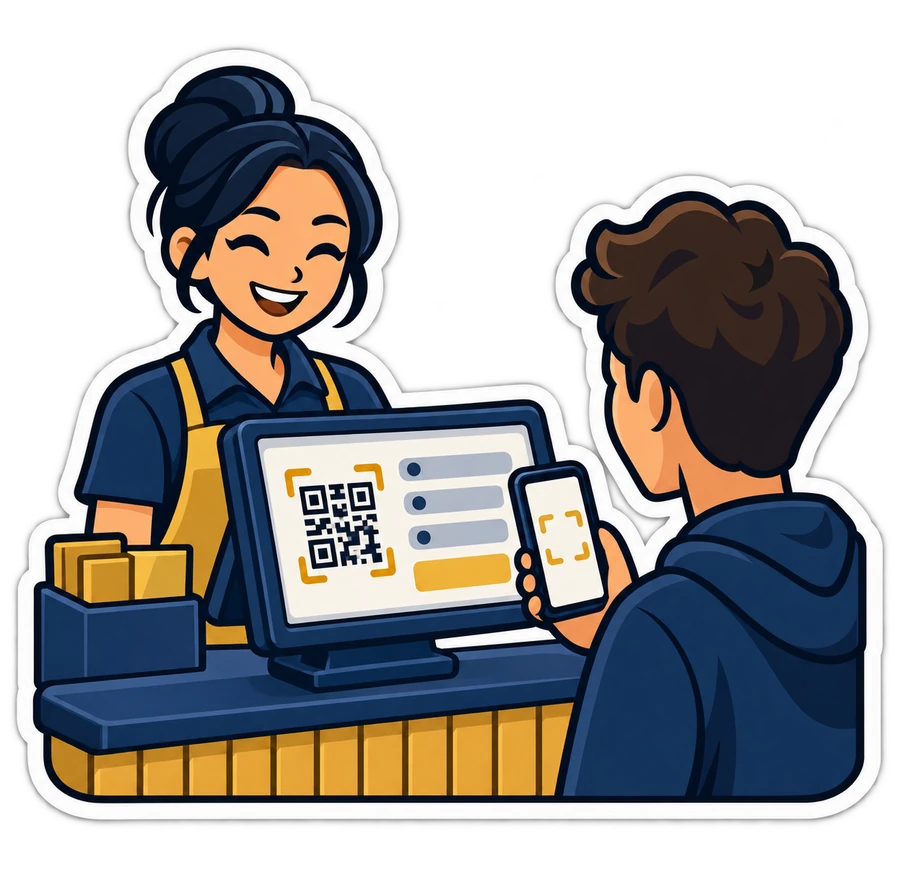
Each page is switched on by itself in Settings → Bookings, with a link to share, a QR code to print and hang at the counter, and a “Book now” button for your website and your social pages.
Everything the front desk needs, in front of it
Phone bookings, walk-ins, the doctor who is running late, the customer who wants the same time every week — the reception handles all of it from PosMasr Cloud, on the PC at the desk or on a phone.
The Today board
The day's visits on one page: who is coming, who has arrived, who is in the chair, who has finished.
A calendar four ways
Day, week, month or a list. A phone booking takes seconds, and a visit can repeat — every week at the same time — without typing it again.
Never booked twice
Each team member and each resource — a room, a chair, a bay, a table, a machine — has one visit at a time, or as many as its capacity. And one person cannot be booked in two branches at the same hour.
The waiting list
When a visit is cancelled, the time does not go to waste: it is offered to the waiting list and held for a while for the person whose turn it is.
The customer card
The same customers as the till: every past and coming visit, the packages he bought, and how many times he cancelled or did not show up.
Packages and memberships
Ten sessions paid in advance, or a monthly membership: the sale is a normal receipt, a session is set aside when a visit is booked, and it is used up only when the visit is done.
Your team, with their rights
The same team as the shop, not a second list. Rights decide who books, who checks out and who sees what — down to “a team member sees only his own visits”. Each one can have a private calendar link to follow his day on his own phone.
Services are your products
A service is a product of the shop, with its price and VAT, plus what bookings need: its length, add-ons, minutes before and after it, a deposit, and how far in advance it must be booked.
Reports that answer something
How busy each person and each chair really is, the no-shows, and the busiest hours of the week — on screen, or as CSV, Excel or a printout.
Bookings never invents a receipt: the visit ends as a normal sale
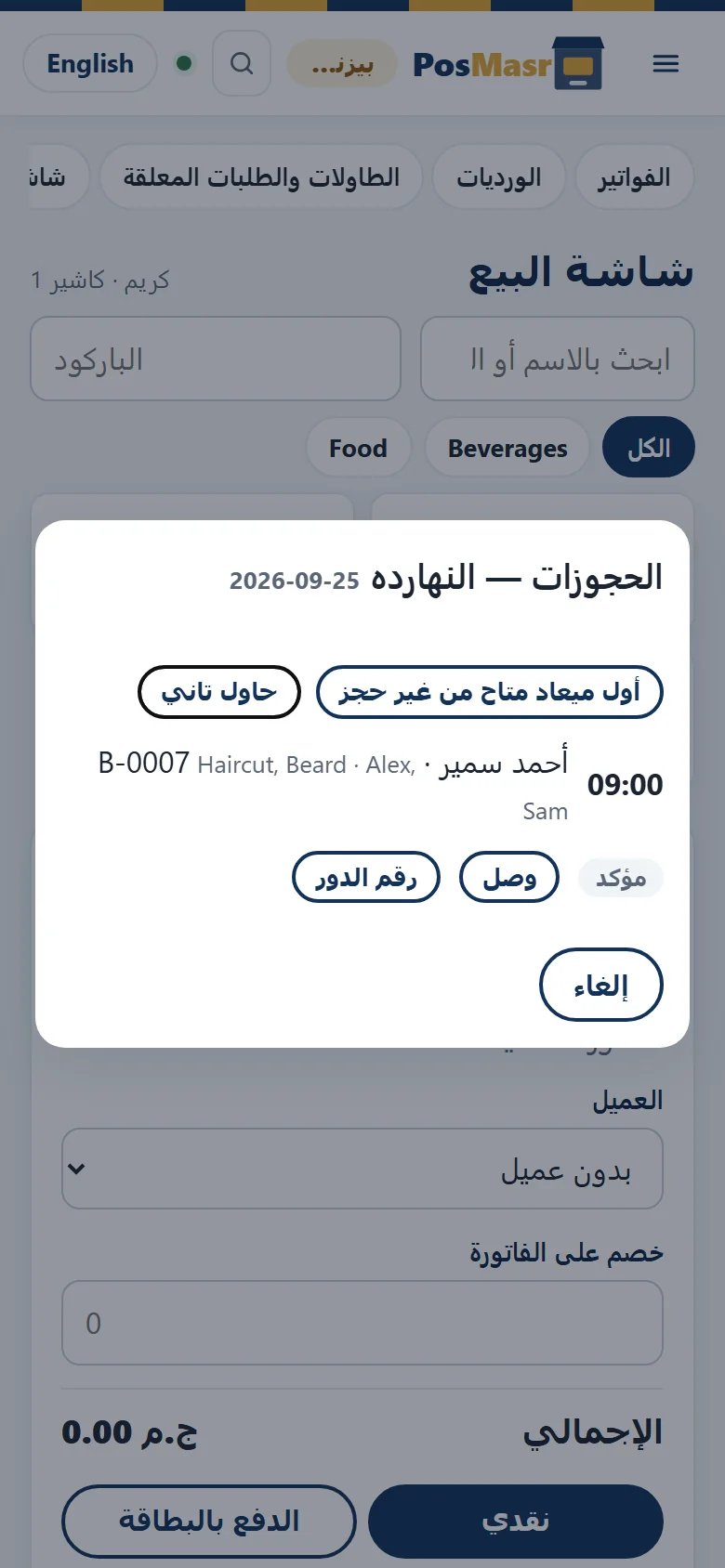
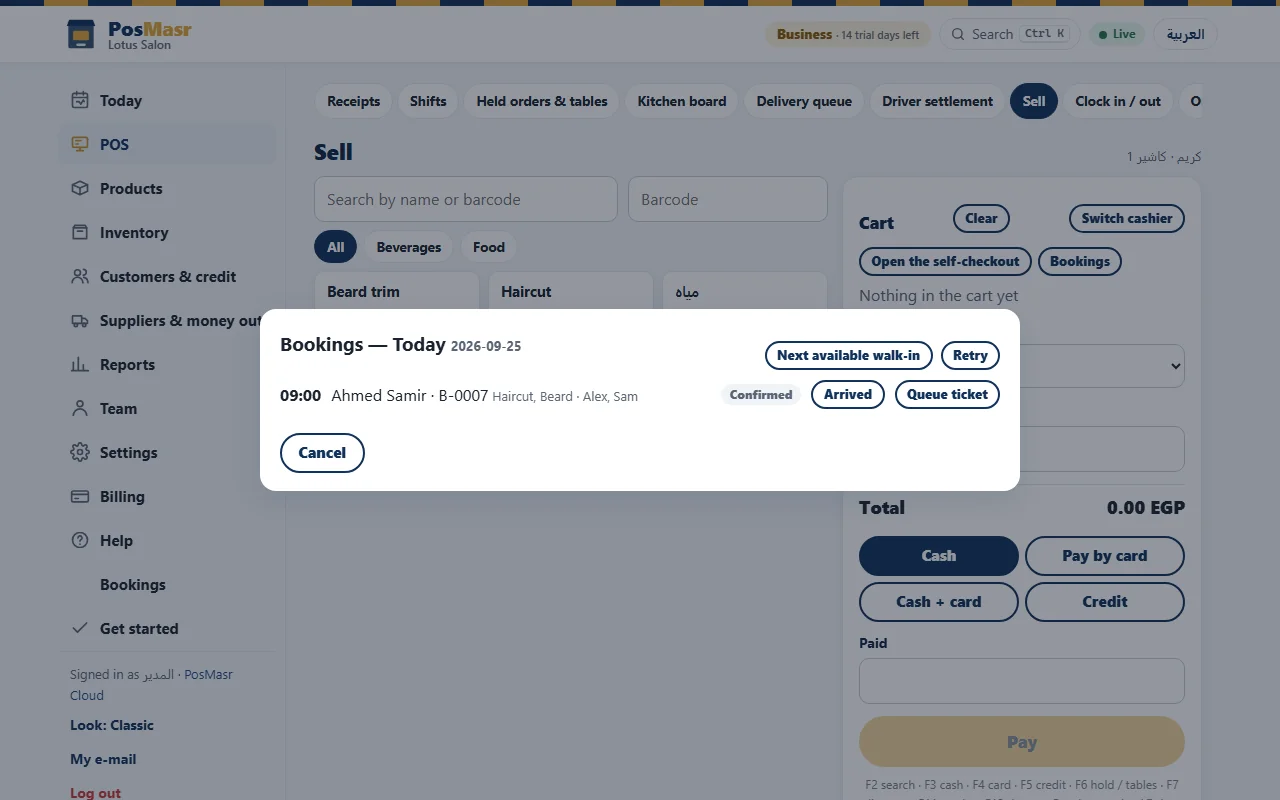
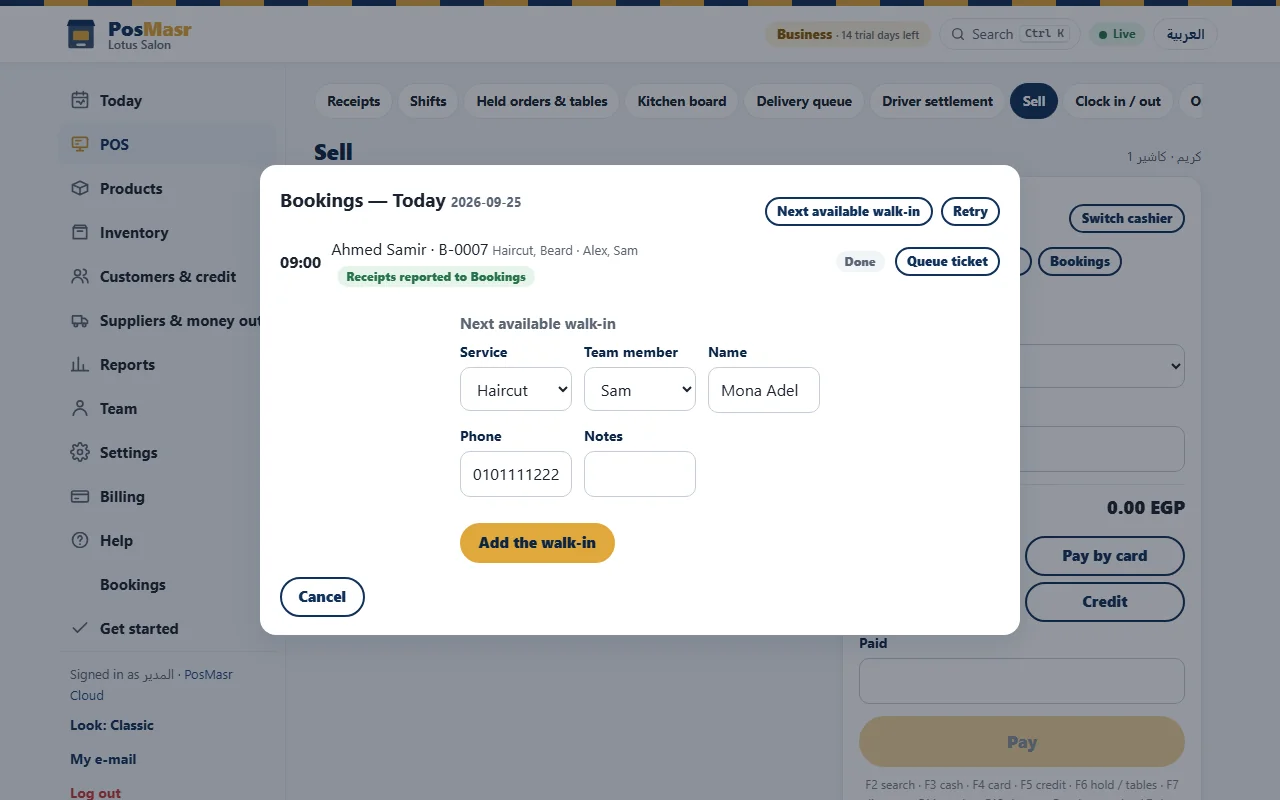
The money side stays exactly where it is today. On the Sell page — in the online app or the till app — a Bookings button opens “Bookings — Today”, and the visit walks to the cart.
① Arrived
Each line shows the time, the customer, the booking number, the services and the team member. The receptionist taps Arrived on a Confirmed visit, then Start when the work begins.
② Check out
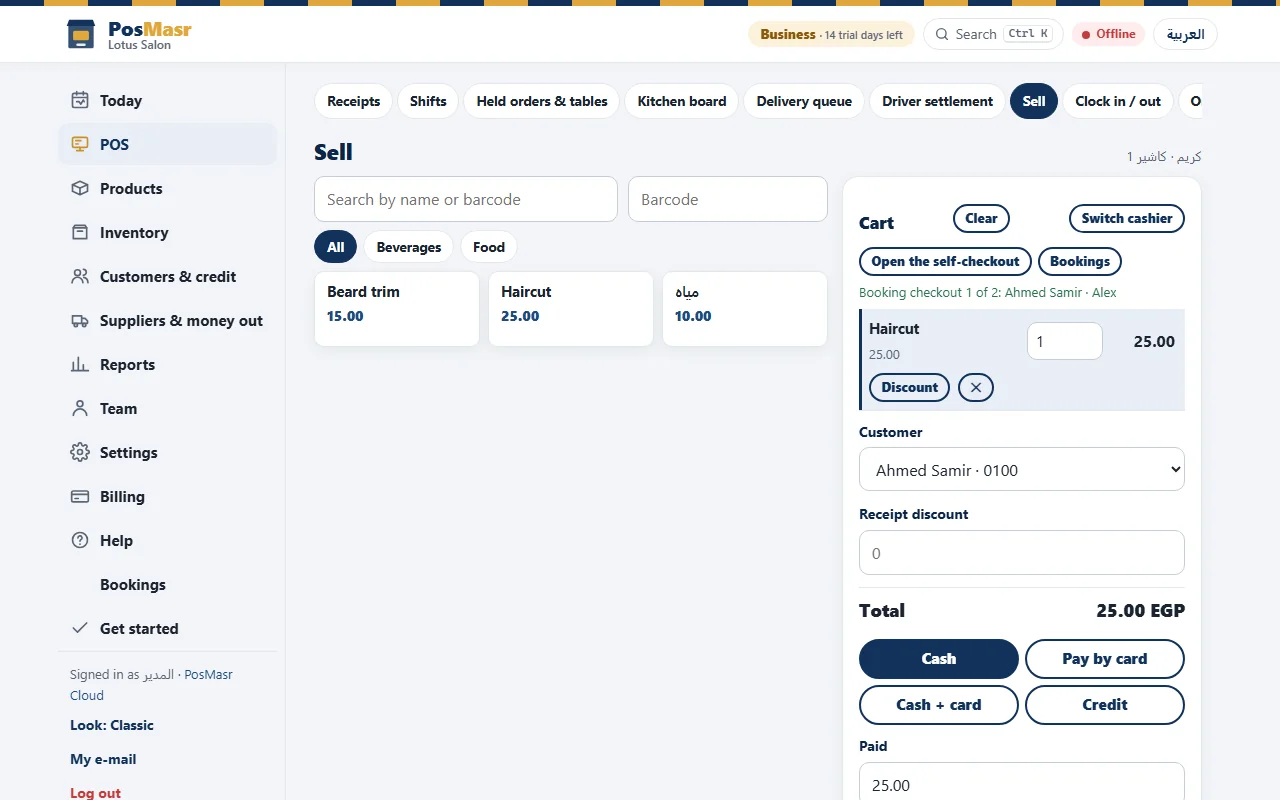
Check out fills the cart with the services at the booking's price, with the customer and the team member already chosen. Add a shampoo or anything from the shelf if he wants it.
③ Payment as usual
Cash, card, both, or on credit — the receipt, the stock and the shift run exactly as for any sale. Then the receipt is reported back to Bookings and the visit closes.
Two team members, two receipts
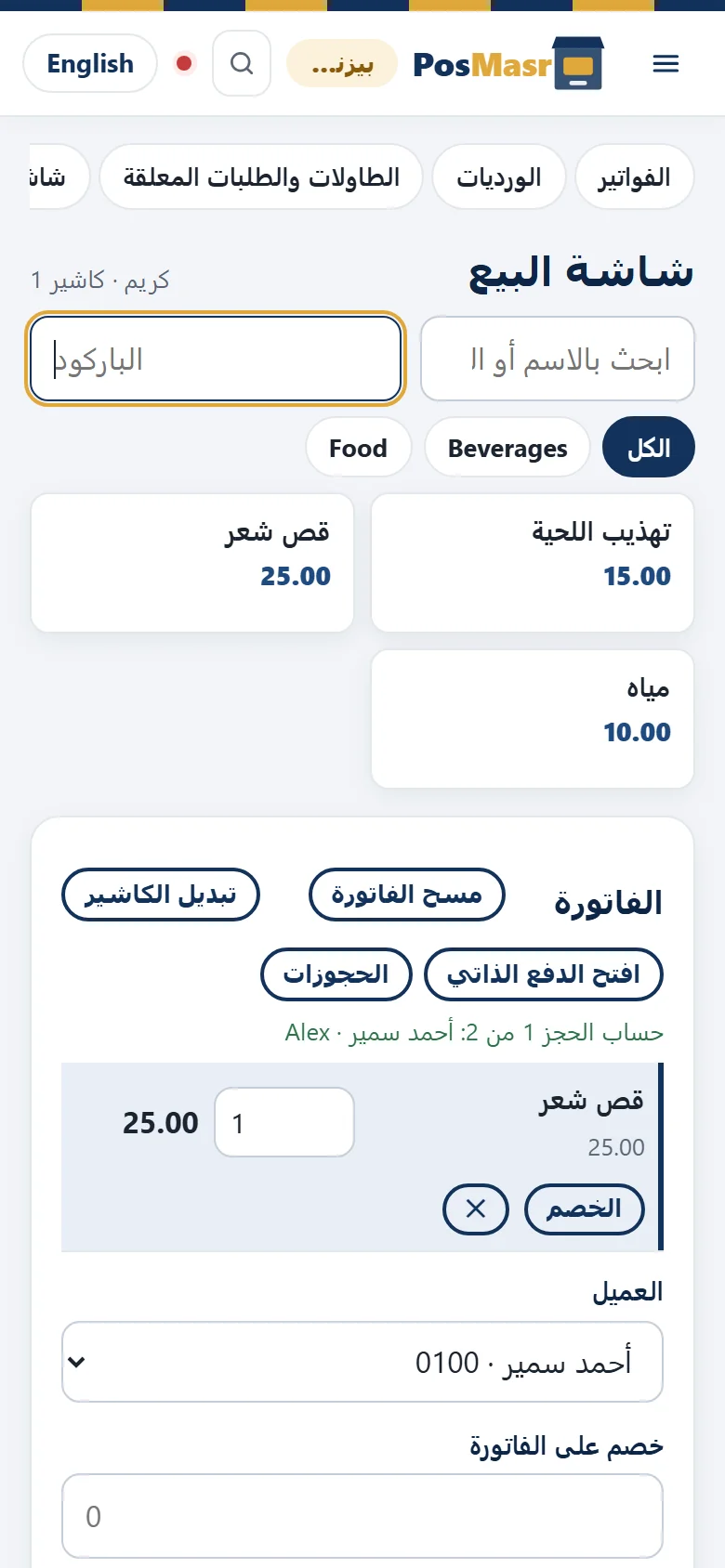
A normal sale has one seller, so a visit shared by two people — a haircut with one and a beard with the other — checks out as one receipt each: “Booking checkout 1 of 2”, then 2 of 2. Each person's sales stay his own, and when both are paid the till shows “Receipts reported to Bookings”.
- A deposit already taken is applied in the same sale, so the customer pays only what is left.
- A package session is used up here, once, and never twice.
The customer at the door gets the next free slot — even offline
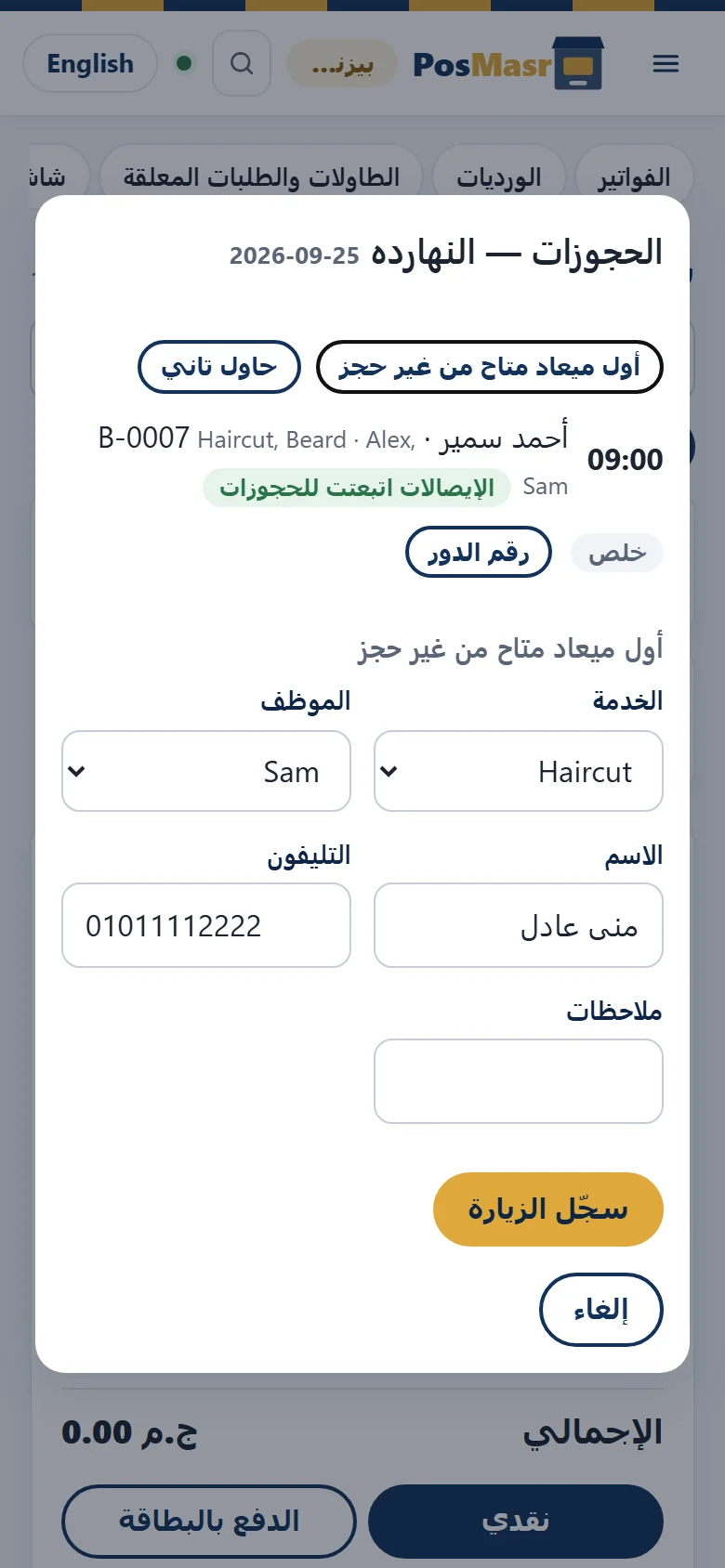
“Next available walk-in” asks four things — the service, the team member, the name and the phone — and Record the visit puts him in the first free place.
- It works when the internet is down: the till keeps the visit and sends it as soon as the line is back.
- If someone booked the same slot online in the meantime, nothing is overwritten: the visit is marked “needs review at reception” and a person decides.
- Queue ticket prints the customer's turn number on the till's own receipt printer.
The customer remembers the visit, because the message is ready
Eleven messages come written, and you can change every word: booking received, confirmed, reminder, moved, cancelled, deposit, a place free from the waiting list, “we missed you”, thank you, time to come back, and happy birthday.
- By e-mail they go out by themselves, once e-mail is set up.
- On WhatsApp they wait in a “to send” list: one tap opens WhatsApp with the message already written to the customer, and your staff press send.
- Quiet hours, so nobody gets a reminder at two in the morning, and a customer who asked for no messages gets none.

An empty chair costs money. Here is how to protect it.
A deposit before the visit
Give a service a deposit and the booking page shows the customer your own payment instructions. The booking stays requested until a member of staff records the deposit; then it is confirmed.
The deposit runs through the shop's normal deposit flow: take it, refund it, or keep it. At check-out it comes off the bill.
Also: Instalments and deposits
When the customer does not come
Mark the visit as a no-show and the “we missed you” message is ready to go. The customer card counts his no-shows and cancellations, so the reception knows who it is talking to.
A customer who makes a habit of it can be blocked from booking online — he can still call. A no-show fee exists only if you switch the setting on, and always with a reason written next to it.
Bookings come with Business and Chain
Bookings is part of PosMasr Cloud — online, nothing to install — in the online app and the till app. It is not in the program on your PC.

Business
With the code: 2,000 EGP a month, the first year
- All of Bookings for one shop: appointments, classes and tables
- The booking pages, the messages, deposits, packages and reports
- 4 tills selling at once, 15 accounts

Chain
With the code: 4,000 EGP a month, the first year
- Bookings in every branch, and the customer picks the branch on the booking page
- One person is never booked in two branches at the same hour
- Everything in Business, in every branch
Every new shop starts with 14 days of Business, free and with no card — so Bookings is there to try from the first day. All plans side by side →
Quick answers about bookings
Does my customer need an app or an account?
No. He opens your page's link, or scans its code, picks a time and types his name and phone. That is all.
Can two people book the same time?
No. Each team member and each resource takes one visit at a time, or as many as its capacity, and the time is held for the customer for 10 minutes while he types. A walk-in recorded offline that clashes overwrites nothing; it is marked for the reception to review.
Are WhatsApp reminders sent automatically?
No. WhatsApp messages wait in a “to send” list, and your staff send each one with a single tap. E-mail goes out by itself once it is set up. SMS is not available.
Can the customer pay the deposit by card online?
Not yet. The page shows your payment instructions, and the booking stays requested until your staff record the deposit.
Is the customer's phone number verified?
No, there is no verification code. That is why the customer card counts no-shows and cancellations, and why you can block a customer from booking online.
What about Ramadan hours?
You type Ramadan's dates and the hours for them yourself, and bookings follow them.
Does it work in the program on my PC?
No. Bookings lives in PosMasr Cloud — the online app and the till app — on the Business and Chain plans.
Is there anything it does not do yet?
Yes, and we would rather tell you ourselves: no card payment for deposits online, no automatic WhatsApp or SMS, no phone verification, no gift vouchers, and no before-and-after photos.