
A till that speaks restaurant
Tables, a large with an extra shot, the order on the cook's screen, 12% service, 14% VAT, half cash and half card, and the receipt on the customer's WhatsApp. All of it in the same program, on the same PC.
A grocery till in a café is a slow café
A normal till knows one thing: a product and a price. A café needs four more — which table this belongs to, which size and which extras, who in the kitchen has to see it, and how the service and the tax land on the bill. Without those, the shop fills the gap with shouting, a notebook and mental arithmetic.
Shouting the order
The order reaches the kitchen through the air, and half of it arrives.

Whose bill is this?
Three open tables and one till with one cart — so the totals get mixed at the worst moment.

Service and tax by hand
12 on top, then 14 on top of that — done on a calculator, differently every time.

“200 cash, the rest card”
One bill, two tenders — and a till that can only take one of them.
Park the order on a table, come back to it later
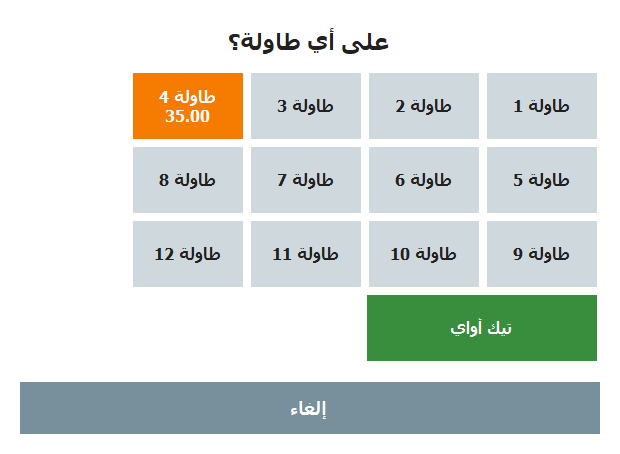
Hold parks the cart on a table and sends it to the kitchen at the same time. Tables brings it back for payment with the same number, so a table can be added to as many times as the guests want before anyone pays.
- You choose how many tables the place has, and the picker shows them as buttons.
- Pick a table that already has a held order and the new items are added to it instead of starting a second bill.
- The table number rides along to the kitchen — it is printed on the kitchen ticket and stored on the sale.
- Deleting a held order is its own right, so a table cannot quietly disappear from the list.
In the manual: Tables & held orders
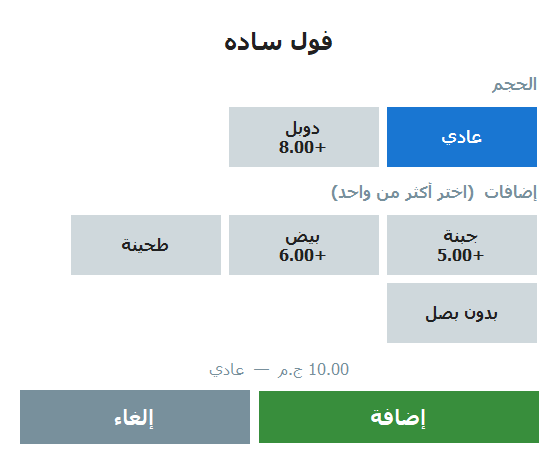
Large, extra shot, no sugar — priced by the program
One product carries its own choices. Tap it on the sales screen and a touch picker opens with the sizes and the extras; the price follows the choice, and the choice follows the order all the way to the paper.
- Small / medium / large, an extra shot, no sugar, extra cheese — you write the list yourself per product.
- The choice prints on the receipt and on the kitchen ticket, so the cook makes what the customer actually asked for.
- No duplicate products: one “cappuccino” instead of three buttons for three sizes.
In the manual: Sizes & add-ons
A screen, a ticket printer, or both together
Both run off the same switch — “send orders to the kitchen” — and both only ever see the items that actually need cooking. A product is flagged “needs cooking”, so a can of soda never bothers the kitchen and a shawarma always does.
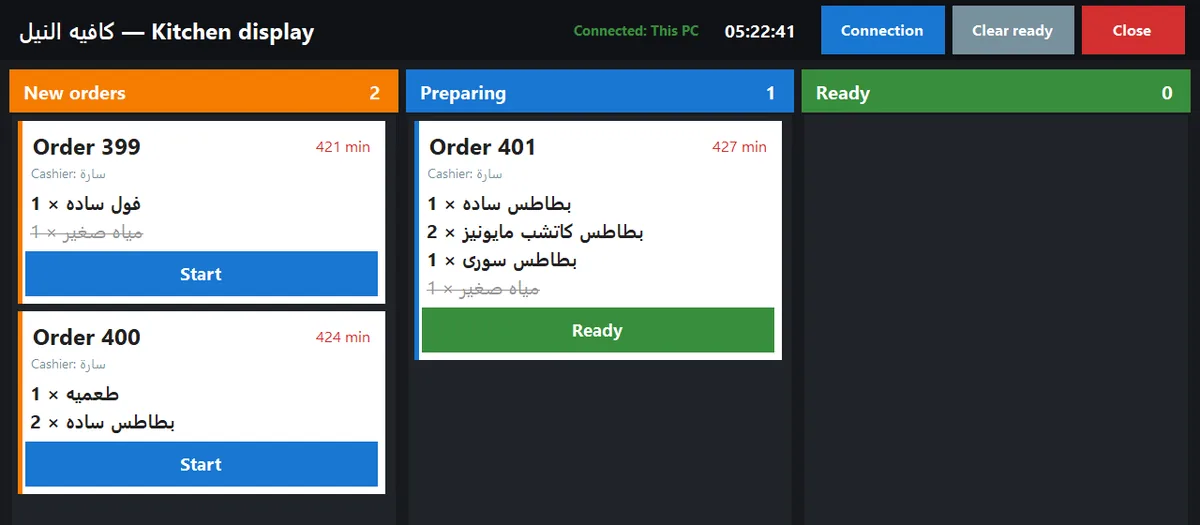
The kitchen screen
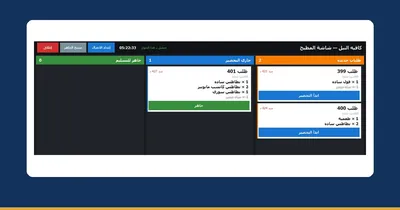
Three columns — New → Preparing → Ready. The cook taps a ticket to move it along, ready-made items on the same order show struck through, and delivered orders clear themselves after a while.
It runs on a second monitor plugged into the till, or on any other Windows PC on the shop's Wi-Fi — and more than one screen can connect.

The kitchen ticket printer
Instead of a screen, or next to it: pick any second thermal printer (or the receipt printer if you only have one) and a ticket prints for every order that has something to prepare.
The ticket carries the order number, the table, the time and the cashier, and only the items to prepare — in a big font. It prints with every sale and with every hold on a table; an order with nothing to cook prints nothing.
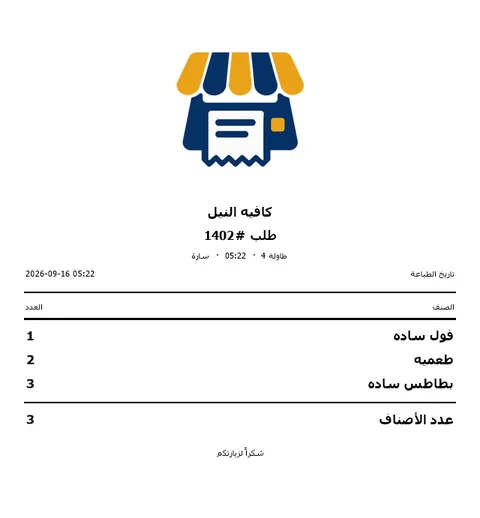
In the manual: The kitchen screen The kitchen ticket printer
12% service and 14% VAT, the Egyptian way round
A one-tap 14% VAT button that you can edit, and an optional service charge — 12% is the usual number for restaurants and cafés. The important part is the order of operations: VAT is computed on the goods plus the service, the way the Tax Authority does it.
- VAT either included in your menu prices or added on top — your choice, and the receipt says which.
- Both appear next to the total before the customer pays, print as their own lines, and add up in the reports, the Z report and the daily summary.
- A company wants a proper invoice? An A4 invoice — or a detailed tax slip on the thermal printer — carries your tax number, the client, the items, service, VAT and a signature line.
- With e-receipts on, the service charge travels to the Tax Authority as its own item line.
In the manual: Service charge & VAT The ETA e-receipt
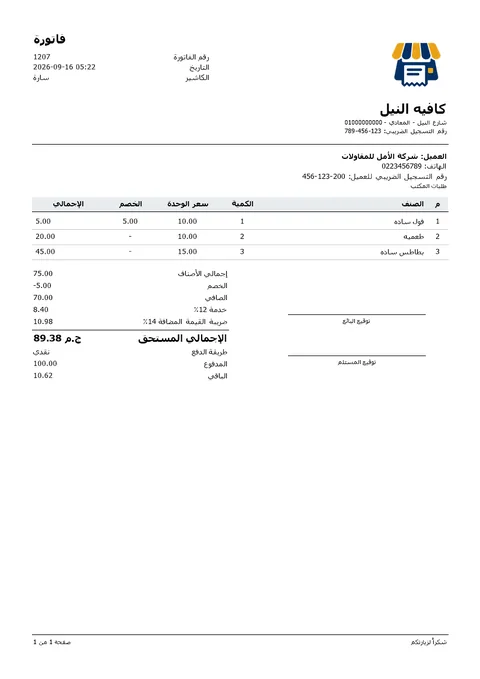

One bill, two tenders — and a screen the customer can read
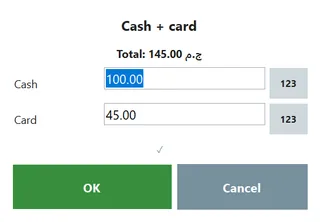
Split: part cash, part card
Switch on split payment and one receipt can be settled with cash and card together — the amounts are stored separately on the sale, so the cash side is the only side that reaches the drawer and the shift.

The customer display
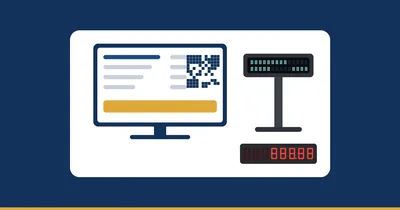
A second monitor turned towards the guest shows the order as it is rung up — every line, the subtotal, the discount, the service, the VAT and the total — then the amount paid and the change in huge digits. The customer corrects the cashier before the paper is printed.

The receipt on WhatsApp
A WhatsApp button under the cart sends the last receipt as a message: the items, the discount, the service, the VAT, the total, the paid and the change — and the tax authority link when e-receipts are on. Handy for delivery and for company orders.
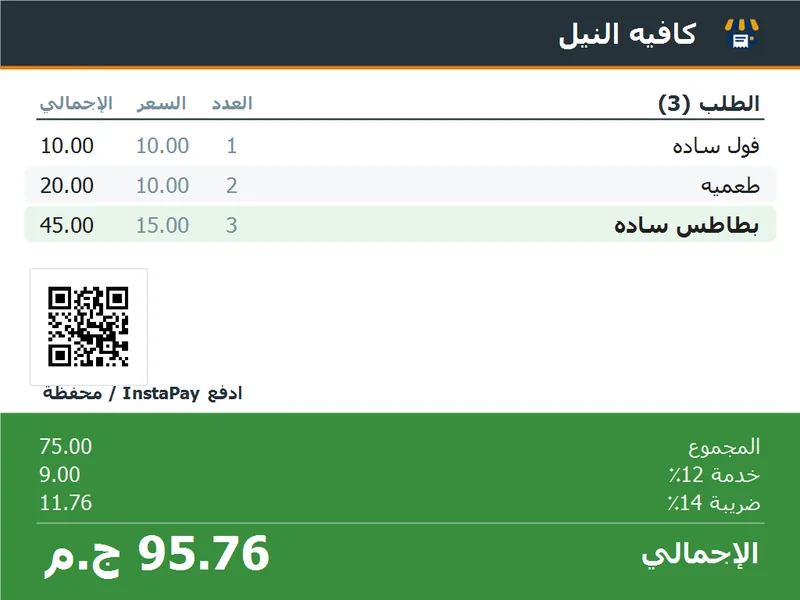
The same screen can carry your InstaPay or wallet QR code, so the guest scans and pays without asking anyone for a number.
In the manual: The customer display Payment QR Receipt on WhatsApp
What the café asks for, and where it lives
| What you need | In the program | Where to switch it on |
|---|---|---|
| A bill per table | Hold on a table, resume it with the same number, add to it any time | Features → Tables & held orders |
| Sizes and extras on one item | A touch picker on add; the choice prints on the receipt and the kitchen ticket | Features → Sizes & add-ons |
| The order in the kitchen | New → Preparing → Ready on a screen, and/or a ticket on a second printer | General → Send orders to the kitchen |
| Service charge | A percentage of its own (12% is the usual), shown before payment and printed as a line | Settings → service & VAT |
| VAT | 14% with one tap (editable), included or added, computed on goods + service | Features → VAT |
| Cash and card on one bill | Split payment, with each amount stored on the sale | Features → Split payment |
| The guest sees the order | A second monitor (or a small pole display), with your payment QR | Features → Customer display |
| Sending the receipt | A WhatsApp button under the cart sends the last receipt as a message | Under the cart, next to Reprint |
| A second till at the bar | A second license at 40% off (the link between tills comes with Gold and up); it shares the menu and the stock over the shop network | General → This till is |
Quick answers for cafés and restaurants
Do I have to turn all of this on?
No. These are optional switches and they all start off — the program stays a plain till until you turn one on. Picking “café” or “restaurant” on the first run switches on the usual set for you (tables, sizes and add-ons, service charge and the kitchen), and everything can be changed later in Settings.
Screen or ticket printer — which one?
Both work off the same switch, and you can run them together. A screen suits a kitchen that is busy and cramped; tickets suit a line where each order is picked up and carried. Many places keep the screen for the cooks and a ticket for the pass.
Does the kitchen need a second computer?
Not necessarily. A second monitor plugged into the till PC is enough — open the kitchen board and drag it over, with no network setup at all. If you want a real screen in the kitchen, any Windows PC or tablet on the shop's Wi-Fi connects by typing the till's IP.
Can I change the service and VAT percentages?
Yes. 14% VAT and 12% service are the usual Egyptian numbers and they are what the buttons start with, but both are fields you edit. You also choose whether VAT is already inside your menu prices or added on top.
Does the kitchen see the drinks too?
Only when there is something to cook on the same order. Each product carries a “needs cooking” flag, so an order made only of ready items never reaches the kitchen at all — and on a mixed order the ready items appear struck through so the cook still sees the whole thing.
Two people taking orders at once?
Add a second till: a second license at 40% off (the link between tills comes with Gold and up). The two PCs talk over the shop's network — one keeps the menu, the stock and the customers, and the other follows it. Tables, shifts and the drawer stay separate per till.
Reads for café and restaurant owners
 Running the shopKitchen display or paper tickets? A guide for cafés and restaurants
 TaxVAT (14%) and the 12% service charge for cafés and restaurants: the maths, with worked examples
 HardwareCustomer-facing displays at the till: second monitor, 2×20 pole display or LED — and which one your shop needs
