Two different things that end up on the same bill
VAT is a tax. The general rate in Egypt is 14%. You collect it from the customer on behalf of the state and pay it over with your return; it is never your money. It applies to the goods and to the service charge.
Service charge is not a tax. It is a percentage the restaurant or café adds to the bill for table service; 12% is the customary figure in Egypt. It is your revenue (many places share it with staff), which is exactly why VAT is charged on it — it is part of the price of the meal.
Grocery, pharmacy, boutique: no service charge, VAT only. Café, restaurant, take-away with tables: usually both. A take-away counter with no seating often charges no service — that is your decision, not a rule.



The maths, step by step
Take a bill where the items add up to 100.00 after any discount. The order of operations matters:
- Service first: 100.00 × 12% = 12.00. Subtotal with service = 112.00.
- VAT on (goods + service): 112.00 × 14% = 15.68.
- Total due: 100.00 + 12.00 + 15.68 = 127.68.
The common mistake is to add 12% and 14% together and charge 26% (126.00). The two are not added; the VAT sits on top of the service. On a 100-pound bill the error is 1.68 pounds — and on a month of bills it adds up.

Worked examples — one table to keep by the till
Every row starts from a menu price of 100. The last row is the real receipt from the screenshot further down (73 after discount).
| Case | Net (goods) | Service 12% | VAT 14% | Customer pays |
|---|---|---|---|---|
| A · Menu 100, exclusive, with service | 100.00 | 12.00 | 15.68 | 127.68 |
| B · Menu 100, exclusive, no service (grocery, pharmacy) | 100.00 | — | 14.00 | 114.00 |
| C · Menu 100 includes VAT, no service | 87.72 | — | 12.28 | 100.00 |
| D · Menu 100 includes VAT, service 12% added on top (PosMasr's “included” mode) | 98.25 (goods + service net of VAT) | 12.00 | 13.75 | 112.00 |
| E · Menu 100 includes service and VAT (“all-inclusive” menus) | 78.32 | 9.40 | 12.28 | 100.00 |
| F · Real receipt: 75 − 2 discount = 73, exclusive, with service | 73.00 | 8.76 | 11.45 | 93.21 |
Inclusive or exclusive pricing — which should you print on the menu?
PosMasr handles both, and the receipt shows the VAT amount either way. The choice is about the customer's experience and your margins:
| Exclusive (added on top) | Inclusive (inside the price) | |
|---|---|---|
| Menu says | “Prices exclude 12% service and 14% VAT” | “Prices include VAT” (and sometimes service) |
| Customer feels | Surprised at the bill — 100 became 127.68 | What they saw is what they pay |
| Your margin | Unchanged — the tax is added to your price | Reduced unless you raised the menu price to cover it |
| Typical for | Restaurants, cafés with table service, hotels | Supermarkets, pharmacies, retail, quick counters |
| Price changes | Menu price = your price; easy to reason about | Every price change is a ÷ 1.14 calculation |
A retail shop almost never prints “+14%” on a shelf label, so retail is inclusive. A restaurant with waiters is used to exclusive pricing, and customers in Egypt expect it. Pick one and make the menu say it clearly — the complaints come from menus that say nothing.

What PosMasr prints on the receipt
With VAT and service switched on, every receipt carries:
- Your shop name, address and tax registration number.
- Receipt number, date and time, and the cashier.
- Each item with quantity and price; any discount.
- The net, the service charge as its own line with its percentage, the VAT as its own line with its percentage, and the total.
- If the shop is enrolled in the e-receipt system: the ETA QR code (see our e-receipt guide).
When a business customer asks for a tax invoice to deduct the VAT, they also need their own name and tax number on it. PosMasr prints that as a detailed slip on the thermal printer or as an A4 invoice with a signature line.
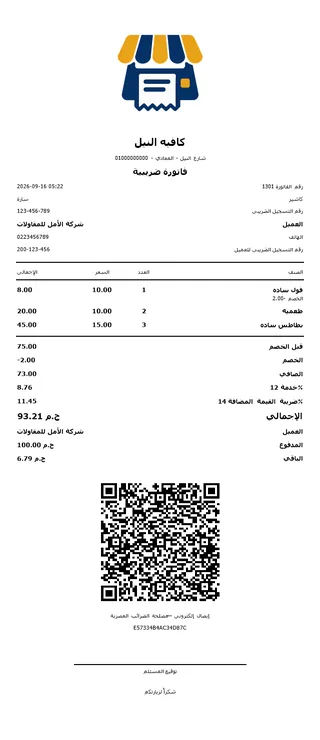
The receipt on the left is case F from the table: 75 before discount, 2 off, net 73, service 8.76, VAT 11.45, total 93.21 — every line printed, and the ETA QR under it because this shop is enrolled.
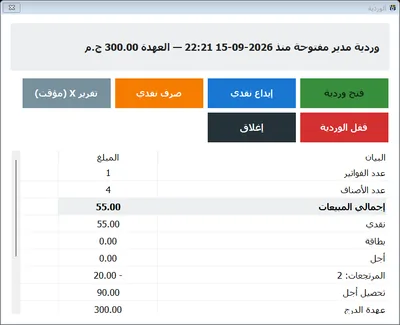
Keep the receipt copy: the Z report and the reports tab total the VAT and the service per day, so the month's figures are a printout, not an evening with a calculator.
Setting it up in PosMasr — two switches
VAT and the service charge are optional features, off by default so a shop that does not charge VAT never sees a tax line. Settings → Features:
- VAT: tap the 14% button (or type another rate), enter your tax registration number, and choose the mode — included in the prices (retail) or added on top (restaurants). Save.
- Service charge: tick it and keep 12% (or change it). PosMasr computes the service on the goods after discounts and then the VAT on goods + service — the way the Tax Authority expects — in both modes.
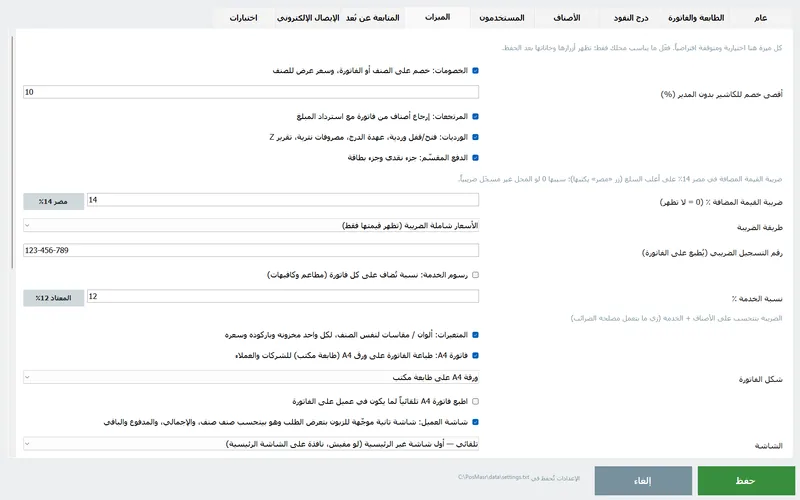
What you get after saving:
- Service and VAT show next to the total before paying, so the cashier can tell the customer the figure instead of reading it off the printout.
- They print as separate lines on the thermal receipt, the detailed tax slip and the A4 invoice, with your tax number in the header.
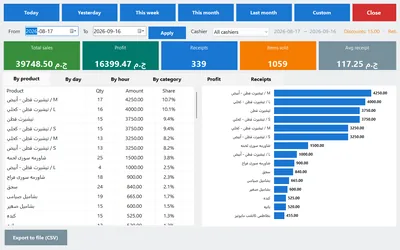
- They add up in the reports, the Z report at shift close and the daily summary on Telegram or e-mail — the VAT collected per day, week or month is one number, ready for your accountant.
- Returns reverse the service and the VAT of the returned lines, so the totals stay right.
- With e-receipts on, the VAT and the service go to the ETA on every receipt in the fields it expects.
Which setting for which shop
| Your shop | VAT mode | Service charge | Why |
|---|---|---|---|
| Grocery / supermarket | Included | Off | Shelf prices are what people pay; VAT is printed as a line for the record |
| Pharmacy | Included | Off | Medicine prices are printed on the pack; ask your accountant which items are exempt |
| Café with tables | Added on top | On, 12% | The Egyptian norm; the menu says “+12% service +14% VAT” |
| Restaurant | Added on top | On, 12% | Same, and the A4 invoice for company lunches |
| Take-away counter / kiosk | Included | Off (or on, your call) | No table service; simple round prices sell faster |
| Not registered for VAT yet | Leave VAT off | On if you take service | Never print a VAT line without a registration number |
Quick answers
Is the service charge subject to VAT?
Yes. It is part of the price of the meal, so VAT is computed on goods plus service. That is why 100 becomes 127.68, not 126.
Can I charge 10% or 15% service instead of 12%?
The percentage is yours to set — 12% is custom, not law. Print it on the menu and set the same figure in PosMasr so the receipt matches.
Does PosMasr handle items with different VAT rates or exempt items?
The VAT rate is set once for the receipt. If you sell a mix of exempt and taxed goods in volume, talk to us — and to your accountant about how those should appear on the return.
A customer wants a receipt without the service charge.
The service feature applies to every receipt. For a take-away order at a table-service place, the practical route is a receipt discount of about the service amount — PosMasr's discount button applies it and prints it as a discount line, so the totals in the reports stay honest.
Where does the VAT number come from?
From your VAT registration certificate. Type it once in Settings → Features (VAT); it prints on every receipt and invoice and is used for the e-receipt enrolment too.
Let the till do the maths — free for 7 days
Switch on VAT and service, ring up a test order and see the receipt, the Z report and the daily summary agree to the piastre. No subscription, and we help you set it up.