What the e-receipt actually is
For years the Tax Authority only saw your sales when you (or your accountant) declared them. The e-receipt system changes that: every sale to a consumer — the tea, the box of Panadol, the kilo of tomatoes — is reported to the Egyptian Tax Authority (ETA) at the moment you close it, and the printed receipt carries a QR code the customer can scan to check that the receipt really reached the ETA.
Three words to keep apart, because people mix them up daily:
- E-invoice: for sales between businesses (B2B). Needs the electronic seal (the USB token) and the buyer's tax number. Wholesalers and companies live here.
- E-receipt: for sales to consumers (B2C). This is the shop, the café, the pharmacy, the restaurant. No token is needed for the receipts themselves — the software signs in with a client id and secret.
- The QR on the receipt: the visible part. It points to the receipt's page on the ETA site, using the unique number (UUID) the ETA returned when it accepted the receipt.

Does it apply to your shop? Your accountant knows
Which shops join the e-receipt system, and from when, is set by ETA decisions and depends on your registration and activity — your accountant or your tax office will tell you. We do not give tax advice; this article is about the software side: what PosMasr does once your shop is enrolled. The setup itself is short; getting the item codes in order takes an afternoon, so it is worth doing calmly.


ERP system vs POS device — the choice that confuses everyone
When you open your taxpayer profile on the ETA portal you can add two kinds of things that issue receipts: a POS device (a specific certified machine with its own serial number) or an ERP system (software that talks to the ETA over the internet). Small shops hear “POS” and assume they must buy a special box. They don't.
| POS device registration | ERP system registration (PosMasr) | |
|---|---|---|
| What you register | One physical machine, by serial number | The software itself, with a validity period you choose |
| What you get from the portal | Device credentials tied to that hardware | A client id and a client secret, shown on the spot |
| Hardware | The certified device, plus its printer | Any Windows PC and any thermal printer you already own |
| Signature / token | Not needed for receipts | Not needed for receipts (the seal is for enrolment and B2B e-invoices) |
| A second till | A second device to register | Same system; each till has its own serial in the settings |
| Who picks it | Shops that bought an approved all-in-one terminal | Anyone running POS software on a PC — the usual route |
PosMasr takes the ERP route. In the portal you choose Register ERP system, type PosMasr as the name and a validity period, and the portal gives you a client id and a secret. Those two strings are the whole “certification” — paste them into PosMasr and it can talk to the ETA. Nothing to buy, nothing to ship to Cairo for approval.

What the customer sees
Almost nothing changes at the counter. The receipt looks the same — shop name, items, total — with three additions at the bottom: a line saying “e-receipt — Egyptian Tax Authority” (printed in Arabic), the QR code, and the receipt's unique number. Scanning the QR with any phone camera opens the ETA page that confirms the receipt, its amount and the shop it came from.
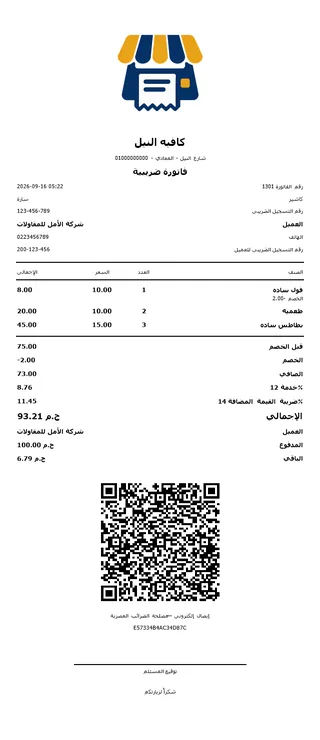
On the left: PosMasr's detailed thermal tax slip — shop tax number, customer, net, service, VAT, total, and the ETA QR with the receipt number under it. The plain receipt (without customer and tax lines) gets the same QR.
Customers rarely scan it. But the ones who do — and the inspector who might — expect it to work. That is why the QR must carry the number the ETA returned, not a code the program invented.

Step by step in PosMasr
E-receipts are part of the Platinum package (and of the free trial). Here is the order that works; the whole thing is about half an hour once your enrolment is done.
- Enrol the shop in the e-receipt system. This part is done on the ETA portal with the electronic seal, or at your tax office — usually with your accountant. You come out with a taxpayer profile, your RIN (tax registration number), a branch code and an activity code.
- Register PosMasr as an ERP system. In the taxpayer profile choose Register ERP system, type PosMasr and a validity period, and copy the client id and client secret it shows you. The secret is shown once — save it somewhere safe.
- Open Settings → E-receipt (ETA) in PosMasr and fill the tab: tick Enable, keep the registration method on ERP system, choose the environment (the ETA has a test environment and the live one), paste the client id and secret, give the till a serial (POS-001 is fine), your RIN, the establishment name exactly as registered, branch code, activity code and governorate.
- Give every product its item code (next section). The tab has an Item codes button that lists what is missing and fills GS1 codes from the barcodes you already have.
- Test. Press Test connection in the tab: it signs in to the ETA with your client id and secret and tells you if they work. Then sell one item and check the tab's counter (pending / sent / rejected) — the receipt should move to “sent” with its UUID and print the QR. The ETA's trial environment is also there in the tab, for the case where your tax office asks you to run a test first.
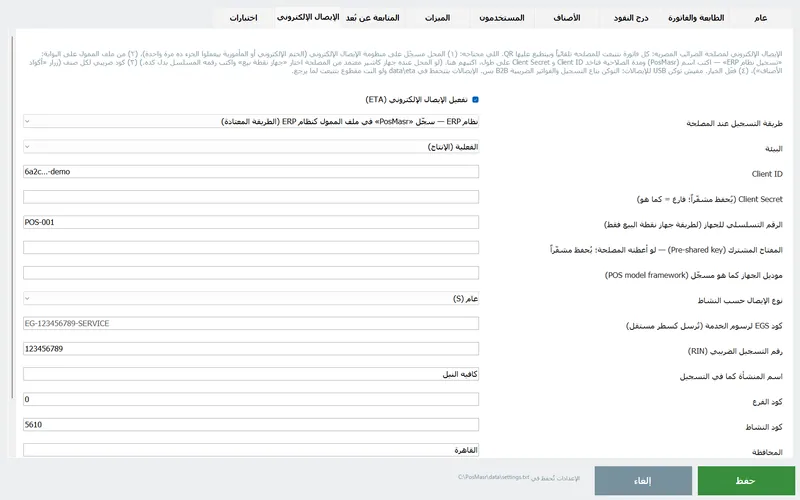
From then on nothing is manual. Every closed sale is submitted in the background; the receipt prints with the QR; if the internet is down the receipts wait in a queue and go out by themselves when it is back, and the tab shows how many are waiting. Returns are submitted as return receipts against the original.



Item codes: GS1 and EGS
This is the part that eats the afternoon, so understand it once. The ETA does not accept “Coca-Cola 1L” as a product; every line on an e-receipt must carry a code the ETA recognises. There are two kinds:
| Code type | What it is | Where it comes from | Typical for |
|---|---|---|---|
| GS1 | The product's global barcode number (the EAN-13 on the pack) | Already printed on packaged goods; PosMasr fills it from the barcode field | groceries, supermarkets, pharmacies |
| EGS | Your own code in the ETA's format, built from your RIN and your item code, registered on the portal | You create it once per product (or per group) on the ETA portal and it is approved there | cafés, restaurants, services, anything without a factory barcode |
A café has no EAN-13 on a cappuccino, so it registers EGS codes — often one per menu group rather than per drink, to keep the list manageable; the level of detail is your accountant’s call. The service charge gets its own EGS code too, and PosMasr has a field for it in the tab.
In PosMasr each product has a tax code field next to its barcode (also a column in the Excel import file). The Item codes tool in the e-receipt tab lists every product without one, fills GS1 codes from existing barcodes in one click, and gives the rest an EGS code in the ETA's format (EG-your RIN-product id) — those you then register once on the portal. A product whose code is not registered gets the receipt rejected by the ETA, and rejected receipts are listed in the tab with the reason so you can fix the code and resend.
Which path for your shop
| Your shop | Codes you'll use | What to prepare |
|---|---|---|
| Grocery / mini-market | GS1 for 90% of items, EGS for loose goods (bread, cheese by weight) | Make sure every packaged product has its barcode saved; the tool does the rest |
| Pharmacy | GS1 from the medicine barcodes; EGS for compounding and services | A 2D scanner so the Data Matrix codes go in fast |
| Café / restaurant | EGS, usually one code per menu group + one for the service charge | Register the EGS codes on the portal first, then paste them into PosMasr |
| Boutique / phone accessories | Mostly EGS (own codes), GS1 for branded items | Group codes by category so a new item never blocks a receipt |
| Two tills | Same codes on both (the secondary pulls the products from the primary) | A different POS serial in each till's e-receipt tab |
Common questions
Do I need a certified device or a USB token to issue e-receipts?
No. Receipts are issued by software registered as an ERP system with a client id and secret. The electronic seal is used for the enrolment itself and for B2B e-invoices, not for each receipt.
What if the internet drops in the middle of the day?
You keep selling. PosMasr prints the receipt, keeps it in a queue and submits it as soon as the connection is back; the tab shows how many are waiting. The receipt's unique number is computed the way the ETA specifies, so the QR prints right away — the ETA page behind it shows the receipt once the queue has gone through.
Does every single receipt go to the ETA, even a 5-pound one?
Yes — the system is per receipt, not per day. That is also why you want it automatic: nobody can be expected to upload three hundred receipts by hand.
Can I keep my old thermal printer?
Yes. The QR is just an image on the receipt; any 58 or 80 mm printer with a Windows driver prints it. See the hardware page.
I'm not in any group yet. Should I switch it on anyway?
Only after enrolment — the ETA has to know you before it will accept receipts. But you can prepare the item codes today, so that switching on later is a ten-minute job.
Try the e-receipt on the test environment — free for 7 days
The trial is the full Platinum package. Enrol, register PosMasr as an ERP system, send a test receipt and see the QR print — before you pay anything.