Why thermal, not inkjet
A thermal printer has no ink and no ribbon. The paper itself is coated with a layer that turns black when the print head heats it. That means no cartridges to buy, nothing to dry out, nothing to jam except the paper, and a receipt in under two seconds. The only consumable is the paper roll.
The downsides are known: the print fades with heat and sunlight over months (fine for a receipt, not for a document you keep for years), and it only prints black. For anything that needs to last — a company invoice, a tax invoice for a client's file — you print an A4 page on an office printer, and PosMasr can do both from the same sale.

58 or 80 mm?
This is the first decision and the one you can't undo later: the printer takes one width for life. The diagram is to scale.

| 58 mm | 80 mm | |
|---|---|---|
| Printable width | ≈ 48 mm — about 32 characters per line | ≈ 72 mm — about 48 characters per line |
| Item name + qty + price on one line | Tight; long Arabic names wrap | Comfortable, with the unit price too |
| Logo, QR, tax lines | Fits, but small | Fits at a readable size |
| Printer size and price | Small (fits a delivery counter), cheapest | Bigger box, more expensive |
| Auto-cutter | Rare; you tear the receipt on the serrated edge | Standard on almost every model |
| Paper roll | 57–58 mm × 40 mm diameter, cheap, runs out fast | 80 mm × 80 mm diameter, more receipts per roll |
| Typical buyer | Kiosks, delivery, mobile carts, a second printer in the kitchen | Every shop with a fixed counter |
Our rule of thumb: if the printer sits on a counter, buy 80 mm. The price difference is a few hundred pounds once, and every receipt for the next five years is easier to read. 58 mm makes sense when space or budget is really tight, or for a mobile setup.
USB, LAN, Bluetooth or serial?

| Connection | Good for | Watch out |
|---|---|---|
| USB | One till, one printer next to it. The default for 90% of shops. | Cable length is limited to about 3–5 m. Windows may install it as a virtual COM port — pick the driver's own name, not COM. |
| LAN (Ethernet) | A kitchen printer far from the till, or one printer shared by two tills. Any cable length. | Give the printer a fixed IP (from its utility or your router), otherwise it 'disappears' after a router restart. |
| USB + LAN together | The common Xprinter / Rongta 80 mm models. Buy this if in doubt. | Costs a little more than USB-only; worth it. |
| Bluetooth / Wi-Fi | Mobile setups, tablets, a printer that moves around. | Pairing drops, batteries, and Windows Bluetooth printing is the least reliable of the lot. For a fixed till, no. |
| Serial (COM / RS-232) | Old tills and some all-in-one POS machines with a built-in COM port. | Slow (a long receipt takes seconds), and new PCs have no COM port. Only if you already have it. |
PosMasr does not care which one you use: it prints through the Windows driver, so any printer that shows up in Windows — USB, network, Bluetooth, or a shared printer on another PC — works the same way.
The cutter and the other details on the box
- Auto-cutter. A small blade cuts the receipt after printing. Without it the cashier tears the paper on a serrated edge, which is slower and often rips the barcode or QR at the bottom. On an 80 mm printer, consider it mandatory. PosMasr sends a partial cut after every receipt automatically.
- Speed (mm/s). 200–260 mm/s on the usual 80 mm models; a 20-line receipt is out in about a second. Below 100 mm/s (cheap 58 mm) you notice the wait.
- Drawer port (RJ11 / DK). The socket the cash drawer plugs into. Almost every 80 mm model has it; many 58 mm ones don't. If you want a drawer, check.
- Print head life. Quoted in kilometres of paper (50–150 km). A small shop uses 1–2 km a year, so even the cheap ones outlive the shop fittings.
- Paper sensors. 'Paper near end' lights a warning before the roll runs out; 'cover open' stops printing. Nice to have, not essential.
- Arabic support on the box. Ignore it. Whether the printer has Arabic fonts inside matters only for programs that send raw text. PosMasr draws the receipt as an image through the Windows driver, so Arabic comes out right on any printer.
Paper rolls: what they cost and where to buy
The roll is the only running cost, so it is worth knowing the numbers. Rough September 2026 prices in Egypt, which move with the dollar:
| Roll | Single, at a stationer | Carton (about 50–60 rolls) | Receipts per roll |
|---|---|---|---|
| 57–58 mm × 40 mm | ≈ 10 – 20 EGP | ≈ 8 – 12 EGP per roll | ≈ 80 – 120 short receipts |
| 80 mm × 80 mm | ≈ 25 – 45 EGP | ≈ 18 – 30 EGP per roll | ≈ 350 – 500 receipts |
So a grocery printing 150 receipts a day spends roughly 8–12 EGP a day on paper with an 80 mm printer — less than a single cup of tea. Buy by the carton from a POS supplies shop or a wholesaler (Ataba and Abdel Aziz street in Cairo, the computer-market streets in Alexandria and the governorate capitals, or the online marketplaces); the corner stationer charges double per roll.

Models you actually see in Egypt, and rough prices
These are the printers that come up again and again in shops we set up. Prices are indicative street prices for September 2026; they move with the exchange rate and vary between sellers, so treat them as a range, not a quote.
| Model | Width | Ports | Cutter | Rough price | Notes |
|---|---|---|---|---|---|
| Xprinter XP-58IIH / XP-58IIL | 58 mm | USB (+ Bluetooth on some) | No (tear bar) | ≈ 1,200 – 2,200 EGP | The cheapest working printer in the market; fine for a kiosk or a kitchen slip. |
| Xprinter XP-80C / XP-Q200 / XP-T80 | 80 mm | USB + LAN (+ serial on some) | Yes | ≈ 2,500 – 4,500 EGP | The default Egyptian shop printer. Drawer port, ~200–230 mm/s, drivers everywhere. |
| Rongta RP80 / RP326 / RP328 | 80 mm | USB + LAN (+ serial) | Yes | ≈ 2,800 – 5,000 EGP | Same class as Xprinter, slightly sturdier build on the RP326/328. |
| Gprinter GP-80250 / GP-L80160 | 80 mm | USB + LAN | Yes | ≈ 2,500 – 4,500 EGP | Common in supermarket bundles; the same Chinese engine family. |
| Epson TM-T20III / TM-T82 | 80 mm | USB, LAN or serial (per model) | Yes | ≈ 7,000 – 12,000 EGP | The reference brand: quiet, fast, long-lived, best drivers. Worth it for a busy lane running 12 hours a day. |
| Bixolon SRP-330II / SRP-350III | 80 mm | USB + serial / LAN | Yes | ≈ 8,000 – 14,000 EGP | Korean, same league as Epson; common in pharmacies and chains. |
| Generic no-name 80 mm | 80 mm | USB | Usually | ≈ 1,800 – 2,800 EGP | Often a rebadged Xprinter engine. Ask for the driver CD or link before paying, and test the cutter in the shop. |
Where to buy: the POS hardware shops downtown and in the governorate capitals, the big electronics chains, and the marketplaces (Amazon.eg, Noon, Jumia, OLX for used). We can also supply a printer with the license and set it up — but you don't have to buy from us; PosMasr works with any of the above.
Which printer for which shop
| Your shop | Buy this | Why |
|---|---|---|
| Grocery / mini-market | 80 mm USB with cutter and drawer port (Xprinter / Rongta / Gprinter class) | Long receipts with many lines; the drawer plugs straight in. |
| Supermarket, 2+ lanes | 80 mm with cutter per lane; Epson / Bixolon if the lane runs all day | Hundreds of receipts a day; the cutter and head life pay for themselves. |
| Café / restaurant | 80 mm at the till + a second 80 mm (LAN) in the kitchen | PosMasr prints a kitchen ticket for every order with items to prepare (2.2); LAN reaches the kitchen without a 10-metre USB cable. |
| Pharmacy | 80 mm with cutter | Medicine names are long, receipts carry tax lines, and the split label can print on the same printer if there is no label printer yet. |
| Kiosk / delivery counter / cart | 58 mm USB (or Bluetooth for a cart) | Small, cheap, short receipts anyway. |
| Boutique / phone shop / stationery | 80 mm USB; the same printer can print your barcode labels until you get a label printer | Few receipts a day, but you want them tidy with the logo and the return policy line. |
| Company sales / wholesale | 80 mm thermal + any A4 office printer | The thermal slip for the counter, the A4 invoice with the tax number for the client's file. |
The classic problems — and their fixes
It prints little squares or gibberish instead of Arabic.
That happens when a program sends raw text and the printer has no Arabic font inside it. PosMasr never does that: it draws the receipt as an image through the Windows driver. If you still see squares, the wrong driver is selected — usually 'Generic / Text Only' or a stray COM port. Install the printer's own driver (from the CD, the maker's site, or ask us for the link), pick it in Settings → Printer & receipt, then Tests → Test print.
The receipt comes out blank, or very faint.
Blank: the roll is in upside down — thermal paper prints on one side only. Flip the roll so the paper comes off the bottom towards you (scratch the paper with a fingernail: the side that leaves a dark mark is the printing side). Faint: cheap paper, or the print density set low in the driver's preferences, or a dirty head — wipe it gently with a cotton swab and alcohol with the printer off.
The right or left edge of the receipt is cut off.
The paper width in PosMasr (or the paper size in the driver) does not match the roll. Set it to 58 or 80 in Settings → Printer & receipt; the 'printable width' box lets you trim a millimetre or two if the printer's margins are odd. The receipt preview in Tests shows it at real size before you print.
Nothing prints and the Windows queue says 'offline' or 'error'.
In order: is the printer on with a green light and the cover closed? Is the USB cable in (try another port — front ports on cheap cases are the usual suspect)? Then in Windows printers, right-click → 'See what's printing' → cancel all documents, untick 'Use printer offline', and print the Windows test page. If the Windows test page prints, PosMasr will too.
A red light blinks and it beeps.
Paper out, cover not clicked shut, or the head overheated after a very long print. Reload, press the cover firmly, wait a minute.
The cash drawer is plugged into the printer but doesn't open.
That is a drawer question, not a printer one: Settings → Cash drawer → 'connected to the printer', then Tests → Drawer diagnostic, which tries every kick command. The whole checklist is in our cash drawer article.
Too much blank paper after every receipt.
Settings → Printer & receipt → 'blank space after the receipt (mm)'. Lower it until the cut lands just under the last line. Every printer needs a slightly different number.
How PosMasr prints
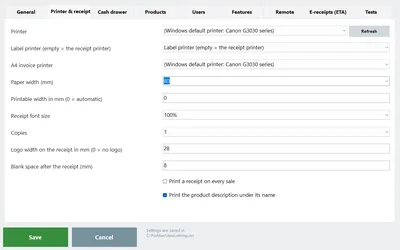
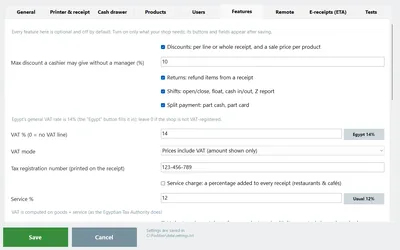
- Any printer with a Windows driver. Settings → Printer & receipt: pick the printer from the list (or leave 'Default' for the Windows default), choose 58 or 80 mm — or type another width for 57 / 76 mm rolls.
- Test before you commit. The Tests tab has Test print, a raw ESC/POS test, and a receipt preview at real size. Get it right there, then tick print a receipt on every sale.
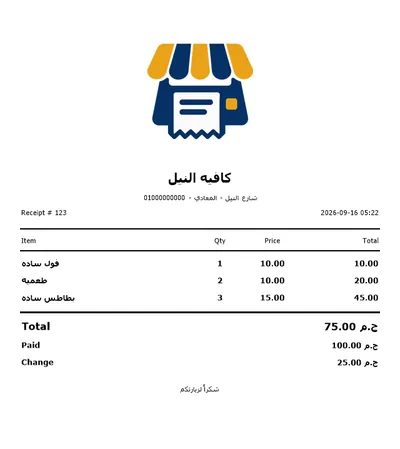
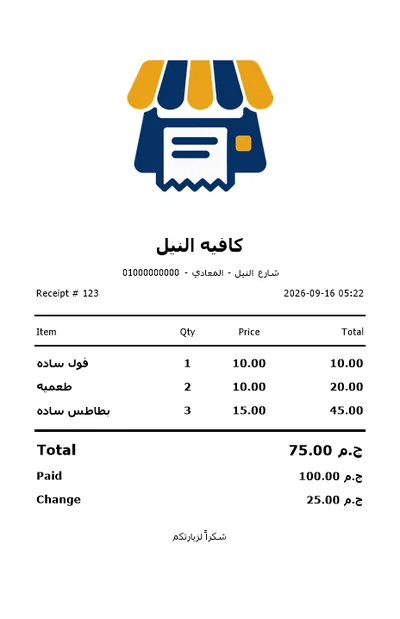
- Your receipt, your way. Shop name and logo (with a logo width in mm), a line under the name for the address and phone, a footer line, the receipt font size, the number of copies, the product description under the name, and the blank feed after the cut.
- Arabic that just works. The receipt is drawn as a bitmap through the driver, so the shaping, the numbers and the QR look the same on a 1,500-pound Xprinter and an Epson. A partial cut is sent after each receipt on printers that have a cutter.
- Two more printers if you need them. A kitchen ticket printer for every order with items to prepare (2.2), and an A4 invoice printer for the full-page invoice with the tax number — or the detailed tax slip on the same thermal printer if you have no A4 one (2.0).
- No printer at all? Untick 'print on every sale' and send the receipt to the customer on WhatsApp in one tap instead (2.2). Some delivery counters run exactly like that.
Quick answers
Does PosMasr need a specific printer brand?
No. Any thermal printer with a Windows driver — 58 or 80 mm, USB, LAN or Bluetooth. Every model in the table above works.
Can I use the old printer that came with my previous program?
Almost certainly. If Windows can print a test page on it, PosMasr can print receipts on it.
58 mm printer, but the receipt is very long — can I shorten it?
Yes: a smaller receipt font, no description under the item, a narrower logo or none, and a smaller feed after the receipt. Or move to 80 mm, which is the real fix.
Do I need a printer with 'Arabic support'?
Not with PosMasr. The receipt is sent as an image, so the printer's built-in fonts are never used.
Can two tills share one printer?
Yes, on a LAN printer or a shared Windows printer — each till prints its own receipts to it. The usual setup is one printer per till though, so the drawer can hang off it.
Print a real receipt on your printer, free, for 7 days
Install PosMasr, pick your printer, press Test print. If anything looks off, send us a photo of the receipt on WhatsApp and we'll set it right.