The tax authority's receipt — sent by the till, not by you
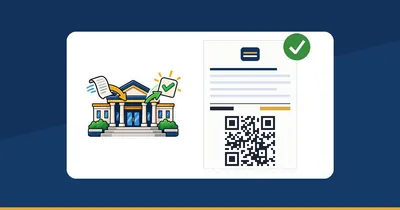
PosMasr turns every sale into the Egyptian Tax Authority e-receipt document, sends it, and prints the ETA QR at the bottom of the paper. The cashier presses “Pay” exactly like before — nothing changed on the sales screen.

Enrolled in the system, and the till knows nothing about it
The shop gets enrolled, and then the receipts are still the same old paper. Somebody re-types the day's sales into a portal at night, the item codes are missing, and a receipt that was never sent is a receipt nobody can find later.

Typing it twice
The sale is already in the till. Typing it again somewhere else at the end of the day is work you already did.

The internet drops
The line goes down in the middle of the rush. Selling must not stop, and the receipts of that hour must not be lost either.

“Where is my copy?”
A customer, a company or an inspector asks for the receipt. Without the QR on the paper there is nothing to look up.
The e-receipt is the retail half of the tax system
The Egyptian Tax Authority runs two documents: the electronic invoice between businesses, and the e-receipt for what you sell to the person standing at your counter. PosMasr does the second one — the receipt.

Who has to do it
The Tax Authority brings taxpayers into the system in groups, and it announces each group and its date on its own. Whether your shop is in a group that is already due is a question for the authority, not for us — check the latest ETA notice for your group, or ask your accountant or your tax office.

The enrolment itself is not done in the program
Getting the shop onto the e-receipt system is a step you do with the tax office or with the electronic seal — once. PosMasr picks it up from there: you paste the credentials the portal gives you and it starts sending.
Four steps, then you forget about it
① The shop is enrolled
The one-time enrolment on the e-receipt system, done with the tax office or the electronic seal.
② Register PosMasr as an ERP system
On the taxpayer profile on the ETA portal choose Register ERP system, type a name (PosMasr) and a validity period. The portal hands you a Client ID and a Client Secret on the spot.
③ Paste them in the program
Settings → E-receipts: the client id, the secret (stored encrypted), your tax registration number, the registered company name, the branch, the activity code and the address.
④ Item codes, then switch on
Give every product its tax item code — the program lists the ones still missing — then tick Enable e-receipts. From that moment every sale goes out on its own.
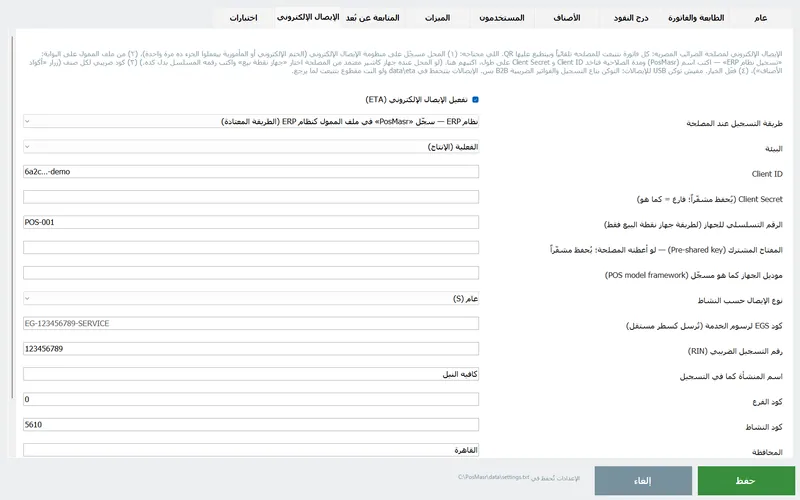
A Test connection button tells you at once whether the credentials work — it says “Connected to the ETA (token received)”, or it shows you the exact error.
In the manual: Section 20 — e-receipts (2.0)

Registered as an ERP system — no certified device to buy
There are two ways a till can talk to the ETA. PosMasr supports both, and the ERP one is the one most shops use because there is nothing extra to buy.
- ERP system (the usual route): the client id and secret you generated yourself on the portal. Nothing to buy, nothing to certify.
- POS device: if your shop already has a till certified by the authority, pick that route and type its serial number instead.
- No USB token is used for receipts. The token belongs to the registration step and to B2B tax invoices, not to the e-receipt itself.
- A trial environment is built in, for when the authority asks you to run a test before going live — one dropdown, the same settings.

The line drops — the shop keeps selling
Every receipt is written into a queue on your own PC first, and a background sender empties that queue in order. When the internet is gone the queue simply grows; when it comes back it goes out. Nothing waits for the network at the counter.
- Accepted receipts move to a “sent” folder; rejected ones move to a “rejected” folder with the error text next to them, so you can see why.
- The settings screen shows a live count: Pending · Sent · Rejected, and the last error underneath it.
- Send pending now pushes the queue by hand and answers with “N accepted, N rejected, N still pending”.
- Everything lives in
data\etaon your PC, and an Open data\eta button takes you straight there.

Every product needs a tax code — the program fills most of them for you
A receipt is refused if an item on it has no code. So the program keeps a list of what is still missing and gives you three ways to fix it in one screen.

GS1 from the barcode
A product whose barcode is a real international barcode already has its code — Use barcodes as GS1 for all fills them in one press.

EGS for the rest
Things you make yourself have no international barcode, so they take an EGS code shaped EG-<your registration>-<product code>. Automatic EGS code for the rest generates them; you register those codes once on the portal.

Or type them / import them
The code is a normal field in the product editor, and the CSV import takes a column called etacode — so a whole list can come from Excel at once.
The button itself carries the count — Item codes (12 missing) — and turns into Every product has a code ✓ when you are done.
The QR at the bottom, and a full tax slip when you need one
The ETA QR on every receipt
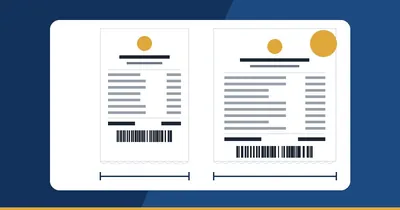
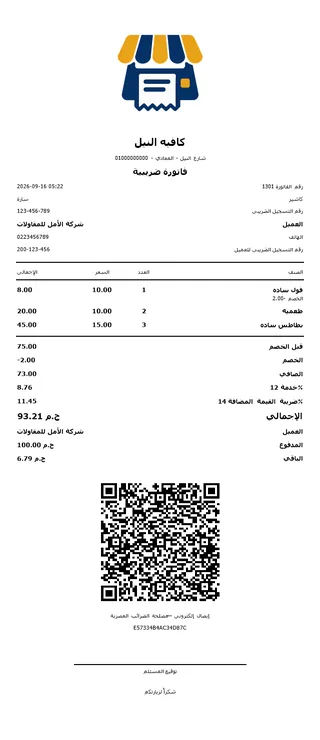
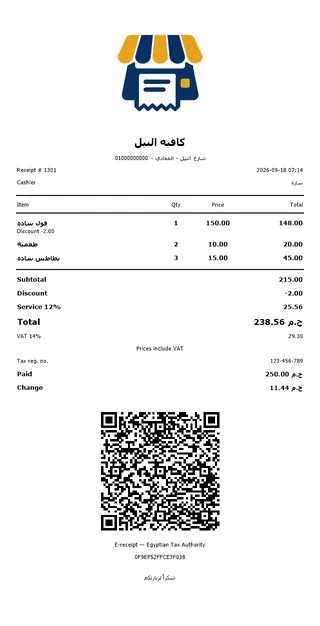
Once e-receipts are on, the authority's link prints as a QR code on the thermal receipt and on the A4 invoice. The customer scans it and reads the receipt at the authority; you scan it to find your own copy.
The WhatsApp button sends the same receipt as a message — and the authority's link travels with it.
A detailed tax slip without an A4 printer
A company asks for a proper invoice and you only have the thermal printer? Switch the invoice format to thermal: your tax number, the client and their tax number, net, service, VAT, total and a signature line — on the same roll.

Returns carry a reference to the receipt they undo
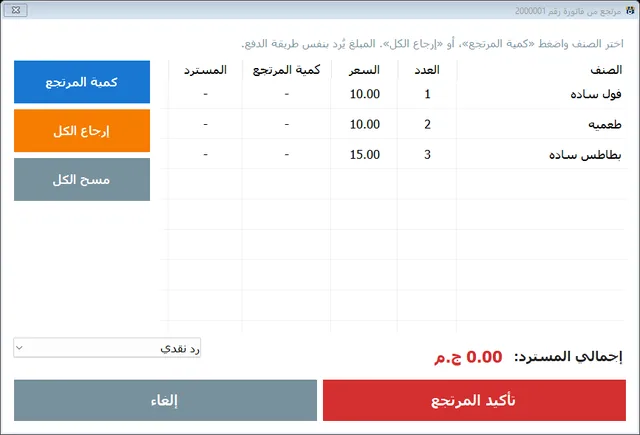
A return is not a negative sale floating on its own. When you refund items from a receipt, the return document goes to the authority with a reference to the original receipt's identifier, so the two are tied together the way the authority expects.
- Returns are a partial affair: pick the items and the quantities, refund in cash, to the card, or off the credit account.
- The return prints its own receipt with its own number, and the goods go back into stock.
- A service charge on the bill travels to the authority as its own item line, not hidden inside the prices.
In the manual: Returns & refunds
Doing it by hand / doing it from the till
| By hand, after closing | From PosMasr | |
|---|---|---|
| Who types the sale | Somebody, a second time, at night | Nobody — the sale is already the document |
| The QR on the customer's paper | Not there | Printed at the bottom of every receipt |
| When the internet drops | You stop, or you write it on paper and hope | Selling continues; the queue is sent when the line returns |
| Item codes | Looked up product by product | Filled from barcodes, generated as EGS, or imported from Excel |
| Returns | Tied to the original receipt by hand, if at all | Sent with a reference to the original receipt |
| Knowing where you stand | A folder and a memory | Pending · Sent · Rejected, counted on the screen |
E-receipts are in the Platinum package → The long read on the e-receipt →
Quick answers about the e-receipt
Does my shop have to be on the e-receipt system?
That is the Tax Authority's call, not ours. It brings taxpayers in by groups and publishes each group on its own. Check the latest ETA notice for your group, or ask your accountant or your tax office — then come back and switch the feature on.
Do I need to buy a certified device or a USB token?
Not for receipts. PosMasr registers as an ERP system with a client id and secret you generate yourself on the portal. The USB token belongs to the registration step and to B2B tax invoices. If your shop already owns a certified till, there is a POS-device route too.
What happens to sales made while the internet is down?
Nothing is lost. Each receipt is queued on your own PC and a background sender pushes the queue in order as soon as the line is back. You can also press “Send pending now” yourself, and the screen shows how many are pending, sent and rejected.
Why would a receipt be rejected?
Most often a product on it has no tax item code — receipts are refused without one. The program keeps a running count of products still missing a code and can fill most of them from the barcodes. A rejected receipt is kept with the authority's error text next to it, so you can read the reason and fix it.
Can I test before going live?
Yes. There is a trial environment in the settings for when the authority asks for a test run, and a “Test connection” button that tells you straight away whether your credentials are accepted. Use your own credentials against the trial environment first and go live after that.
Does the cashier have to do anything differently?
No. The cashier sells and presses Pay exactly as before. The document is built, queued and sent behind the screen, and the only visible difference is the QR code at the bottom of the printed receipt.