
Your products are ready before you open
PosMasr comes with a catalogue of more than 50,000 products that Egyptian shops actually sell — each one with its name, its barcode and its category, and 18,493 of them with a product picture. Pick what you sell, type your prices, and start selling. Open your shop in under an hour instead of days of typing.

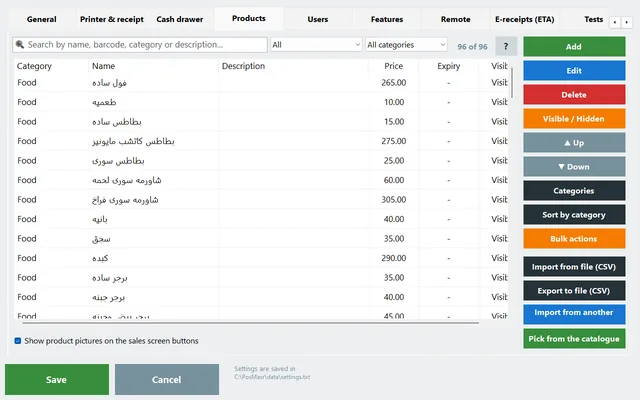
More than 50,000 products, sorted by the trade that sells them
Not a demo menu and not a foreign database — the goods on the shelves of Egyptian shops, with the barcodes that are printed on the boxes.

Groceries
Rice, oil, sugar, tea, dairy, detergents, tinned food, snacks and drinks.

Supermarkets
The wide shelf: every brand and every size, each with the barcode on its own pack.

Cafés
Tea, Turkish coffee, espresso and its family, juices, shisha and the sweets next to them.

Restaurants
Sandwiches, grills, pasta, pizza, sides and the extras people ask for.

Pharmacies
Medicines and the shelf around them — baby milk, care products and supplements — with their barcodes, so scanning works from the first day.

Written for Egypt
Arabic names the way the customer says them, Egyptian brands, and Egyptian sizes — not a translated list from another country.
What every row in the catalogue carries
Three things on every row, and a fourth on 18,493 of them — every one a thing you would otherwise type yourself.
- The name in Arabic, written the way your customer asks for it, so the cashier finds it by typing two letters.
- The barcode that is printed on the pack, so the scanner works from the first sale — and your labels print with the right code. Only barcodes that mean the same product in every shop are in it; a shop's own short in-store codes are not shared.
- The category — one of 59 clean Arabic categories — so the sales screen is already sorted into groups with their colours instead of one long list.
- The product picture, for 18,493 of them — it lands on the product with the rest and is kept in your own program.
No price — on purpose. What a pack sells for in your shop is yours to say, so the catalogue never sets one: products come in without a price, and the no price filter in Products lists the ones still waiting for yours.
In the manual: Managing products Import & export

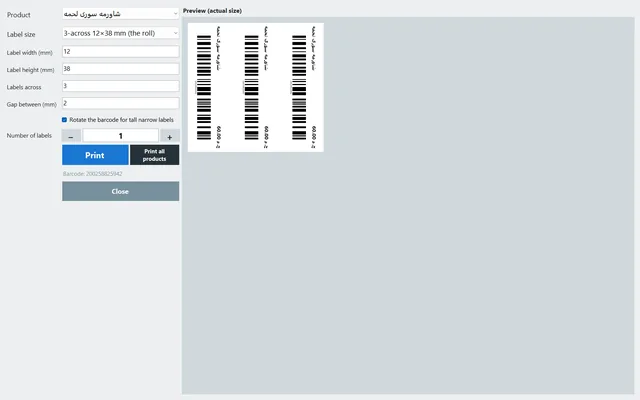
Barcodes ready means labels ready
A product that already has its barcode needs nothing before you can scan it, price it, or print a shelf label for it.
- Scan at the counter from the first receipt — no “unknown barcode” screen.
- Print your own labels with the name, the price and the code, on the roll size you use.
- Receive stock by scanning instead of hunting for the product in a list.
In the manual: Barcodes & labels

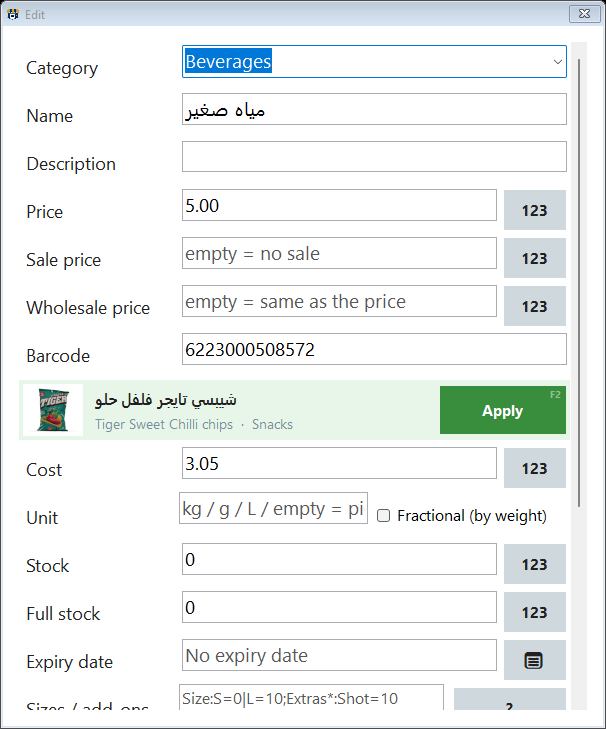
Scan a barcode, and the product fills itself in
A pack in your hand that is not in your list yet? Scan it in the product screen instead of typing it.
- While you add or edit a product, scan or type the barcode. If the catalogue knows it, the name, the category, a description from the English name and brand, and the picture fill in.
- Adding: they fill in at once. Editing: a strip shows the catalogue's picture and name with an Apply button, so nothing changes unless you press it.
- Your price is never changed — nor the cost, the wholesale price, the stock or the expiry date.
- It works offline, from the encrypted catalogue file on your PC (below); a picture you apply is saved in your program, not loaded from our server.
In the manual: Barcode lookup

Scan to add, right at the till
A customer is holding a pack you have never sold. Scan it on the sales screen as usual.
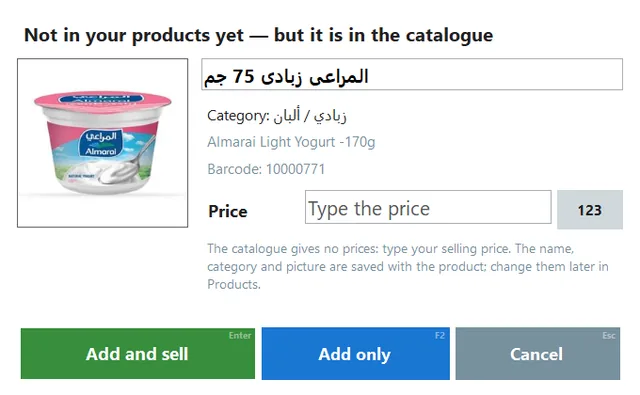
- If your products do not have it but the catalogue does, a small window opens with the catalogue's picture, name and category, and an empty price box.
- Type your price, then Enter adds it and sells it, F2 only adds it, Esc cancels. The catalogue never supplies a price.
- A cashier without the right to manage products needs a manager's approval, so nothing enters your list behind your back.
- A shop that does not share its list sees the usual “not found”, exactly as before.
In the manual: Scan to add
The whole catalogue on your PC — encrypted, and no internet needed
Picking, the barcode lookup and scan-to-add should not stop because the line is down. So the catalogue now lives inside your program.
- One file, downloaded once: about 70 MB, in the background while you work. After that everything catalogue-related works with no internet.
- Private to your PC: the file is encrypted, and the key that opens it is issued by PosMasr to your PC only — a copy of the file is useless anywhere else.
- Pictures from the file, not from us: the 18,493 pictures come out of that file, so nothing is loaded from our server afterwards.
- Kept fresh: the program checks for a newer catalogue at most once a day.
In the manual: The catalogue on your PC

Four steps, and the till is selling
Since version 4.0 you pick your products yourself inside the program — Settings → Products → Pick from the catalogue — or we load the list with you during setup. Either way the longest part of opening a shop is already done.

1 · Pick your trade
Grocery, supermarket, café, restaurant or pharmacy — tell us what you sell.

2 · Tick what you sell
Open Pick from the catalogue and tick your products — or we load your trade's list with you while we install the program.

3 · Type your prices
The catalogue has no prices: the “no price” filter lists what you added, you type yours from the keyboard — Enter, the price, Ctrl+Enter for the next one. A few seconds a product.

4 · Sell
Scan, print, open the drawer — the stock and the profit count themselves from there.
Without the catalogue / with the catalogue
| Without the catalogue | With the catalogue | |
|---|---|---|
| Time to open | Days of typing | Under an hour |
| Mistakes | Typos in names and prices, duplicated products | Names written once, checked, and the same every time |
| Barcodes | Scan every pack yourself, one by one | Already on the product — scanning works from the first sale |
| Prices | Typed from zero for every single product | Always yours — the “no price” filter lists what is waiting, and you price many at once |
| Shelf labels | Wait until the barcodes are in | Print them on day one |
Why this matters more than the price tag: Free POS software costs you time → · products the catalogue does not have: a barcode for every product →
From shops that choose to share their product list
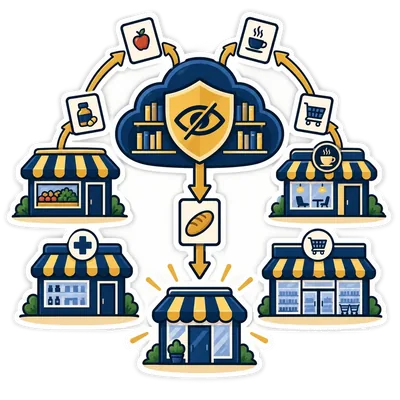
The catalogue grows because shops choose to share their product lists — the products only: names, barcodes, categories and prices. That is the whole of it, and it is written the same way in our privacy policy.
- Never your sales, your customers, your suppliers, your users or your passwords.
- The catalogue talks about products, not shops: it never says which shop sells what, and it never carries your shop name, phone or address.
- Every shop that shares makes the next shop's first hour easier. That is the only reason it exists.
Share your list, and the catalogue is yours to use
Because the catalogue is built from shared lists, it is open to the shops that share theirs. Picking from it, the barcode lookup and scan-to-add work when, in Settings → Backup:
- A copy at PosMasr is on — the products list (the default) or the full backup;
- Upload automatically once a day is ticked;
- and Do not use my products in the shared catalogue is not ticked.
You can stop sharing whenever you like, and we delete what we hold on request. Nothing is taken back: the products already in your program stay, with the pictures already applied to them — only new picking from the catalogue, the barcode lookup and scan-to-add stop until you share again.
It is a starting point, not a cage
Once the list is in the program it is yours: your prices, your categories, your names, your stock. Nothing is locked and nothing phones home to change it back.
- Rename, price, re-category or delete any product.
- Select many products at once and change them together — prices, category, hidden or not.
- Export the lot to Excel, edit it there, and import it back.
- Add the products that are missing — and they make the next shop's list better.
In the manual: Products: categories, filters, bulk actions

Quick answers about the catalogue
Is the catalogue free?
No — it comes with every package, Bronze, Silver, Gold and Platinum, with nothing extra to pay and no monthly subscription. What it asks in return is your product list: it is open to the shops that share theirs, through the daily copy at PosMasr.
Why do I need to share my list to use the catalogue?
Because that is where the catalogue comes from. Every product in it is there because a shop shared its list, and every shop that shares makes it better for the next one — so it is open to the shops that give back. What is shared is product data only (names, barcodes, categories, prices and costs), never your sales, customers, users or passwords, and the catalogue never says which shop sells what. If you stop sharing, everything already in your program stays, pictures included; only new picking, the barcode lookup and scan-to-add stop.
Does the catalogue come with prices?
No. Since 4.1 the products you pick come in without a price — what a pack sells for in your shop is yours to say. The “no price” filter in Products lists them, and you can price many at once. Nothing in the catalogue ever changes a price you typed.
What if a product I sell is missing?
Add it in the products screen as usual — name, price, barcode. If you are sharing your product list, that product helps the next shop find it ready. Missing something big? Send it to us on WhatsApp and we add it to your trade's list.
I already have my products in another program.
Then you don't need the catalogue for them — bring your own list in. Since version 4.0, Settings → Products → “Import from another program” reads a file with any column names, an Excel sheet, a database or an older PosMasr copy, lets you map their columns onto ours and shows you the result before anything is written. How the import works →
Do you see my sales?
No. Sales, customers, suppliers, users and passwords are never part of the catalogue or of the copy we keep. The catalogue is product data only, it never says which shop sells what, and you can stop sharing any time from Settings → Backup.
Is there a picker inside the program?
Yes, since version 4.0: Settings → Products → Pick from the catalogue. Type to find, tick what you sell and add it (without a price — you type yours). The catalogue is downloaded once as an encrypted file and then works offline. A new till offers it by itself right after it asks what kind of shop you are.
What happens when I scan a barcode in the product screen?
If the catalogue knows the barcode, the name, the category, a description and the picture fill in — at once when you are adding, or through an Apply button when you are editing. Your price, cost, wholesale price, stock and expiry are never changed, and it works offline.
What happens when I scan, at the till, a pack I do not have?
Since 4.1, if the catalogue knows the barcode, a small window shows its picture, name and category with an empty price box: type your price, then Enter adds it and sells it, F2 only adds it, Esc cancels. A cashier without the right to manage products needs a manager's approval. If the catalogue does not know it — or your shop does not share its list — you get the usual “not found”.
Does the catalogue need the internet?
Only to download it: one encrypted file of about 70 MB, in the background. After that the picker, the barcode lookup and scan-to-add work with no internet, and the program checks for a newer catalogue at most once a day. The key that opens the file is issued to your PC only, so a copy of it is useless on another PC.
Is the catalogue in PosMasr Cloud too?
Yes. In the online edition you tick your products in the same ready catalogue when you add them, from the browser, with no prices — you type yours. PosMasr Cloud →
Try it free for 14 days Ask for your trade's list on WhatsApp
