The till sells, the books write themselves
Books is real double-entry accounting and invoicing inside PosMasr Cloud. Every sale from the till lands in the ledger by itself; you issue quotes and invoices, record your suppliers' bills, match the bank and see your profit — in plain words first, with the accountant's view one click deeper. Online, nothing to install.
First year 20% off every plan with the code

Five questions every owner asks — answered on one page
You do not need to know what a trial balance is to know whether the month was good. Books opens on the words you already use; the debits and credits are still there, correct to the piastre, for the day your accountant asks.

Money in
Till sales, invoices paid, deposits — what actually came into the drawer and the bank.

Money out
Suppliers paid, rent, electricity, salaries, card fees — every pound that left, with its reason.
What I'm owed
Every customer who owes you, how much is overdue and since when — the same balance the till sees.

What I owe
Every supplier bill still open, and what falls due in the next seven days.

Profit
This month against last month and the same months last year, for the whole business or one branch.

…and the accountant's view
One click deeper: the journal, the trial balance, the general ledger and the chart of accounts — ready when your accountant sits down.
Nobody types the day's sales twice
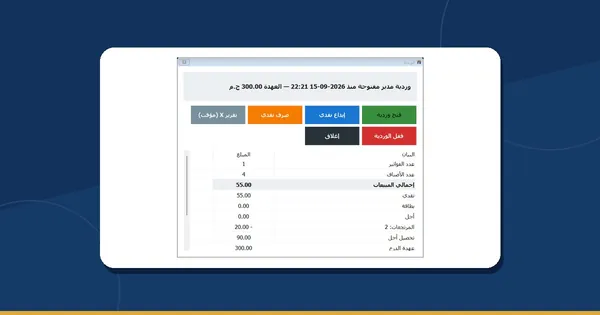
Every fifteen minutes, each branch's business day is posted to the books on its own: one entry per day by default, or one per receipt if your accountant prefers it that way.
- Sales, returns and voided receipts; sales on credit; expenses paid from the drawer; supplier payments; and the VAT on deposits.
- A sale made offline that arrives late is posted as a new correcting entry — a posted entry is never edited, so the trail stays honest.
- One balance per customer and per supplier. An invoice from Books and a credit sale at the till raise the same customer's balance — never two truths.
- No till at all? An office, a workshop or a service company can invoice from Books alone.
In the manual: Books Selling offline

From the quote to the money in the bank
Quote → order → delivery note → invoice, each one made from the one before, in full or in part. Then the receipt when the customer pays, and a credit note if something comes back.
- Your customer opens the quote from a link and accepts or declines it himself; the quote-outcomes report shows what you won and lost.
- Three print templates with your logo and colour; an A4 page in Arabic and English, printed or saved as PDF from the browser.
- Send it by e-mail, by a copied link, or as a ready WhatsApp message that you send with one tap.
- Prices with or without VAT, discounts per line or on the whole document, retail and wholesale price levels, and a special price for one customer.
- Recurring invoices for the monthly client, the salesperson on every document, customer statements and aged receivables.
In the manual: Quotes and invoices Selling on credit

What you buy, what you pay, and a bank that finally matches
Supplier bills, expenses and the bank statement in the same books as your sales — so the end of the month is a check, not a hunt.

Bills and supplier credits
Enter a bill by hand or make it from goods you received; Books warns you when the same supplier invoice is entered twice. Pay one bill or several at once, record a supplier advance, read the supplier statement, aged payables and “due in 7 days”.

Expenses, and the rent that repeats
Record an expense with its VAT and where it was paid from. A recurring expense — the rent, the internet — records itself each period as a paid expense. It writes the books; it never moves money.

The bank, matched line by line
Import the statement you downloaded from your bank (CSV, Excel, OFX or MT940) — with undo, and no line imported twice. Books suggests matches and you confirm them; bank rules fill in the usual lines. A reconciliation finishes only at a zero difference.

Cards, cheques and petty cash
Card settlements with the bank's fee, a cheque register, petty cash, and transfers between your own accounts.

13 weeks ahead
A cash forecast from what you are owed, what you owe and what repeats — so the rent week does not surprise you.

A report to hand over
Download the reconciliation as CSV or Excel, or print it, for your accountant's file.
In the manual: Purchases and banking
The 14% VAT summary, with the transactions behind every figure
Monthly or quarterly: output tax, input tax, the net, zero-rated and exempt — and a click on any figure lists the transactions behind it. When your accountant has filed, you record the filing and those months lock.
- Tax codes for each kind of sale and purchase.
- An Egyptian withholding-tax register, incoming and outgoing, month by month.
- The rates are defaults — confirm them with your accountant for your kind of business.

One page in the morning, and you know where you stand
Cash and bank, profit against last month, what you are owed (and how much is overdue), what you owe in the next seven days, the VAT estimate, your five biggest expenses and a twelve-month profit chart.
- Tasks under it: invoices to send, bills to pay, bank lines to match, months to close.
- Profit and loss and the balance sheet against last period and last year, by branch; profit by branch; the cash-flow statement.
- Business activity: sales by customer, by item and by salesperson; purchases by supplier.
- Trial balance and general ledger for the accountant — every report to CSV and Excel.
In the manual: Dashboard and reports

The controls an accountant expects, on when you need them
Closing the month
A checklist before a month closes — the till feed complete, the banks reconciled, the tax reviewed — then year-end. Reopening a closed month asks for a reason.
A second pair of eyes
Optional approvals: anything above an amount you set waits for a second person before it posts.
Fixed assets
The fridge, the oven, the car — with their depreciation posted to Books month by month, in the Fixed assets module (Books' old asset page moved there).
Budgets and cost centres
A budget against what really happened, and cost centres when a branch alone is not enough to tell the story.
Other currencies
Documents in USD, EUR, GBP, SAR and more at a rate you type; the books stay in Egyptian pounds.
The paper behind it
Attach the PDF or a photo of the paper to the document it belongs to — private and encrypted.
Hidden until you want it, then five steps
Books stays out of the way of a shop that does not need it. The owner switches it on in Settings → Features, then runs the setup; every step saves on its own and you can come back to it.

1 · Your business
The kind of business and the month your financial year starts.
2 · Tax identity
The tax number, address and phone that print on your invoices.
3 · Cash and bank
Your cash accounts and your bank accounts.

4 · Opening balances
Where you start from — best reviewed with your accountant.
5 · Invite the accountant
Give your accountant his own login and only the rights he needs.
It is new — here is what it does not do yet
We would rather you hear it from us than find out at the end of the month. Books is new, and your accountant stays in charge — invite him in on day one.

Online only
- There are no Books screens in the program on your PC — Books lives in PosMasr Cloud.
- PDFs come from your browser: Print → Save as PDF.
- Paying a Books invoice at the till is not wired yet; record the payment in Books.

It never touches money or the Tax Authority
- No bank payment files, and nothing contacts your bank — you import the statement yourself.
- It does not file your taxes for you, and a Books invoice is not sent to the Tax Authority's systems.
- Bank accounts in a foreign currency are not supported yet.
In Business and Chain — and in the free trial
| Basic · Cashier · Shop | Business | Chain | The program on your PC | |
|---|---|---|---|---|
| Books (accounting and invoicing) | Not included | Included | Included, every branch | Not available |
| Price | — | 2,500 EGP a month | 5,000 EGP a month + 750 per extra branch | — |
Every new shop starts with 14 days of Business, no card — Books included. The full comparison is on the PosMasr Cloud page.
Quick answers about Books
Do I still need an accountant?
Yes, and Books is built for him to work in. It keeps the books straight every day; he reviews them, closes the months and files the returns. Invite him in step five of the setup, with only the rights he needs.
Will my cashiers see the accounts?
No. All six Books rights stay with the owner until he gives them to someone, and a manager does not get them automatically. Until you switch Books on, nobody sees it at all.
Do I have to type the till's sales into Books?
No. Each branch's day is posted by itself every fifteen minutes — sales, returns, voids, credit sales, expenses, supplier payments and deposit VAT.
Does Books send my VAT return?
No. It prepares the 14% VAT summary with the transactions behind each figure, and locks the months once you record the filing. Filing and paying stay with you and your accountant.
I run an office, not a shop. Can I use it?
Yes. Books works without a till: quotes, invoices, receipts, supplier bills and the bank, all from the browser.
Does WhatsApp send my invoices by itself?
No. Books prepares the message with the link, and you send it with one tap from your own WhatsApp. E-mail and a copied link work too.