Where the notebook loses money
Ask a grocer how much is owed to him and he will say “about four, five thousand”. Ask him to add up the notebook and it is 9,200 — with three names he cannot place and two pages where a payment was written but the amount was not. Nobody stole anything. The notebook simply does four things badly:
- It has no total. You never see the whole number, so it never feels urgent.
- It has no dates. A 300-pound line from January and one from last week look the same.
- It is one copy. The customer has nothing in hand, so every conversation about the balance starts from zero — and from suspicion.
- It depends on one person. The day the owner is away, the cashier either refuses everyone or writes on a loose paper.
None of that is an argument against credit. Credit is why the family across the street shops with you and not at the chain. It is an argument for a ledger that adds up, dates itself and prints.

Three habits that protect you
1. A ceiling per customer — decided before, not during
Decide, for each customer, how much you are comfortable being owed: 500 for the new neighbour, 3,000 for the family that has shopped with you for ten years. Write it where the cashier can see it (PosMasr's client notes field is made for this). The point is not to refuse people — it is that the conversation “let's settle some of it first” happens at 2,900, calmly, not at 7,000, angrily.
2. A statement the customer can hold
A printed statement — every receipt, every payment, the balance — ends the “I paid you last week” argument before it starts, because both of you are looking at the same paper. Print it monthly for anyone over a few hundred pounds, and on the spot whenever someone asks.
3. A reminder that isn't awkward
The awkwardness of asking is why balances grow. Remove the asking: the receipt itself prints the running balance every time the customer buys on credit, and a WhatsApp message with the statement is a reminder nobody has to say out loud. Fixed days help too — “we settle on the first of the month” is a policy, not a personal request.



How credit accounts work in PosMasr
Credit is built into the sale, not bolted on. After the items are in the cart, the cashier presses Credit instead of Pay:
- Pick the customer from the list, or type a new name and phone on the spot. A loyalty or credit card with a barcode picks them by a scan.
- The receipt is saved on their account and prints with their name and their new balance — the reminder is in their hand before they leave the counter.
- The Credit button in the top bar opens the who-owes screen: every customer, phone, balance and last activity, with the total owed at the top. From there: Statement, Record payment, Print all balances, New client.
- Payments can be partial and are dated; the balance drops immediately and the payment shows on the statement. The daily report has a “credit collected” line so the drawer count stays right.
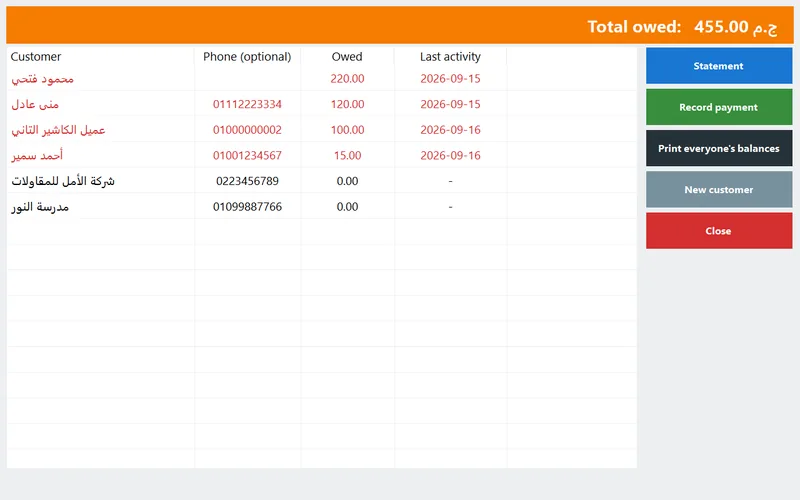
A few details that matter in practice:
- Who may sell on credit: rights per cashier. Take the credit right away from a new cashier and the button asks for the manager's password — the manager's decision, on the spot, without leaving the counter.
- Returns can be refunded off the credit account instead of from the drawer, so the ledger stays the single truth.
- Clients and credit customers are one list (Suppliers & clients feature): notes, this month's purchases, balance and last activity side by side — the ceiling you decided goes in the notes.
- WhatsApp: the receipt button under the cart sends the last receipt as text to the customer's number, filled in automatically when the sale is on a client.
- Packages: the credit screen (who owes what, repayments), the statements and the clients list come with Silver and up; the phone dashboard and managing credit from the phone with Platinum. See pricing.
A real statement
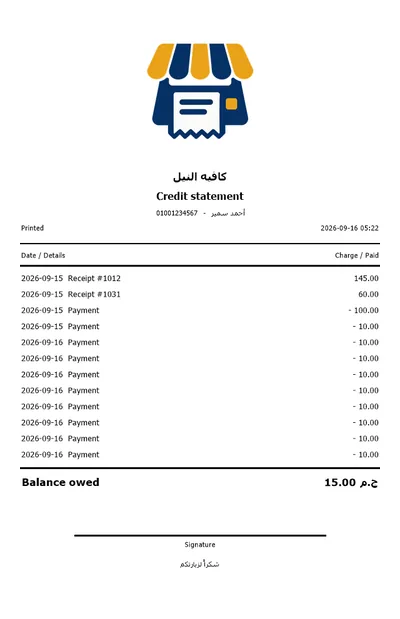
This is what comes out of the thermal printer when you press Statement: the shop's logo and name, the customer and phone, the print date, then one line per receipt (debit) and per payment (credit) with its date, and the balance due in bold at the bottom, with a signature line.
Two receipts of 145 and 60, a payment of 100 and a string of 10-pound payments — this customer pays a little every visit, which is exactly the kind of account a notebook loses track of and a statement makes obvious.
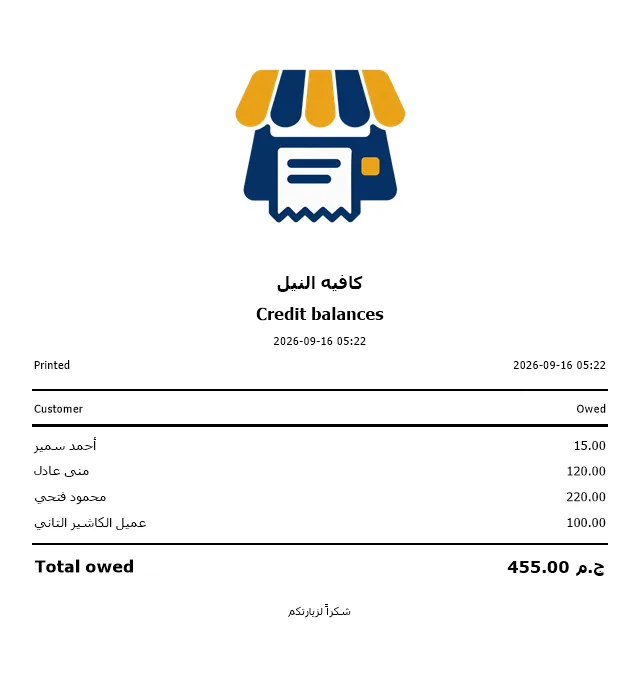
Print all balances gives the same thing for everyone on one sheet — the list to walk through on collection day.
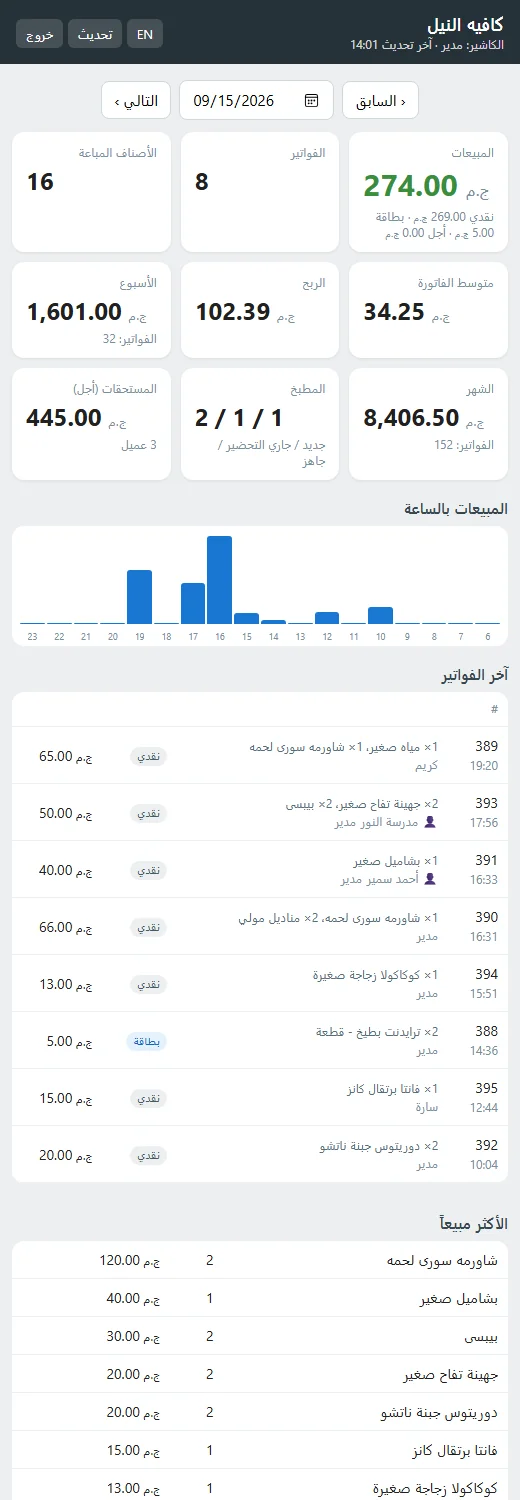
The “credit owed” card on your phone
The owner portal (Platinum) has a card called Credit owed: the total owed to you right now and how many customers it is spread over, refreshed every 30 seconds, from the shop's Wi-Fi or from anywhere over the internet. When that number goes up two days in a row, you know before the month ends.
The Manage page on the same portal opens the credit accounts themselves: who owes what, each statement, and record a payment — so a customer who transfers by InstaPay while you are at home gets credited from your phone, with your name on the entry.
The daily summary on Telegram or e-mail carries the credit figures too, so the day's picture arrives without opening anything.

A weekly collection routine
Collection is a habit, not an event. Ten minutes a day, with fixed jobs on fixed days, keeps the total flat and the conversations short. Adjust the days to your own week.

| When | What | In PosMasr | Takes |
|---|---|---|---|
| Every day | Glance at the total owed and who moved | Dashboard card on the phone, or the Credit screen at close | 1 min |
| Saturday | Print statements for everyone above your “worth a paper” line | Credit → Statement, or Print all balances | 5 min |
| Monday | Friendly reminder to the ones who did not pass by | WhatsApp receipt / a short message with the balance | 5 min |
| Wednesday | Review who is near their ceiling; decide before Thursday | Clients list: balance + notes column | 3 min |
| Thursday | Collection day — record every payment as it comes | Record payment (till or phone); it prints on the next receipt | ongoing |
| 1st of the month | Settle the big accounts; hand the statement with the receipt | Statement + Record payment | 10 min |
Which rules for which shop
| Your shop | Typical ceiling | Settle when | Watch out for |
|---|---|---|---|
| Grocery / mini-market | A week's shopping per household | Salary day, every month | Many small accounts — the total is bigger than it feels |
| Pharmacy | One month of chronic medication | On the next refill | Expensive one-off items — agree the amount before dispensing |
| Café / restaurant | Staff and regulars only, small amounts | Weekly | Tabs opened by waiters — restrict the credit right to the manager |
| Building materials / wholesale | Per contractor, agreed in writing | Per delivery or per project stage | Use the A4 invoice with the client's tax number |
| Boutique / phone shop | Instalments on a single item | Fixed dates written on the statement | Keep the ID details in the client notes |
Quick answers
Does PosMasr block a sale when a customer passes their limit?
It shows the balance on every credit receipt and on the who-owes screen, and you can keep the credit right with the manager so a cashier cannot extend credit alone. The ceiling itself is your policy, written in the client's notes — deliberately, because the neighbour of ten years and the newcomer are not the same case.
Can I move my current notebook into the program?
Yes: add each customer with their opening balance as a credit sale or a note, then everything after that is recorded automatically. Most shops do it in one evening with the notebook open next to the till.
A customer pays part now, part later?
Record payment accepts any amount; the balance updates and every payment shows on the statement with its date.
Can the customer see their balance without asking me?
On every receipt they get, and on the WhatsApp receipt if you send it. There is no customer login — the ledger stays yours.
I have two tills — do they share the credit ledger?
Yes. The primary till keeps the clients and the credit ledger; the secondary uses the same list and sends it every receipt. See the second till in the manual.
Close the notebook — 14 days free
Add your credit customers, sell one order on credit and print the statement. If it doesn't make the month-end easier, you have lost nothing. No subscription, ever.