
Customer Portal
A private place for customers to find purchases, documents, support and service updates.
Customer Portal400 EGP per workspace per month, before VAT.
Simple on the surface, complete underneath. More than 200 things PosMasr does, grouped so you find yours in seconds — each with one line on what it does for your shop.

Optional turned on from Settings → Features 4.0 the version it arrived in Everything else is shipped and working today. Each name opens its section in the manual.
 New in October 2026
The biggest month the program has had: 1-Click AI & MCP integration (Claude Desktop .mcpb, ChatGPT, Gemini, SKILL.md), Wave 1 & Wave 2 Instant-Win Features (Kitchen QA Prep-Stage SLA Telemetry, Waiter/Chef Speed Leaderboards, Waiter Tablet Ready-Bell, Fractional 1/3 Bill Splitting, Instant Mobile Browser PWA Digital Stamp & VIP Card with Cashier QR, Recipe/BOM Auto-Deduction & Stock Variance, Pharmacy FEFO & Substitutes, Power BI Live Feed & HH:mm Exports, Hourly Gaming/Table Timer, Laundry & Repair Tag Tracker, Salon Commission & Tip Split, Prepaid Digital Coupon Book, Cold-Chain Log & USB Flash Backup, InstaPay duplicate reference guard, Law 6/2025 SME tax calculator, blind shift close, Fakka wallet, delivery captains, multi-tier price lists, call-center router, and 1-click migration), plus accounts, bookings, HR, procurement, warehouses, projects and fixed assets. Each line says where it runs and in which plans.
Connect your shop in one click with the ready .mcpb bundle for Claude Desktop, one-URL connector for ChatGPT and claude.ai, Gemini CLI command, SKILL.md and /.well-known/mcp.json. Ask in Egyptian Arabic or English about today's sales, cashier voids, expiring stock and margins — 100% read-only.
Online: Business and Chain (and in the 14-day free trial)
Tracks exact preparation seconds per stage on the KDS, flags SLA breaches, and renders fastest/slowest garçon and chef charts with both monetary (EGP) and time Y-axes.
Online: Business and Chain · On your PC: Gold and Platinum
Rings the waiter's tablet when kitchen orders are bumped ready, marks vacated tables “Needs Cleaning” on the floor board, and splits restaurant checks by seat or even 1 dish across 3 guests (1/3 each).
Online: Shop and up · On your PC: Gold and Platinum
Guests scan the table QR to order, pay immediately, and watch live kitchen preparation status; stamps, VIP tiers and points update immediately on the Instant Mobile Browser PWA Digital Stamp & VIP Card with Cashier QR — zero app downloads.
Online: Shop and up · On your PC: Gold and Platinum
Automatically deducts raw ingredients in grams and milliliters per recipe sold, and compares theoretical consumption against physical stock-takes to catch kitchen waste and theft automatically.
Online: Business and Chain · On your PC: Gold and Platinum
Connect Power BI via a live feed or export filtered data natively for Excel, CSV, Zoho Books and QuickBooks with exact Date + Hour/Minute (HH:mm) range filtration.
Online: Shop and up · On your PC: Silver and up
Pharmacy FEFO batch/expiry & active-ingredient substitutes, supermarket BOGO/Happy-Hour promos, central kitchen commissary requisitions, supplier RTV claims, smart Auto-PO reordering, Hourly Table/Gaming Lounge & Minimum-Charge Timer, Laundry Conveyor & Electronics Repair Tag Tracker, Salon Multi-Chair Commission & Tip Split, Prepaid Digital Coupon Book, Cold-Chain Log & USB Flash Backup, conflict-free barcode minting, safe drops, B2B credit gates, gold/roastery gram pricer, Go-Green paperless receipts, auto-clock-in on POS sign-in, and universal cash drawer (Seethings/ESC-POS) diagnostic.
Online and on your PC: Silver and up / Cashier and up
Prevents reused or fake transfer screenshots at the cashier by verifying the transfer reference digits across all shifts and history before completing the receipt, with full Z-report reconciliation.
Online and on your PC: every plan and package
Calculates your simplified SME turnover tax under Egypt Law 6/2025 (0.4%, 0.5%, 0.75%, 1.0% or 1.5% up to 20M EGP) side by side with 22.5% corporate tax on net profit and 14% VAT threshold alerts.
Online: Shop and up · On your PC: Silver and up
Hides expected drawer cash so cashiers count bills and coins blind by denomination; logs every no-sale drawer pop, cleared cart item and post-print void per cashier, and alerts the owner.
Online: Cashier and up · On your PC: Silver and up
Saves small change (2, 3 or 4.50 EGP) directly to the customer's mobile number in one tap when coins are short, and applies it automatically on their next purchase.
Online: Cashier and up · On your PC: Silver and up
Automatically breaks 1 carton or shrink into individual pieces when shelf pieces hit zero, and auto-calibrates weight/price barcodes (prefixes 20–29) from any deli, butcher or roastery scale.
Online: Shop and up · On your PC: Silver and up
Assigns orders to delivery riders, tracks their petty-cash float and zone fees, settles their wallet at shift end, switches Multi-Tier Price Lists (Dine-In, Takeaway, VIP, In-House Delivery), calculates packaging/delivery net margin with the Menu Engineering Matrix, and routes call-center orders across branches.
Online: Shop and up (call-center router & menu matrix: Business) · On your PC: Gold and Platinum
Tracks IMEI/serial numbers and warranty claims per receipt, generates clothes Size×Color grids, manages Layaway/Deposit orders, and imports from Foodics, Daftra or Excel in 1 click.
Online and on your PC: Silver and up / Cashier and up (1-Click Migration: every plan)
For contractors, fit-out and maintenance, agencies, workshops, events and printing: each long job a project with a customer, a site, a contract value and a budget split into phases; tasks with checklists and comments on a four-column board.
Online: Included in Business and Chain; an add-on for Shop at 300 EGP a month
Hours typed on the phone page or Clock in / Clock out; the hour costed from HR’s pay, the staff record’s salary or a rate; a weekly timesheet to approve or send back. Field staff never see the money.
Online: with Projects
By milestone, by progress (% of the contract) or by time and materials with a markup; retention held on each work invoice and released at the end, advances recovered in proportion; a preview before issuing; through Books or the customer’s account.
Online: with Projects (a Books tax invoice where Books is on)
Per project and per phase: costs from expenses, stock and suppliers, labour, invoiced, paid, margin and margin %; late and over-budget counts, alerts, a CSV or Excel report, and Ask your shop “how are my projects”.
Online: with Projects
Every machine, shelf, van and computer with a tag (FA-000123) printed as a barcode label, a photo, a place, its cost, life, method, serial and warranty, and its state. Books’ old asset page moved into it with the same book values.
Online: Included in Business and Chain (needs Books); an add-on for Shop at 200 EGP a month once Books is there
Straight line or declining balance, first and last months in days; each month a preview, then one journal per branch with a line per category, never twice; after the first run it runs by itself.
Online: with Fixed assets
A sale or disposal with depreciation to the day, the gain or loss and VAT; transfers between branches; revaluation and impairment; counts by scanning the tags with the phone’s camera: found, missing, from elsewhere.
Online: with Fixed assets (transfers between branches: Chain)
Purchase requests, approvals or return for changes, the order from the request, the supplier’s invoice matched with the order and the deliveries, Invoices to check, supplier ageing and a Procurement home — on one PC, offline. Quotes by link stay online.
On your PC: Gold and Platinum, from desktop 5.7.0
Billing → Plan → “Add-on modules”: each module your plan can add, its monthly price and what it needs, with Buy and Cancel; Settings → Modules links to it. Cancelling switches the module off at once and deletes nothing.
Online: the owner, on the plans that can add a module
Settings → Modules: one card per module — what it includes, how it is priced, a switch. Off hides its pages from the menus and Ctrl+K, nothing is deleted; it names what must be on first; per branch.
Online: every plan (each module as its plan allows)
Staff with the right ask for goods with a reason and a date; per branch an amount approved at once and one that needs two approvers; monthly budgets per category, soft or firm; an approvals inbox.
Online: Included in Business and Chain; an add-on for Shop at 300 EGP a month
Up to 8 suppliers, each with its own link sent from your WhatsApp; they type price, quantity and a date and never see your costs. Side by side, the cheapest marked; Pick makes the order.
Online: Included in Business and Chain; an add-on for Shop at 300 EGP a month
Damaged refused at the door, over and short, batch and expiry; the supplier invoice checked against the order and the delivery — within the tolerance it is posted, outside it waits in “Invoices to check”.
Online: Included in Business and Chain; an add-on for Shop at 300 EGP a month
What you owe each supplier by days past due, and per supplier: on time, fill rate, price against the orders, damaged. Alerts for late orders and unmatched invoices.
Online: with Procurement
The shop floor, a store room, a central warehouse (no extra branch to pay for), a van, consignment stock — up to 50 locations with bins and min / max per product.
Online: Included in Business and Chain; an add-on for Shop at 300 EGP a month
Request, pick with a scanner or the phone's camera, dispatch with a numbered note and its QR, receive in parts; short, damaged or over settled by a manager.
Online: with Warehouses (in transit between branches: Chain)
Batches travel with their expiry and cost; serial numbers are received one by one and never twice; recall finds a batch or a serial everywhere, on the way, and in the receipts it went into.
Online: with Warehouses
Count a location, a category or a bin (blind for staff, a manager approves the difference); value each location at cost plus what is on the way; refill from the source up to the max.
Online: with Warehouses
Link your companies and shops: one dashboard without the sales between them, group P&L and balance sheet from each one's Books, VAT side by side, transfers at an agreed price, Ask the group.
Online: Chain (any plan may join a group)
The day's sales journal per branch, customers on credit, their invoices, credit notes and payments go to your accountant's program by themselves, each once — never an edit of what is there.
Online: Business and Chain
With your own Paymob account: “Pay online” in the online shop beside cash on delivery, pay links from the credit book, refunds, and a statement Books imports. We charge nothing per payment.
Online: Business and Chain
It answers from your notes and FAQs, lists the questions it could not answer for you, remembers each customer briefly, follows open matters as cases, and keeps replies short and honest.
Online: an add-on on Business and Chain, 750 EGP a month
Your shop's WhatsApp answers from your real products, prices, stock and hours: written orders, voice notes, photos of a list, bookings. The customer confirms, the order lands on the till and in the kitchen, and a person takes over in one tap.
Online: an add-on on Business and Chain, 750 EGP a month
Paste your review link once: every sale receipt ends with “Happy with us? Scan to rate us” and the QR, and the WhatsApp receipt carries a “Rate us” link.
Every plan: online, the till app and the program on your PC
The customer's receipt page offers last week's order again: into your online shop's cart at today's prices, or as a QR the cashier scans to fill the cart.
Online: every plan (into the online shop: Business and Chain, or the add-on)
A customer asks for a return (lines, a reason, a photo) or asks a question from the receipt's link; the till shows “Customer requests”, staff accept, decline or reply, and the customer sees the answer on the same page.
Online: every plan
When a delivery costs 10 % more than last time (your threshold), the line says what your margin became and the price that keeps it — one tap applies it. A margin floor lists the squeezed products.
Online: Shop and up · On your PC: Silver and up
What has not sold for 45 days (you choose), the money it holds at cost, the last sale, and what to do: discount, bundle, return to the supplier or stop reordering. On the dashboard, in a weekly summary and in the owner alerts.
Online: Shop and up · On your PC: Silver and up
Beside each slow product: the other branches where it sells, their cover in days and the quantity to send — “Create transfer” makes the numbered transfer note.
Online: two or more branches (transfers on Chain)
Photograph the supplier's price list: the invoice reader reads the rows, you see the new piece cost, the change and the price that keeps your margin, tick what to apply. Purchase orders start from the list.
Online: with the invoice reader — each page is one of its readings
Saturday morning, a one-minute voice note on last week: sales against the week before, the best day, the top sellers, low and slow stock — and one thing to do. In the app, on Telegram and by e-mail.
Online: Shop and up, with owner alerts
A menu board can show the team's top three between the menu pages: a podium, first names, a medal each — money hidden unless you choose. Off until you switch it on per screen.
Online: Business and Chain (menu boards)
One click fills a new shop with products, customers, suppliers and 25 days of receipts of its own kind, so the reports and alerts have something to show; one click takes exactly that out again. Your first real receipt is still number 1.
Online: every plan, for a shop that has not sold yet
A question the fixed list does not read goes to your AI, which reads the shop's own reports with your rights and says what it used under the answer.
Online: Shop (20 free questions a day), Business (50), Chain (100)
The Instant Mobile Browser PWA Digital Stamp & VIP Card opens via QR in any phone browser with zero app downloads, updates stamps and points after every visit, and works in the program on your PC too.
Online: Shop and up · On your PC: Gold and up
PosMasr Till for Android tablets and handhelds (Samsung, Sunmi, iMin): the same online till, selling offline and sending later, with USB, Bluetooth or built-in receipt printers and the camera as a scanner.
With PosMasr Cloud, Android 9 and up
Laundries, tailors and repair shops on the program on your PC: intake over the cart, claim ticket and piece tags, the board, collection as a normal sale with the deposit used — and a voided collection gives the pieces and the deposit back to the job.
On your PC: Silver and up (online: Cashier and up)
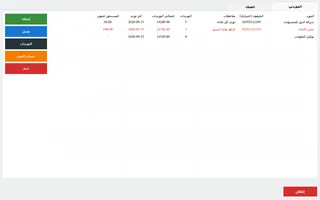
Who owes what and since when, promises to pay, limits at the till (warn or block), the printed statement and a daily “to send” list of polite WhatsApp reminders — in the program on your PC.
On your PC: Silver and up (online: Cashier and up)
Quotes, invoices, supplier bills, expenses, the bank and the 14 % VAT summary — with the till's sales flowing in by themselves every 15 minutes. Plain words for you, the journal one click deeper for your accountant.
Online: Business and Chain
A booking page for your shop where customers pick the service, the person and the time — for salons, clinics, car washes, studios and restaurant tables. The visit ends as a normal sale at the till.
Online and the till app: Business and Chain
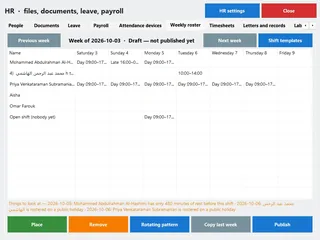
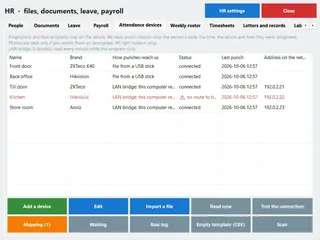
Employee files and papers, leave, attendance by PIN, card, phone or a fingerprint device (by file or over the network), a weekly roster, and Egyptian payroll with income tax and social insurance.
Online: Shop and up, payroll Business and Chain · On your PC: Silver and up, payroll Gold and up
Ask ChatGPT or Claude about your own shop — sales, stock, receipts — with a key you make and can revoke in a second. Read only: no AI can sell, refund or change anything.
Online: Business and Chain
Staff clock in and out with their PIN or card at the till, even offline; timesheets flag late and missing days; commission by product, category or target; an advance is a cash-out of the drawer that shows on the Z report.
Clock-in: online Shop and up, on your PC Silver · Commission and advances: online Business and Chain, on your PC Gold
A loyalty card on the customer's phone: they join with their number from your QR, every purchase gets a stamp, and a full card earns the reward you chose. Returns take their stamps back.
Online and the till app: Shop and up
A down payment, then weekly or monthly instalments on the customer's account; a deposit kept as money you owe until the sale is done, with an optional advance tax invoice so the 14 % VAT is charged when the money comes in.
Online: Cashier and up · On your PC: Silver and up
Any TV with a browser becomes a menu board with your offers, or an order-status screen that tells the customer their order is ready. Pair it with an 8-digit code.
Online: Business and Chain
Voids, refunds, big discounts, a drawer that does not add up, the drawer opened with no sale, a new device — told to you in the app, by e-mail or on Telegram, with quiet hours.
Online: Shop and up (Telegram from Business) · On your PC: Silver (“Needs a look”)
Type “how much did we sell today?” — in Egyptian Arabic, Arabizi or English — and get the figures. Fixed, explained rules: an unknown question gets examples, never a guessed number.
Online: Shop and up (in Telegram from Business)
From Excel, CSV or another program's export: columns matched for you with the reason shown, a dry run before anything is saved, and undo for 30 days. Customer and supplier balances and opening stock too — not only products.
Products on every plan · customers Cashier and up · suppliers and stock Shop and up · also on your PC
Take the item in, print a claim ticket and tags, track it on a board, and let the customer follow it from a QR. The deposit is kept as an advance; uncollected items show at 30, 60 and 90 days.
Online and the till app: Cashier and up
Suggested orders from how fast each item really sells, rounded to the carton, within the supplier's minimum and your budget; send it by print, Excel, e-mail or a WhatsApp message.
Online: Shop and up · On your PC: Gold and up
An expiry board that says what will not sell in time, markdowns on one lot with their labels, expired lots stopped at the till, a supplier return sheet and a waste report.
Online: Shop and up · On your PC: Gold and up
Type “250 g”, “a quarter” or “20 pounds”; the container's weight comes off; saved blends take each part from stock; a sack of green coffee becomes roasted bags with the loss and the cost carried over.
Online: Shop and up · On your PC: Silver and up
Who owes what and since when (0–90+ days), promises to pay, a statement link for the customer, credit limits at the till, and polite reminders — by e-mail, or a ready WhatsApp message the cashier sends with one tap.
Online: Cashier and up
Photograph the supplier's invoice and an AI reader fills in the receiving for you to check: each line green, amber or red, the totals recomputed by PosMasr itself.
Online: Shop (15 a month), Business (20), Chain (40)
One box finds any page, setting, receipt, customer, product, invoice or booking as you type — a receipt number goes straight to the receipt.
Online and the till app: every plan
Every error message has a small link to the guide that explains it: what it means, what may have happened and how to fix it, step by step, in Egyptian Arabic or English.
Everywhere: online, the till app and the program on your PC
A QR and barcode maker, price-label sheets, VAT and margin calculators, a drawer counter, shift hours and a number checker — free, in the browser, no sign-up.
Free for everyone
 Selling
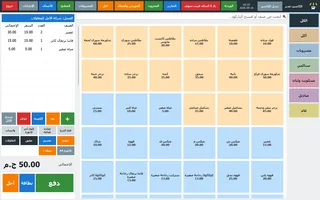
The screen your cashier lives on: big buttons, a scanner that just works, and nothing in the way.
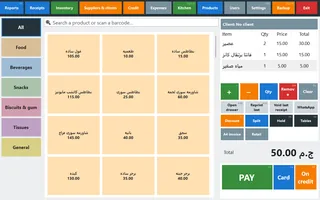
Your products as big buttons grouped by category and colour — one tap adds the item, another adds one more.
Type part of a name and the list narrows, or scan a barcode and the item drops straight into the receipt.
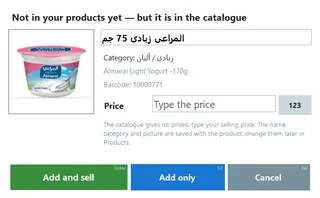
Scan a pack your shop does not have yet but the catalogue knows: a small window shows its picture, name and category with an empty price box — Enter adds and sells, F2 only adds, Esc cancels. The price is always yours; a cashier without the products right needs the manager.
A tracked product shows what's left in brackets; sold-out ones fade, or disappear from the screen if you prefer.
Raise or lower a quantity, remove a line or clear the whole receipt without leaving the sales screen.
A wrong receipt is cancelled on the spot — with the manager's approval, and the stock goes back.
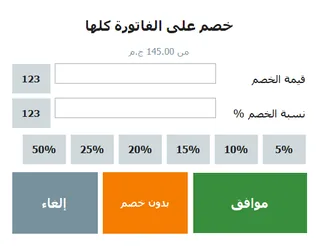
On one line or the whole receipt, an amount or a percentage, with a ceiling for the cashier — above it the manager must approve.
Pick the items from any old receipt and refund cash, to the card or off the credit account — the stock comes back and a return receipt prints.
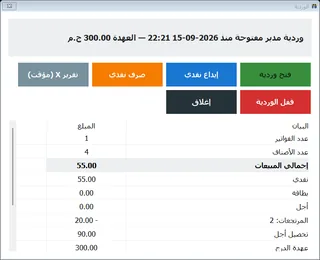
Open the shift with its float, record cash in and out with a note, and close it with a Z report that has every number on it.
Count the money in the drawer and the program prints expected, counted and the difference — so a shortage has a name and a time.
Sell by the kilo, the gram or the litre, with a Qty button for any fraction you like.
EAN-13 labels carrying the price or the weight: one scan and the right quantity lands in the cart.
No mouse needed: F1 lists the keys of the screen you are on, and every button shows its key in its corner.
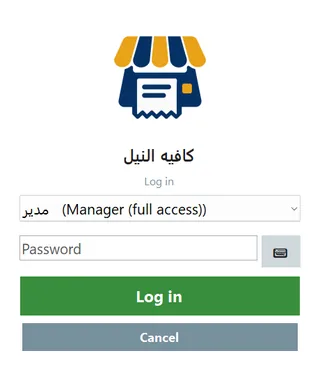
The login screen opens without closing the program, so the next cashier starts under their own name.
 Payment
Cash, card, on account — or a bit of each. The change is never the cashier's guess.
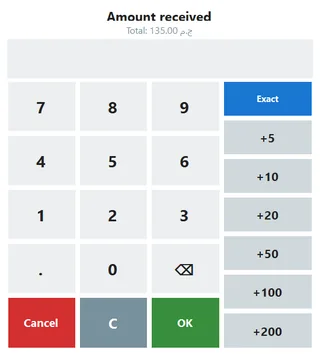
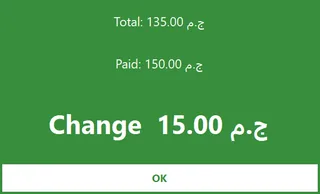
Quick-cash buttons that add up, an “Exact” button, and the change in digits the customer can read from where they stand.
Untick “ask for the amount received” and Pay saves the receipt immediately — faster in the rush hour.
Recorded as paid by card: no change, the drawer stays shut, and the receipt says so.
Press Credit, pick the customer (or type a new name and phone) and the receipt prints with their name and balance.
Part cash and part card on one receipt, and the reports keep the two apart.
Your own code shows on the customer display while the order is rung up, and prints on the receipt if you want it there.
 Receipts & printing
A clean Arabic receipt on any thermal printer, a drawer that actually opens, and labels you print yourself.
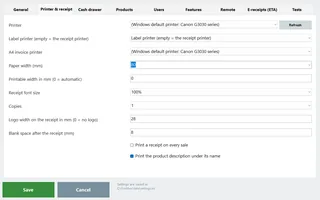
Any ordinary thermal printer, USB or on the network — or simply the Windows default printer.
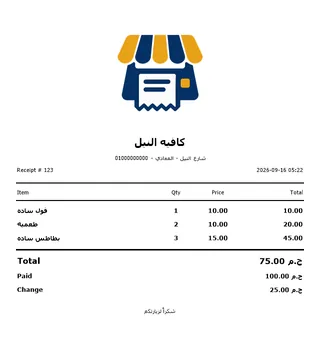
Shop name, the address and phone line, the thank-you footer and the product descriptions — set once, printed for ever.
Printable width, font size, logo width and the number of copies — until it comes out exactly right.
See the receipt before you print it, and a raw ESC/POS test for when the printer is being stubborn.
The paper tore, or the customer wants another copy — one button under the cart.
A Receipts button in the top bar, and a search that finds a receipt by its number, the customer's name or the amount as you type.
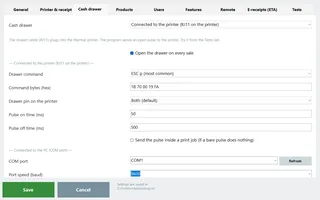
The usual RJ11 socket on the printer, a USB/serial trigger, or straight to a network printer's IP on port 9100.
It tries every kick command with 50, 120 and 250 ms pulses until you hear the one that opens your drawer.
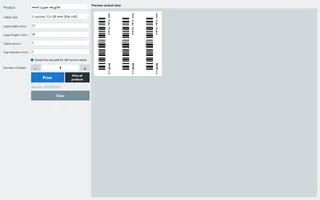
Name, price and a scannable barcode on every label; a product with no barcode gets one generated and saved.
3-across 12×38 mm rolls, the split pharmacy label, 40×25, 50×30, 60×40 — or any size you type. Print one product or all of them at once.
One tap sends the last receipt as text to the customer's number — filled in by itself when the sale is on a client.
A bag of bread, a bottle of water: a sale made only of those categories is saved and shown, but no paper comes out.
 Products & catalogue
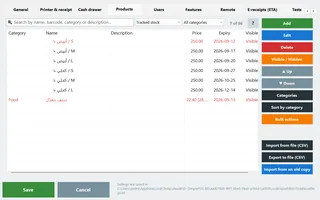
Getting a few hundred products in — and keeping them tidy afterwards — is where most tills lose you. Not this one.
Name them, reorder them with ▲ / ▼, merge or delete one — and the sales screen follows the same order.
Find what has no barcode, no price, no cost, what's hidden, low, expiring — or a duplicate barcode or name.
Select twenty products and move their category, hide them, or raise the price by a % or an amount rounded to 0.25 / 0.5 / 1.
A second product with the same barcode or name is refused, and the importers skip and report it instead of quietly creating a twin.
Export the template, fill it in Excel, import it back: existing products are updated, new ones added, and a blank cell keeps the old value.
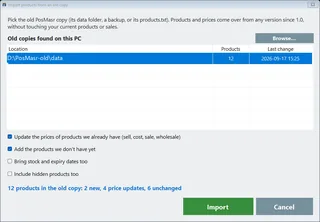
The program finds your older copies on the PC by itself and brings their products and prices over — the old copy is only read, never changed.
A text file with any column names, an Excel file, a database on the PC or on a server through ODBC, or an older PosMasr copy — four sources, one wizard.
The map comes pre-filled with a guess, the first twenty rows are shown exactly as they will land, and a run touching more than 200 products backs you up before it writes.
The program asks what kind of shop you are — grocery, supermarket, café, restaurant, pharmacy — and starts you on a list that already fits.
52,548 products Egyptian shops sell, with their names, barcodes and categories — sorted into 59 Arabic categories, 18,493 of them with a product picture. No prices: every shop types its own.
Open the ready list, type to find, tick what your shop sells and add them — without a price, which you type yourself. Works offline.
Scan a barcode while adding or editing a product and, if the catalogue knows it, the name, category, a description and the product picture fill in — your price, cost, stock and expiry are never touched. Works offline.
“Generate” next to the barcode in the product editor, or “Give a barcode to the N products without one” in the bulk actions — then print their labels in the same step. The codes are in-store codes starting with 2, so they never match a real product's barcode or a scale label. Need barcodes or labels outside the program? Try the free barcode maker and label sheets.
Downloaded once as one encrypted file (about 70 MB, in the background); the picker, the barcode lookup and scan-to-add then work with no internet. Its key is issued to your PC only, so a copied file opens nowhere else, and it checks for a newer catalogue at most once a day.
The catalogue exists because shops share their product lists, so picking from it and the barcode lookup are there for shops that share theirs: the daily copy at PosMasr on, and your products not excluded from the shared catalogue.
Select two or more rows and the normal product screen opens on all of them — only the fields you touch are saved.
“Save & add another” opens an empty product with the same category and unit — type a whole shelf in one run.
After every add or edit the list keeps its place and your selection, and a new product lands in its own category, not at the end.
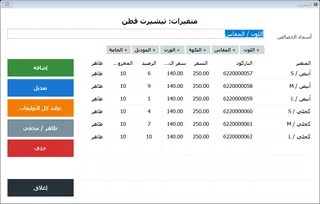
You name the attributes and generate every combination; each variant keeps its own stock, barcode, price and cost.
A wholesale price per product and a Retail / Wholesale button on the sale that goes back to retail after every receipt.
In a café or a sweet shop a picture finds the item faster than a name — especially for a new cashier.
“Show product pictures on the sales screen buttons” at the bottom of Settings → Products (managers only); the pictures are scaled so the name and the price stay readable, and the screen stays fast with hundreds of products.
Cost & profit, expiry dates and stock are three switches, all on by default — switch off what your shop doesn't use and the product screen gets shorter.
 Inventory & purchasing
What you have, what's about to run out, what's about to expire, and who you bought it from.
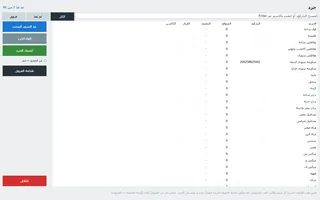
Every product with its stock, cost, price and stock value — low in orange, out in red.
Scan each unit as it comes off the van, or add a quantity in one go — and fix a wrong number on the spot.
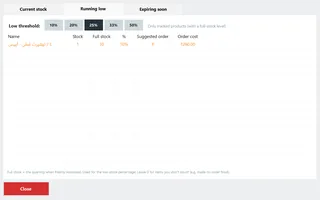
At a threshold you choose (10–50%), with the suggested quantity and what the order will cost you before you go to the market.
One setting keeps the sales screen clean of everything you cannot sell today.
Print the list exactly as you filtered it on the receipt printer — grouped by category, low rows marked, totals at the end.
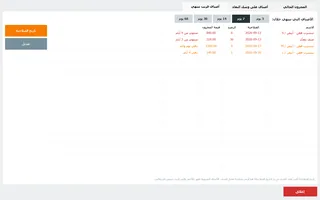
An expiry date on any product, expired in red and close in orange, and a list for 3 to 60 days ahead with the stock and its value.
A red badge in the top bar, a once-a-day reminder with the names, and a warning under the cart if an expired item is rung up.
Expected against counted with the differences in colour, then Apply — the variance is saved and prints with its value at cost.
From the till and from the staff's phones together, so the whole shop is counted in the closing hour.
Add a product, receive stock with its cost and supplier, and scan the barcode with the phone camera — no reader needed.
Every supplier with the number and total of their deliveries, and every receive logged against them with date, cost and who took it in.
What you owe each supplier, what you have already paid, and what is left.
Rent, salaries, electricity — and a net-profit line in the profit report, not just gross margin.
 Customers & credit
The notebook by the till, done properly: every pound on record, and a statement you can hand over.
Put the receipt on a customer's name — a new one with a phone number, or one you already have.
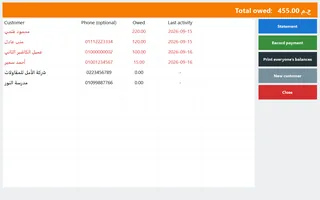
Every customer with their balance, and the total the shop is owed, on one screen.
He paid 200 of the 500 — record it and the balance moves, with the date and who took the money.
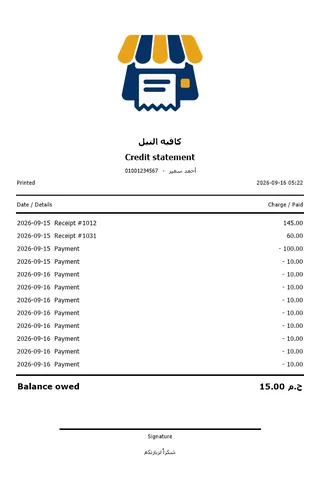
One page for one customer with every receipt and payment, or one page listing everyone who owes you.
One switch adds a page with a Clients tab and a Suppliers tab — names, phones, notes and last activity.
Pick the client before ringing up and their name is stored on the sale and printed — cash, card or credit.
How much each client bought this month, their credit balance and when they were last in — so you know who to call.
Tick “wholesale client” once and the cart prices at the wholesale level the moment you pick them; the receipt says so.
Who owes what, the statement and recording a payment — from the owner portal, each action under your name.
The items, the discount, service, VAT, total, paid and change — as a message, ready to send.
 Restaurant & café
Orders reach the kitchen the moment you sell them — no paper tickets flying about, no shouting across the counter.
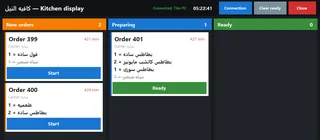
Three columns; the cook taps a ticket to move it along, and “clear ready” takes the delivered ones off.
Ready-made items appear struck through so the cook sees the whole order, and an order with nothing to prepare never appears.
A second monitor on the same PC, or a PC or tablet on the shop network — and more than one screen at a time.
A big-font ticket with the order number, table, time and only the items that need preparing.
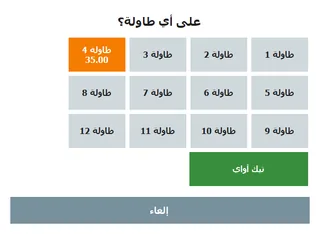
Park the cart on a table (it goes to the kitchen at once) and pick it back up with the same number when they ask for the bill.
Small, medium, large, extra shot, no sugar — a touch picker on add, and the choice prints on the receipt and the kitchen ticket.
The usual 12% added to every bill, shown before paying and printed as its own line — with VAT computed the way the Tax Authority does it.
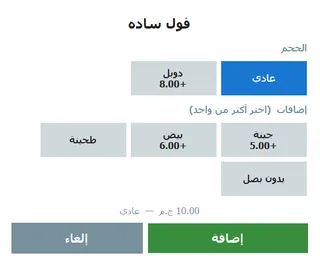
The kitchen screen in full → PosMasr for restaurants → PosMasr for cafés →
 Reports & your phone
Answers to the questions an owner actually asks — at the till, or from your phone on the other side of town.
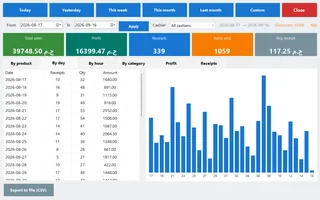
Today, yesterday, this week (starts Saturday), this month, last month — or any two dates you pick.
Total sales, profit, number of receipts, items sold and the average receipt — in big coloured tiles.
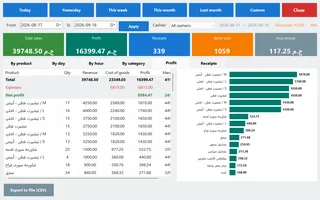
By product, by day, by hour and by category — so you know what to reorder and when to put a second cashier on.
Revenue, cost, profit and margin per product — and a net-profit line once expenses are on.
Every receipt with its lines: open one, void it, reprint it or start a return from it.
Every receipt records who sold it, so each cashier's day is its own report.
Any tab saves as a CSV that opens in Excel with the Arabic intact — for your accountant, or for you.
At the time you set, the till writes the products, the day's receipts, the receipt items and the current stock into a folder on the PC or a server share — files Excel opens with the Arabic intact, and the last 60 days are kept.
The accountant's software reads the products, the receipts between two dates, one receipt's items and the stock — read-only, with a token you generate, and off until you switch it on.
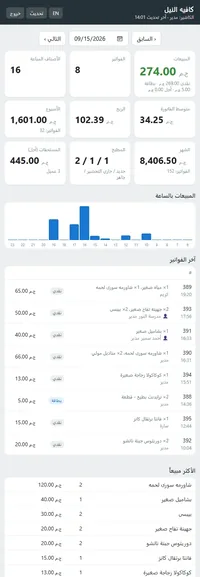
A tiny web server inside the program — nothing to install: today's sales, sales by hour, the latest receipts, best sellers, low stock, what's owed and the kitchen queue.
Behind a shared carrier address? The till keeps one encrypted connection out and your phone opens your own address — no router setup, nothing of yours kept on our side.
Your own SSL certificate (or a free Let's Encrypt one), manager login with a 5-strikes lock-out, and one button that tests local, LAN, firewall and internet.
Reports over any period, credit accounts and repayments, expenses and supplier payments — every action recorded under your name.
The day's numbers arrive on your phone at the time you choose, without you opening anything.
Sent from your own e-mail account once a day — you pick what's in it: the day's summary, the Z report, the low-stock list, the expiring list.
A fictional café with data that moves with the clock — one button and you're in; walk around the whole dashboard.
 Tax & compliance
Egypt's numbers are already in it: 14% VAT, 12% service, a proper tax invoice, and the Tax Authority e-receipt.
A one-tap “Egypt 14%” button, VAT either inside your prices or added on top, and your registration number printed on the receipt.
For restaurants and cafés — and VAT is computed on goods plus service, exactly the way the Tax Authority does it.
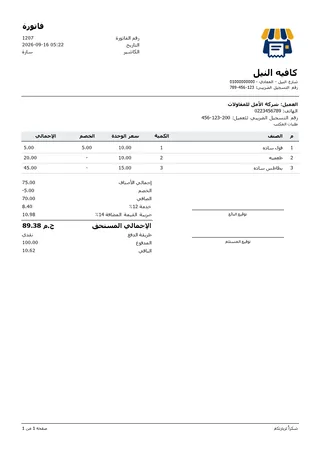
Logo, shop details and tax number, the customer, an items table, service, VAT, total due and signature lines — long ones span pages.
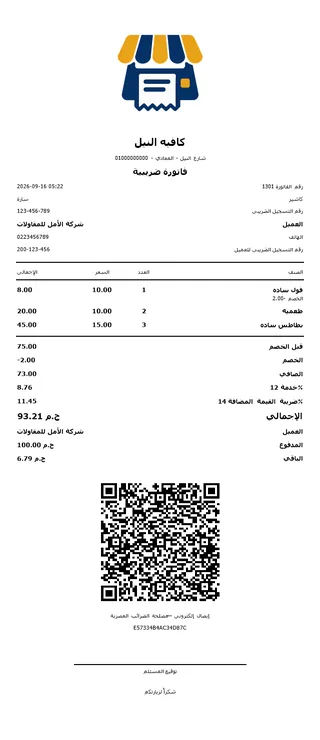
No A4 printer? The shop's tax number, the client and theirs, net, service, VAT, total and a signature line — on ordinary receipt paper.
Once the shop is enrolled, receipts go to the Tax Authority by themselves and the ETA QR prints on every one — no certified device, no signature.
The internet drops and selling carries on — the receipts wait in the queue and go up the moment the line is back.
The program lists the products still missing a code and fills them in from their barcodes.
With e-receipts on, the message you send the customer carries the Tax Authority link to their own receipt.
 Hardware
Ordinary shop hardware from any shop in Ataba — nothing proprietary, nothing you must buy from us.
Leave “Set up connected devices” ticked while installing: the printers it recognises — the Epson TM-T20 family, Citizen CT-S310II, Bixolon SRP-350plus and known Xprinter, Rongta and POS58/POS80 USB versions — are added to Windows by themselves, and the CH340/CH341 driver for USB-serial cables comes included. USB versions differ, so another model may still need its own driver.
Settings → Devices lists the devices connected to the PC; from there a COM port is given to the scale, the pole display or the drawer.
USB or on the network, any brand — and the Generic / Text Only driver when a driver misbehaves.
Four kick commands, three pulse lengths and a diagnostic — a drawer that will not open is a solved problem.
The ordinary keyboard-wedge kind: plug it in and scan — no drivers, no settings.
Keep the receipt printer for receipts and send the labels to a dedicated printer.
The buttons are sized for a finger, but everything works with a mouse, and the whole program works from the keyboard.
The customer watches every line go in, then the paid amount and the change in huge digits — so they correct the cashier before the receipt prints.
The small VFD or LCD on a stand, or the LED amount display — EPSON, AEDEX or plain, with a test button that prints the bytes it sent.
Any USB magnetic-stripe or RFID reader: the supervisor swipes instead of typing a password, and a lost card is revoked on the spot.
Tap a by-weight product and the weight lands in the cart — CAS, Mettler Toledo, DIGI DS or generic, with a test that shows the raw bytes.
Any spare PC on the shop network — and the kitchen screens are covered by the till's own license.
Only if you invoice companies — otherwise the thermal tax slip does the same job.
The phone camera scans the shelf — so a stock-take costs you nothing in hardware.
Windows 8.1, 10 and 11 need nothing; Windows 7 asks for .NET 4.8 once, free from Microsoft.
 Tills & licensing
Who may do what, a second till when the queue grows, and a license nobody can switch off on you.
The manager does everything; a cashier sells, and the management buttons simply are not there.
Hand one cashier reports, inventory, editing products, voiding, returns, credit, expenses or exit — or take a default right away.
What a cashier lacks still goes through if the manager types their password — or swipes their card — right there.
The cashier is stored on the sale, so any report or dispute has a name and a time on it.
The Users tab is one button away, and after 3 days on the manager account alone a one-time reminder suggests giving the cashiers their own.
Never kept as plain text — not even in a backup.
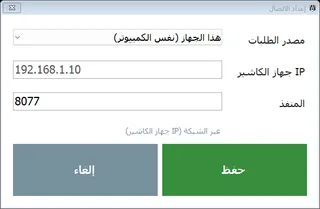
Products, stock and clients come from the primary, every receipt is pushed back to it, and nothing stops when the network drops.
No IPs and no passwords: the second PC finds the primary on the shop network, you type a 6-digit code, and they talk over a signed, encrypted link.
The second till notices within about 90 seconds and takes over by itself; when the old PC returns it steps down and hands over the missing receipts.
Connect the till to a PosMasr Cloud account with a 6-digit code from the web app instead of a licence key. When the internet drops it keeps selling, and the receipts sync by themselves once it is back; screens, shortcuts, printer, drawer and scale stay as they are.
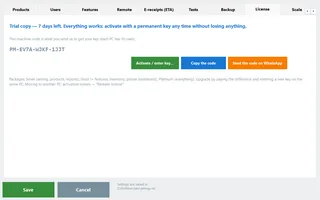
7 free days with everything on, then one activation key — no subscription, and nobody can switch it off remotely.
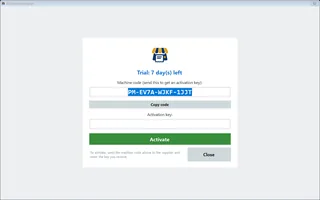
Whether you are on the trial and how many days are left, or which package is active — with your machine code, a copy button and a “send on WhatsApp” button.
Release it and you get a release code; send it with the new machine's code and the new key comes back right away.
Arabic by default, English one setting away — the receipts and labels follow.
On the window, the top bar, the receipts and the labels — changed any time, no reinstall.
Everything lives in plain files on your PC — the sales are a text file a day that opens in Excel or Notepad.
For a PC where you have no admin rights: extract it to a permanent folder and run it — the data folder is created next to it.
 Backup & support
A hard disk dies on a Thursday afternoon. What happens next is the whole point of this section.
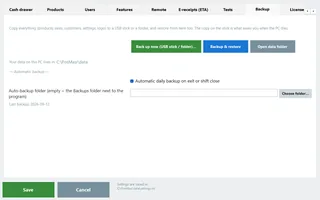
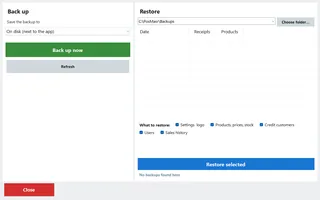
Back up now to a USB stick or a folder, restore, open the data folder and set the daily backup — all in one place (Ctrl+B).
Tick only what you want back: settings and logo, products and stock, customers, users, or the sales history.
Taken on exit or at shift close, into the folder you choose — so nobody has to remember.
Your product list goes up once a day so we can hand it back if the PC dies; the full backup is there when you want it, and you can switch all of it off. Sharing that list is also what opens the ready catalogue to you.
Downloads your newest copy into a folder you pick and opens the normal restore screen on it — on a PC with an activated license.
Settings → Backup → “Move to PosMasr Cloud…” makes one file with your products and their pictures, customers, suppliers and sales, to upload to your online account.
Next, Next, Finish — and your products, sales and settings live outside the program folder, so no update or uninstall ever removes them.
Ask me (the default), Automatic or Never — the download's SHA-256 fingerprint is checked first, and an update never touches your data.
Once a day, with what is new in it — and selling never stops if the internet is down.
Write what happened and one text file goes up — no passwords, no sales, no products — and you get a ticket number to quote on WhatsApp.
Once a day, so we can see your license page the moment you call — and you can switch it off any time.
Every screen explained with real pictures, and a human on WhatsApp in Arabic when the manual isn't enough.
Selling, products, stock and reports work the same in both. They differ in where the data lives, how you pay and how many places you sell from.
| Desktop (one-time) | PosMasr Cloud (online) | |
|---|---|---|
| Works when the internet is down | Always — it never needs it | Selling continues; syncs when the line is back |
| What you pay | 2,450 / 4,900 / 8,500 / 12,900 EGP once, per till launch prices until 14 November | 499 / 999 / 1,999 / 2,500 EGP a month, per shop; Chain 5,000 + 750 per extra branch the first year 20% off on every plan with the code AHLAN20 |
| Where your data lives | On your own PC; you back it up | On our servers in Milan, backed up daily; downloadable any time |
| Can be switched off remotely | Never | Selling pauses if you stop paying; reading and exporting keep working for 90 days |
| Your phone | Platinum: on the shop Wi-Fi, or from anywhere with PosMasr Link | Every plan, from anywhere, nothing to set up |
| Several tills, several branches | A second licence at 40% off over the shop network (the link comes with Gold and up); branches are separate copies | In the plan: 1 / 1 / 2 / 4 / unlimited tills, and the Chain plan for branches |
| Online menu, ordering from the table, online shop | — | Business and Chain; add-ons on Cashier and Shop |
| Runs on old Windows 7 PCs | ✓ | The PosMasr program in cloud mode: yes; the Cloud app needs Windows 10 |
Which features are in which package → PosMasr Cloud plans Read the manual
Each module is included in Business and Chain, or 300 EGP a month as a Shop add-on.
A private place for customers to find purchases, documents, support and service updates.
Customer Portal400 EGP per workspace per month, before VAT.
Start in your suite and move between the products your business uses.
One account, connected modulesConnect your business software and your AI tools with controlled access.
Public API and customer MCPEach add-on has its own switch and team permissions. Connections use the same customer, stock and account records when the relevant modules are enabled. Cancelling an add-on keeps its records for reactivation.
Work orders, technician scheduling, equipment history and recurring maintenance.
500 EGP per workspace per month, before VAT. Separate purchase; not included in a base plan or its free trial. Buy in Billing → Plan, then enable it in Settings → Modules.
Support tickets, team assignments, response deadlines and shared knowledge articles.
300 EGP per workspace per month, before VAT. Separate purchase; not included in a base plan or its free trial. Buy in Billing → Plan, then enable it in Settings → Modules.
Internal forms with versioned fields, validated submissions and team review.
150 EGP per workspace per month, before VAT. Separate purchase; not included in a base plan or its free trial. Buy in Billing → Plan, then enable it in Settings → Modules.
Turn module events into support tickets or service orders, with optional approval.
200 EGP per workspace per month, before VAT. Separate purchase; not included in a base plan or its free trial. Buy in Billing → Plan, then enable it in Settings → Modules.
Bills of materials, work orders, consumption, output, waste and recorded costs.
500 EGP per workspace per month, before VAT. Separate purchase; not included in a base plan or its free trial. Buy in Billing → Plan, then enable it in Settings → Modules.
Equipment reservations, deposits, handovers, returns and condition reports.
400 EGP per workspace per month, before VAT. Separate purchase; not included in a base plan or its free trial. Buy in Billing → Plan, then enable it in Settings → Modules.
Saved dashboards, daily activity and CSV exports for sales and your add-ons.
250 EGP per workspace per month, before VAT. Separate purchase; not included in a base plan or its free trial. Buy in Billing → Plan, then enable it in Settings → Modules.

Run business-to-business orders with agreed prices, pack sizes, credit controls, partial deliveries and returns, using the customers and stock you already have.
Trade & Wholesale750 EGP per workspace per month, before VAT.

A shared product directory for shops and suppliers: search products, compare unit prices and delivery terms, then turn an agreed request into a purchase order.
Supplier MarketBrowsing and supplier listings: no additional module fee. Trade purchasing is a separate paid add-on.
Search by feature, screen or task. Open a guide and share its link with your team.

Download, pick your products from the ready catalogue, plug in the printer and start selling today — no internet needed. Want the shop on any device instead? PosMasr Cloud runs online.