What the notebook does not say
Every grocery in the neighbourhood has the notebook: “Umm Karim — 340”, “the doorman of number 12 — 95”. It says who owes. It does not say that Umm Karim's 340 is three small bills, the oldest from two months ago; that she promised to pay on the first of the month; that you already reminded her once and felt awkward about it. So the reminder either never happens, or happens at the wrong moment, in the wrong tone, in front of other customers.
PosMasr already keeps the customer's account — every sale on credit and every payment (the basics are in selling on credit without losing money). The credit book is the layer on top that remembers the rest.

The book: who owes, and since when
Customers → Credit book lists everyone who owes: how much, how much of it is overdue, the oldest unpaid day, days late, the last payment, the last reminder, a promised day and the limit. Above it, the money owed by age — 0–30, 31–60, 61–90 and over 90 days — because 500 pounds from last week and 500 pounds from last spring are not the same problem. Filter the overdue ones, the promised ones, those over their limit; print it, or take it to Excel.
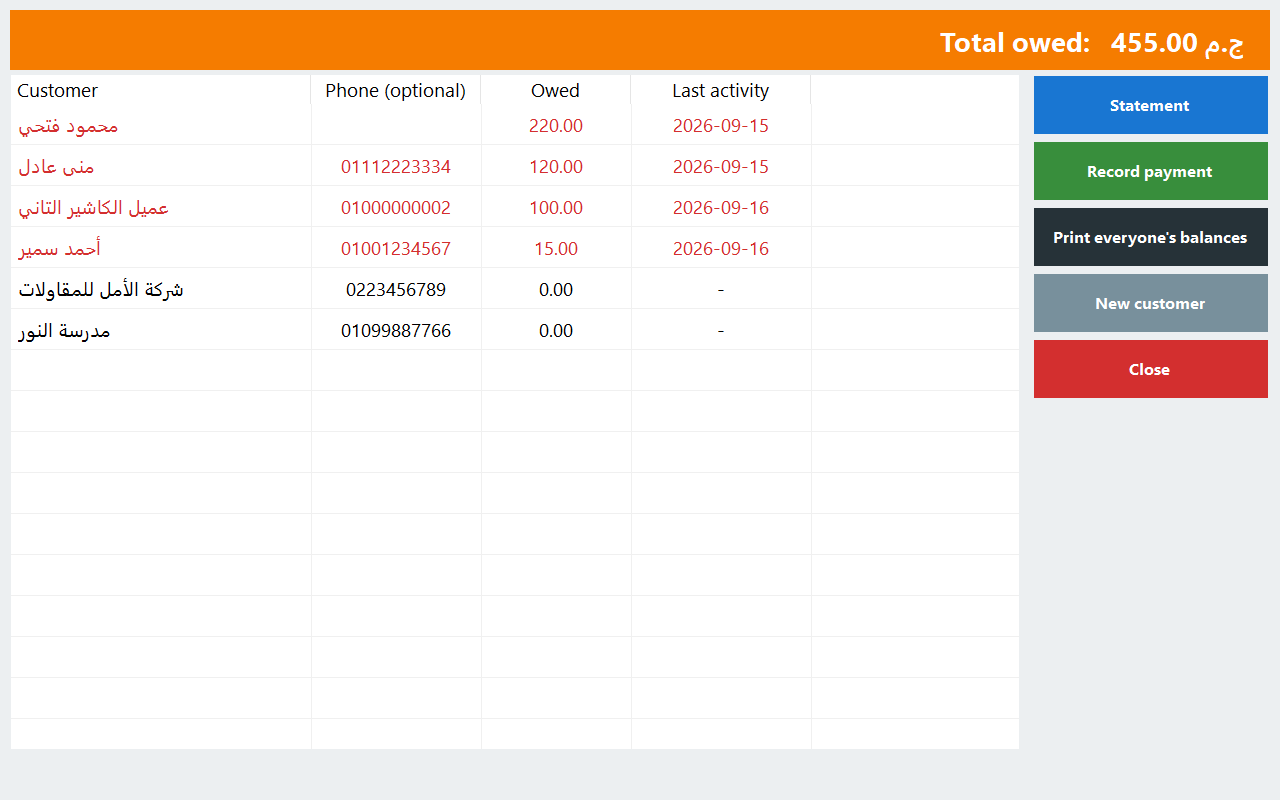
One customer: notes, promises and the payment
- Notes with the date: “called, will pass by on Saturday”. Whoever is on shift tomorrow knows what was said.
- A promise to pay on a day, for an amount or the whole balance. Until that day, no reminder goes to him; if he pays, the promise is marked kept; if the day passes with nothing, it is marked missed.
- Take a payment, cash or card, right there; the slip shows the new balance — print it, or send it on WhatsApp.
- His terms (30 days by default) and his own limit, set by a manager.
A statement he opens on his phone
Print the statement — open items, the running balance, how to pay — or send him a statement link. It opens on his phone in your shop's look: what is still to pay and since when, his recent payments, and your payment details exactly as you wrote them (your InstaPay or wallet number, for example; it is your free text). The link is a long random code, shows no phone or e-mail, and you can stop it any time. At the bottom he has his own button to stop the e-mails, and to turn them back on.


Reminders, politely
Reminders are off until you switch them on. Then, once a day at the hour you choose, PosMasr works out who is due one: a few days before the due day, on the day, then every week while it is late — and it stops after four reminders of the same debt. A promise holds them until its day. Quiet hours keep everything silent at night.
- E-mail goes by itself to customers who gave you an address.
- WhatsApp goes on the day's list, Reminders to send. The cashier taps Send on WhatsApp, WhatsApp opens with the message already written, and he presses send. Or: sent already, snooze 3 days, promised to pay, skip. Nothing is sent on WhatsApp automatically.
- Three tones — friendly, firm, final — and every one of them polite: never a threat, never shame, always an offer to agree a way that suits him. Write your own words if you like; keep them kind.
In the morning you get one nudge by e-mail: “8 reminders are ready to send today”, with the total owed (on Business and Chain it can come on Telegram too).
Credit limits at the till
Set a default limit for the shop and, if you like, one per customer. When a sale on credit would take a customer over it, the till warns (the default) or refuses — your choice. When the internet is down the till still judges, with the last balance it knows plus its own credit sales since.
The collections report
Reports → Collections: what came in for the period (cash, card, by cashier, by day), how many reminders went out and how many customers paid within a few days of one, and the promises made, kept and missed. That is how you find out whether the reminders work for your customers — and which tone they answer.
On the program on your PC
Since 7 October 2026 the credit book is in the program on your PC too, from the Silver package: Settings → Features → Credit book and reminders. The top bar's Credit book has who owes and since when with the same ageing, a customer's page with notes, promises, their own limit and terms, Take a payment and the printed statement; the limit warns or blocks at the till; Reminders to send is the day's WhatsApp list, sent from WhatsApp on that PC; and the collections report.
What stays online only:
- E-mail reminders and the customer's stop link: the program on your PC sends no e-mail of ours; reminders there are WhatsApp only.
- The statement link the customer opens on his phone: it needs a web address, which a shop on the program on its PC alone does not have. The printed statement is there.
- The owner's morning nudge, your own reminder words per tone, and collections by cashier (the PC's ledger does not record the cashier).
- The day's list is built when you open the book (or by a manager's tap), not by itself in the background, and a second till does not keep the book.
The steps on your PC are in the manual.
What it does not do
- It does not send WhatsApp messages by itself: WhatsApp is always a person's tap.
- On your PC (Silver and up, since 7 October) it sends no e-mails and has no statement link; see above.
- It does not collect money online for you: the statement shows how to pay you; the payment itself is recorded at the till or on the customer's page.
- Rules about messaging people over a debt are your responsibility; the defaults are deliberately careful (off, at most four, weekly, an opt-out).
Which plans include it
| Edition | Credit book and reminders |
|---|---|
| PosMasr Cloud | Cashier, Shop, Business and Chain (and the 14-day trial) |
| The program on your PC | Silver and up, since 7 October 2026 (WhatsApp reminders only, no statement link) |
Cashier is 999 EGP a month; every plan is on the PosMasr Cloud page. Switch the book on in Settings → Credit book; the steps are in the manual.
Quick answers
Will my customers get messages the day I switch it on?
No. The book and the reminders have separate switches, and reminders stay off until you turn them on. Even then WhatsApp waits for your tap.
Can a stranger open someone's statement?
Only with the link. It is a long random code, not a phone number; it shows no phone or e-mail, and you can stop it any time.
A customer is offended by reminders. What then?
Turn reminders off for him on his page, or snooze them. He can also stop the e-mails himself from his statement.
I use the program on my PC. Can I have the credit book?
Yes, since 7 October, from the Silver package: Settings → Features → Credit book and reminders. Reminders there go by WhatsApp from that PC; e-mails and the statement link stay online.
Does it work with instalments?
Yes. An instalment is due on its own day, and the book, the statement and the instalments screen always agree on what is paid. See instalments and deposits.
Close the notebook, keep the customers
Start the 14-day trial of Business, no card: bring in your customers with what they owe, switch the credit book on, and read your ageing on the first day.
First year 20% off every plan and add-on — with the code