

Ordering by eye
It is Wednesday evening and the dairy rep is on the phone. You glance at the shelf: “send me two cartons of rice, three of milk, and the usual yoghurt.” The usual, though, was set in August, when the school next door was closed. The rice is gone by Thursday night, and on Sunday half a crate of yoghurt goes past its date. Neither mistake is big on its own; together, every week, they are the difference between a good month and an ordinary one.
PosMasr already knows what left the shelf, day by day. Smart reorder and expiry control simply put that knowledge to work. “Smart” here means fixed, explained rules — not AI. Every number on the page comes with the sentence that produced it, so you can check it with a pencil.

How the order is worked out
Inventory → Reorder lists, supplier by supplier, what to order today. For each item it looks at:
- How fast it sells over the last 28 days. A day it sat at zero does not count — an empty shelf must not make the item look slow. With two weeks of history each weekday gets its own weight, so the item that flies on Friday is ordered with Friday in mind.
- What you have: the stock on the shelf plus what is still coming on open purchase orders.
- When the supplier delivers and how often you order (by default 2 days and every day, with one safety day; change them per supplier).
- How many days you want covered (7 by default; per item, category, supplier or the whole shop).
Then the quantity is made practical: rounded to whole cases, at least the supplier's minimum, never more than the shelf holds, and for a dated item never more than sells before its usual shelf life. Give an order a budget and it trims the least urgent lines first. The same page sorts your items into A, B and C by revenue, lists dead stock (nothing out in 60 days, and the money it holds), and a dashboard tile warns about fast movers at risk of running out before the next delivery.
A worked example: the rice
Rice sells 6 bags a day. There are 18 on the shelf, nothing on order, the supplier takes 2 days, you want 7 days covered, and it comes in cases of 12.
| Question | The sum | Answer |
|---|---|---|
| Order now? | 18 is less than 6 × (2 + 1) + 6 = 24 | Yes |
| How much? | 6 × (2 + 7) + 6 − 18 = 42, rounded up to cases | 48 (4 cases) |
| The shelf holds only 50? | 50 − 18 = 32 fit, rounded down to cases | 24 (2 cases) |
And the line reads in plain words: “sells 6 a day, 3 days left, the supplier takes 2 days → order 48 (4 cases)”. Change the quantity, drop a line, add an item you want anyway — the suggestion is a starting point, the order is yours.
Sending it to the supplier
One button turns a supplier's lines into an ordinary purchase order, and from there you send it the way that supplier likes:
- Print it in the supplier's language (or save it as a PDF from the print window).
- Excel or CSV, for the distributor who wants a sheet.
- E-mail from your shop's own mail settings.
- WhatsApp: one tap opens WhatsApp on your phone with the order already written; you press send. Nothing goes by itself.


The expiry board
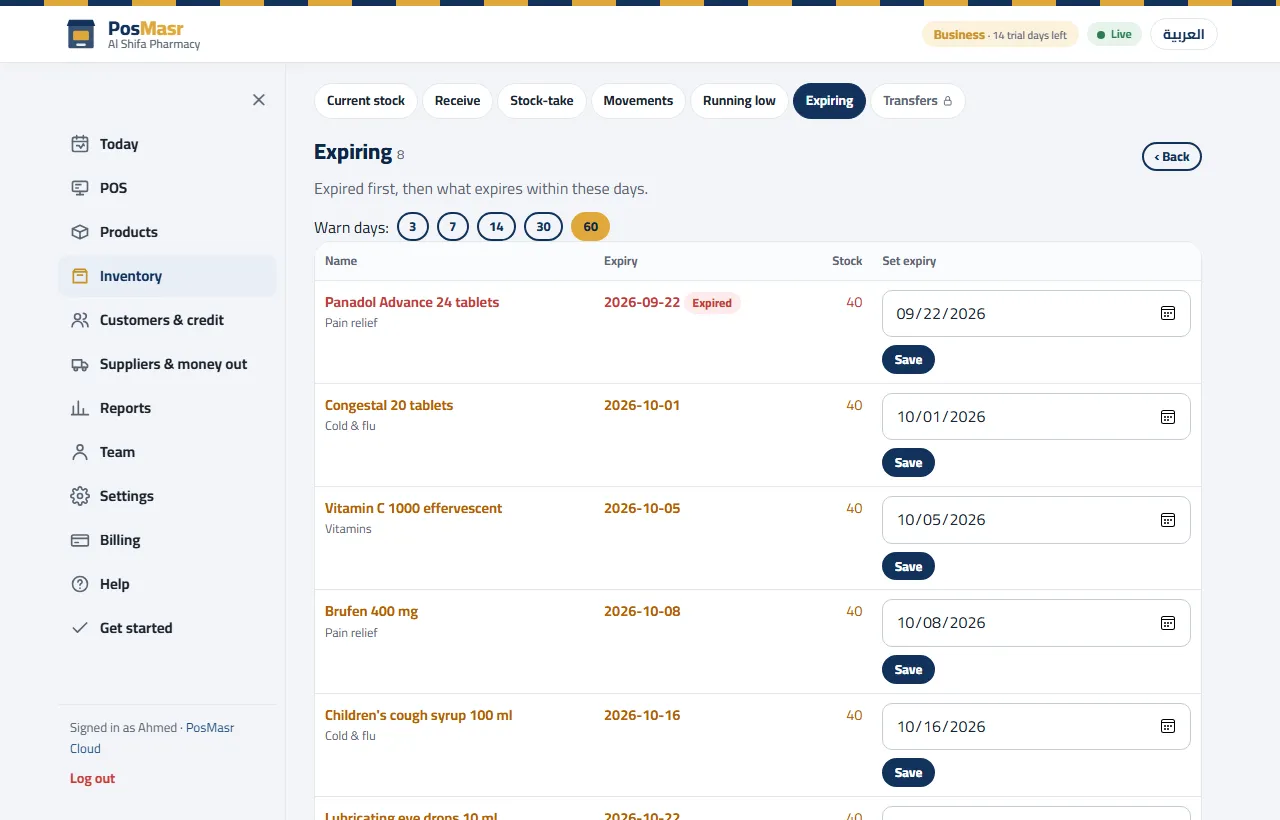
Expiry control works on the batches you already receive with a date (see our article on expiry dates). The board lists every lot close to its date — 30 days by default, 7 for a category like dairy if you choose — in tabs of 7, 30, 60 and 90 days and “expired”: the quantity, its value at cost, the days left, the batch and the supplier.
The useful part is the sell-through forecast. With the same sales speed as the reorder, each lot gets one honest sentence: “will not sell out before expiry: 14 left over”. Now you know on the 1st, not on the 20th, that 14 tubs need a plan.
Markdowns for one lot only
By default a lot with 7 days left gets 30 % off and one with 2 days 50 % — and only if the forecast says it will not clear on its own. The markdown is limited to that lot: the fresh cartons of the same yoghurt keep their full price, and the till sells the marked-down units first. Choose automatic, or “suggest and I approve” (the default). Print the shelf labels from the board: the new price large, the old one struck through, and the “best before” date.

Returns, write-offs and the waste report
- The supplier return sheet. Note in each supplier's terms how many days before the date he takes goods back, and whether for credit or replacement. The sheet lists the lots (batch, date, quantity, value), prints, and posts the return; a return for credit puts a credit note on the supplier's account, so what you owe him goes down by itself.
- Write-off: one action writes off every expired lot, valued at cost, with the reason “expired”.
- The waste report by month, category and supplier: what you lost against what went back to the supplier. That is the number that tells you whether all this is worth it — and which supplier's short dates cost you most.
Both switches live in Settings → Stock rules and stay off until you turn them on; expiry control needs batch tracking on. The steps are in the manual.
What it is not, yet
- It is not AI and does not guess seasons: Ramadan or the school year show up only once they are in your last 28 days.
- There is no “draft” order: the suggestion becomes an ordinary open purchase order. Until it is received you can cancel it from the purchase orders page.
- There is no PDF maker of its own: print it, or choose “save as PDF” in the print window.
- WhatsApp is your own tap on your own phone, never an automatic message.
Which plans include it
| Edition | Smart reorder and expiry control |
|---|---|
| PosMasr Cloud | Shop, Business and Chain (and the 14-day trial) |
| The program on your PC | Gold and Platinum |
Shop is 1,999 EGP a month; every plan side by side is on the PosMasr Cloud page, and the desktop packages on Prices.
Quick answers
Is this artificial intelligence?
No. It is fixed, explained rules on your own sales. Every line says how its number came out, and the same data always gives the same answer.
Does it order from the supplier by itself?
Never. It suggests; you edit, make the order and send it — by print, Excel, e-mail or your own WhatsApp tap.
I just opened. Is the suggestion useful from day one?
It gets better with history. A new item is measured from the day it arrived, a single busy first day is softened, and weekday weights start after two weeks.
Will the markdown hit the fresh stock too?
No. It is limited to the lot it was made for, and ends by itself when that lot is sold, gone or past its date.
Let your own sales write the next order
Start the 14-day trial of Business, no card: bring your products in, sell for two weeks, and read the first suggested order.
First year 20% off every plan and add-on — with the code



