What the bin really costs
Take one expired box that cost you 40 EGP and sold for 50. Throwing it away does not lose 10 EGP of profit — it loses the 40 you paid, and the 10 you would have made, and the shelf space it occupied for two months. To earn that 40 back you have to sell four more boxes at full margin. That is why a small pile of expired stock every week matters more than it looks.
For a pharmacy the numbers are bigger (a single cold-chain item can be several hundred pounds) and the rules are stricter: an expired medicine cannot be sold at any price, and inspectors look for it. For a grocery the boxes are cheap but there are hundreds of them — dairy, juice, bread, sweets, canned goods — and the bin fills every week.
FEFO in two lines
First Expired, First Out: the box that expires soonest leaves the shelf first — regardless of when it arrived. Not FIFO (first in, first out), because a new delivery can carry a shorter date than the one already on the shelf. Two habits make it happen without thinking:
- On receiving: read the date on the new carton before shelving it. Shorter than what is on the shelf? It goes in front. Longer? It goes behind. Thirty seconds per carton.
- On selling: the cashier takes from the front, always. If the customer reaches to the back for 'the fresh one', that is fine — the front one still sells to the next customer.
Rotation handles the shelf. It does not tell you that a product is not selling fast enough to clear before its date. That needs a date per product and a list — which is where the till comes in.


Tracking expiry in PosMasr
Every product in PosMasr can carry an expiry date. You set it in three places, whichever is closest to hand:
- In the product editor when adding or editing a product — type the date or tap the 📅 calendar, which has +1 / +3 / +6 / +12-month shortcuts for the usual shelf lives.
- In Inventory: select the product and press Expiry date. Handy during a stock-take when you are already holding the box.
- When receiving from a supplier: the deliveries log keeps the expiry of each delivery next to the quantity, cost and who received it — so you can look back and see which batch carried the short date.
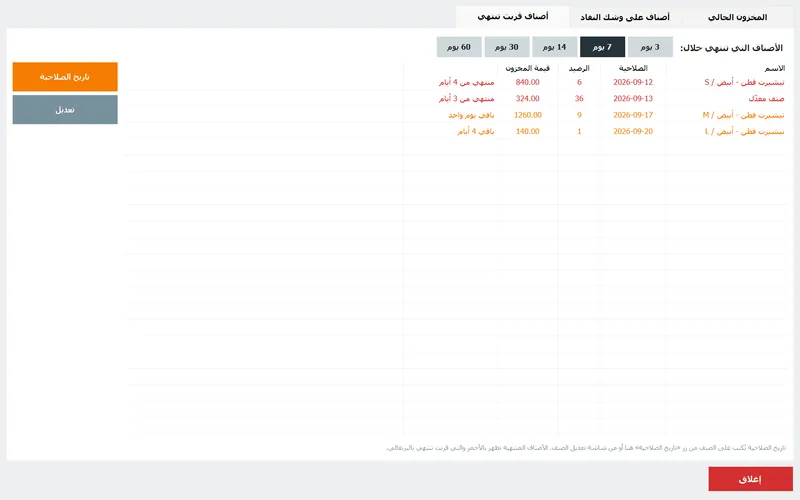
Products with variants (the same cream in three sizes, the same milk in two packs) show the expiry per variant in the lists, because each variant has its own stock. In Current stock a column shows the date: expired in red, close to expiry in orange, so the problem is visible every time you open the screen.
The list, the badge and the phone

- The Expiring-soon tab (Inventory → Expiring soon) lists everything expired or expiring within 3 / 7 / 14 / 30 / 60 days, with the stock, its value at cost and the days left. The value column tells you where the money is.
- The red badge: the manager sees a ⚠ N expiring button in the top bar all day; it opens that list. There is also a once-a-day reminder with the product names when the manager logs in.
- At the till: adding an expired product to a receipt shows a warning under the cart. The sale is not blocked — the till is not the inspector — but the cashier cannot say they did not see it.
- On the phone: the owner dashboard has an expiring-items card next to sales and low stock, refreshing by itself. You see the short dates from home before the supplier's rep calls.
- How far ahead to warn: Settings → General → 'Warn this many days before expiry' (default 7). A pharmacy usually sets 30; a bakery sets 1.
Discount it before it expires
A product with ten days left and twenty units in stock will not sell twenty units at full price by itself. Sold at a small discount today it returns most of its cost; in the bin next week it returns nothing. Supermarkets have done this for decades with the yellow sticker; PosMasr gives you the same tool without a sticker:
- Switch on Discounts & sale prices once (Settings → Features).
- Open the product and set a sale price. The button on the sales screen now reads '4.00 (was 5.00)', the receipt shows the lower price, and the cashier does not have to remember anything.
- Move the product to the counter or an end-of-aisle basket, and clear the sale price once the batch is gone.
For a one-off, the Discount button under the cart takes an amount or a percentage off the line — with a ceiling per cashier above which a manager must approve, so 'expiry discount' does not quietly become 'friend discount'.
| Days left | Grocery / supermarket | Pharmacy |
|---|---|---|
| 60 – 30 | Order less of it; do not receive a new batch until it clears | Talk to the supplier's rep about exchange before it is too late (many distributors accept returns only with 3+ months left) |
| 30 – 14 | Front of shelf, eye level, maybe a bundle (2 for the price of 1.5) | Return or exchange with the distributor if their policy allows; otherwise front of shelf |
| 14 – 7 | Sale price 10–20% off, basket at the counter | Sale price on non-prescription items (vitamins, cosmetics, baby food); prescription items stay full price and are offered first |
| 7 – 3 | 30–50% off, or staff purchase at cost | Last call; anything not sold by day 3 is pulled and recorded |
| 3 – 0 | Pull it, write it off in the stock-take, throw it away | Pull it, record it, dispose of it the way the regulations require |



The weekly routine (pin it by the till)
| When | Who | What | Where in PosMasr |
|---|---|---|---|
| Every delivery | Whoever receives | Read the date on the carton; shelve it FEFO; enter the expiry with the receive | Inventory → Receive quantity (supplier chosen) |
| Saturday morning | Manager | Open the 30-day list; decide discounts and returns to suppliers | Inventory → Expiring soon → 30 days |
| Every morning | Opening cashier | Glance at the red badge; pull anything at 0 days | ⚠ button in the top bar |
| Wednesday | Manager | Set sale prices on the 7-day list; move them to the counter basket | Products → sale price |
| Month end | Manager | Count what was pulled; write off in the stock-take; note the value on the differences sheet | Inventory → Stock-take (guide) |
| Anywhere, anytime | Owner | Check the expiring card on the phone dashboard | Owner dashboard (setup) |
Which rules for your shop
| Your shop | Warn days (Settings) | What to date | The one habit |
|---|---|---|---|
| Pharmacy | 30 – 60 | Everything, at receiving | Saturday 30-day review with the distributor's return policy in mind |
| Grocery / mini-market | 7 | Dairy, juice, bread, sweets, biscuits; skip long-life dry goods | Front-of-fridge FEFO at every delivery |
| Supermarket | 14 | All chilled and fresh categories | Wednesday sale prices + a counter basket |
| Café / bakery | 1 – 3 | Packaged drinks, milk, syrups; prepared food stays out | Morning badge check by the opening barista |
| Cosmetics / baby shop | 60 | Creams, formula, sunscreen | Order less of slow lines; sale price at 30 days |
How PosMasr handles it — in one list
- An expiry date on any product, set in the product editor, in Inventory, or logged per delivery with the supplier.
- Current stock colours it: expired red, close orange.
- Expiring soon list for 3 / 7 / 14 / 30 / 60 days with stock, value at cost and days left.
- Red badge in the top bar, a daily reminder for the manager, a warning under the cart when an expired item is rung up.
- Expiring card on the owner's phone dashboard.
- Sale price per product and a discount button with a cashier ceiling, for clearing short-dated stock.
- Excel import to load hundreds of dates at once, and the stock-take to write off what was pulled.
Quick answers
Does PosMasr block the sale of an expired item?
No — it warns under the cart and lets the cashier decide, because dates on the product are sometimes stale (the old batch sold out and nobody updated it). Pull expired stock from the shelf; the warning is your safety net, not your process.
I have 800 products. Do I type 800 dates?
No. Date only what actually expires within a year or so (chilled, fresh, medicines, cosmetics); long-life dry goods can stay blank. And you can fill an expiry column in the Excel export and import it back in one go.
Can the pharmacist see the list from home?
Yes — the owner dashboard on the phone has an expiring-items card and refreshes on its own. It needs the built-in web server switched on (Settings → Remote monitoring) and, from outside the shop, port forwarding on the router.
What about batch numbers?
PosMasr keeps one expiry per product (per variant) plus the expiry of each delivery in the suppliers' deliveries log. It does not track sales per batch number; pharmacies that need that for recalls keep the distributor invoices, which carry the batch.
See your expiring list in 14 free days
Import your products, add the dates that matter, and let the badge do the nagging. No subscription; the phone dashboard is included.