The first question: what kind of shop is it?
On the first run, right after you create the manager account, PosMasr shows a grid of shop types with a picture and one line each: grocery or supermarket, café, restaurant or takeaway, canteen, pharmacy, clothes or shoes boutique, mobiles and electronics, bakery or pastry, butcher or greengrocer, warehouse or wholesale, and general shop for everything else. Pick the closest one and press it.
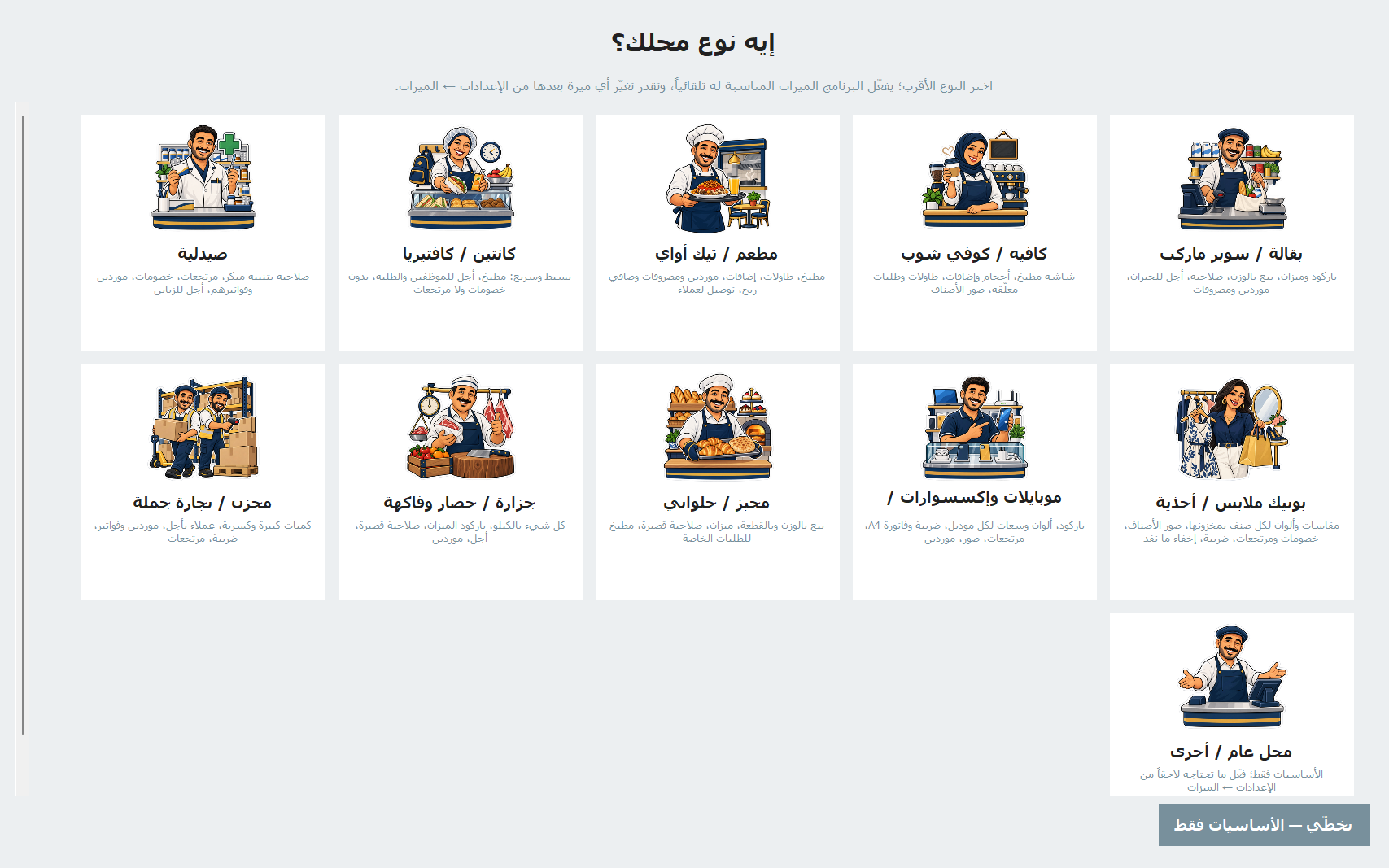
The type is not a lock. It only flips a set of optional switches and a few defaults — kitchen or no kitchen, tables, sizes and add-ons, sale by weight, how many days before expiry to warn you. Every feature still works on its own, and you can turn any of them on or off later in Settings → Features, or pick another type in Settings → General. PosMasr Cloud asks the same question in “Set up your shop” and uses the same types.
What each type switches on
These are the program's own one-line descriptions under each type:
| Type | What it switches on |
|---|---|
| Grocery / supermarket | Barcodes and scale, sale by weight, expiry (warns 14 days ahead), credit for regulars, suppliers and expenses |
| Café / coffee shop | Kitchen screen, sizes and add-ons, tables and held orders, product pictures |
| Restaurant / takeaway | Kitchen, tables, add-ons, service charge, suppliers and expenses with net profit, delivery clients |
| Canteen / cafeteria | Simple and fast: kitchen, credit for staff and students, no discounts or returns |
| Pharmacy | Early expiry alerts (30 days), returns, discounts, supplier invoices, customer credit |
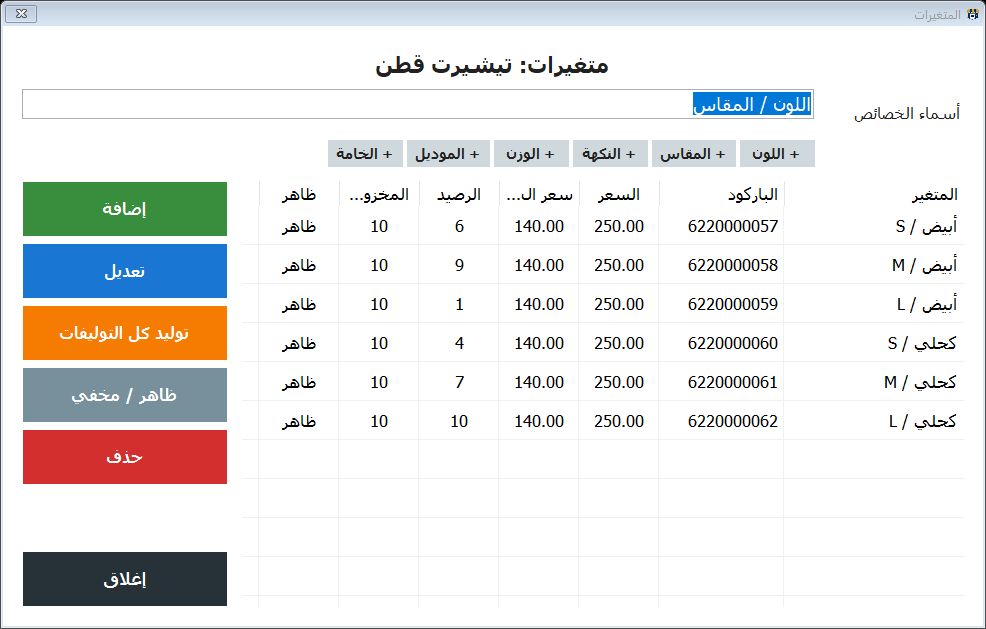
| Boutique (clothes / shoes) | Sizes and colours per product with their own stock, pictures, discounts and returns, sold-out items hidden |
| Mobiles and electronics | Barcodes, colours and capacities per model, A4 invoices, returns, pictures, suppliers |
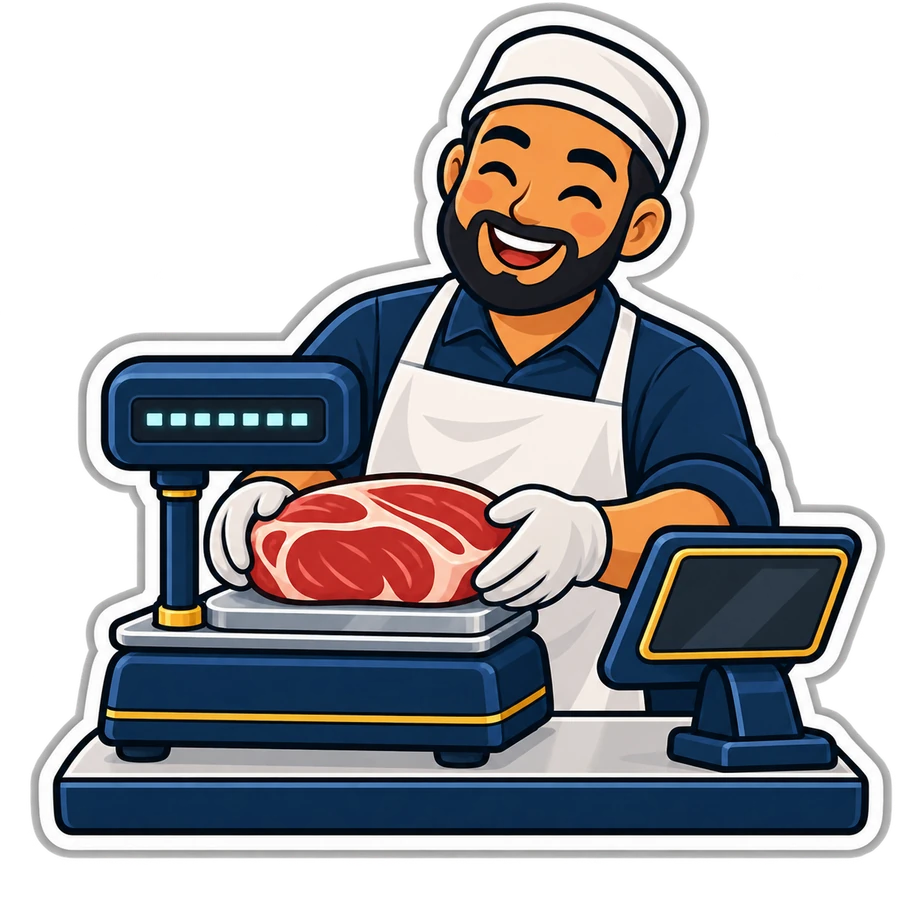
| Bakery / pastry | By weight and by the piece, scale, short expiry (3 days), kitchen for special orders |
| Butcher / greengrocer | Everything by the kilo, scale barcodes, short expiry, credit, suppliers |
| Warehouse / wholesale | Large and fractional quantities, clients on credit, supplier invoices, returns |
| General shop / other | Just the basics; turn on what you need later |

Supermarket and grocery: barcodes, scale, labels, stock
- Barcodes and the ready catalogue. Any USB scanner works like a keyboard. The ready catalogue of more than 52,000 products with pictures fills your list in an evening; scan an item you have not added yet and, if it is in the catalogue, its picture and name come up and you only type your price. Products with no barcode of their own can get one from the program for printing — see barcodes for everything.
- The scale. Either a scale connected to the till that sends the weight, or a label scale that prints a barcode with the weight or the price, which the till reads in one scan. Both are explained in scale barcode labels and serial scales.
- Shelf labels with the name, the price and a barcode, from a label printer or the receipt printer.
- Stock and running low: receive by scanning, count a stock-take, and a “running low” list with the quantity to order.
- Credit for the neighbours instead of the notebook.
Selling with barcodes and the catalogue is in every package, from Bronze and the online Basic. Stock, labels, the scale and expiry come with Silver on the desktop and the Shop plan online; credit with Silver or the Cashier plan. One honest note: Basic stops at 300 products, and most supermarkets pass that in the first week. More in PosMasr for supermarkets and the online version for supermarkets.

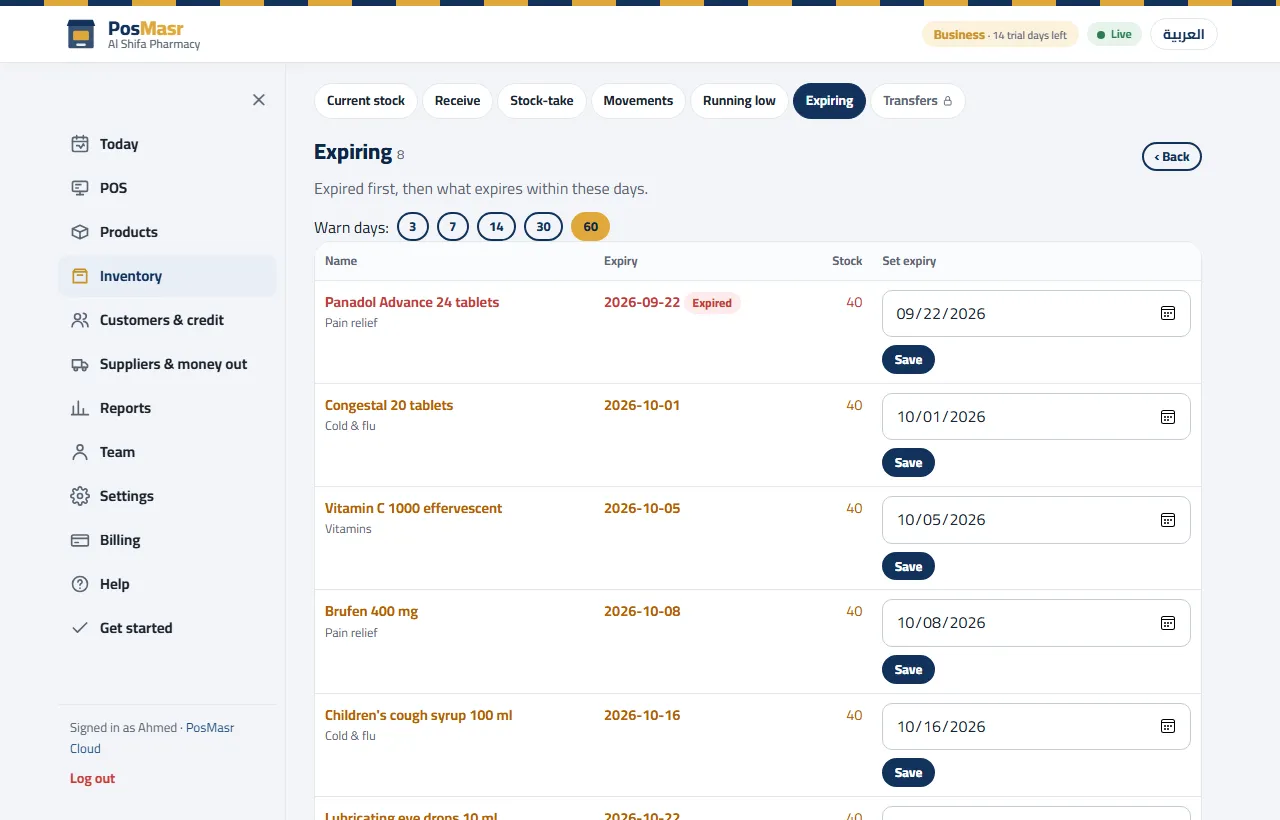
Pharmacy: expiry dates and the expiring list
In a pharmacy the money is lost on the shelf: a box that expires is a box you paid for and threw away. What PosMasr gives you:
- An expiry date on every product, typed or set while receiving the goods.
- The expiring soon list, expired first, with the warning period one tap away: 3, 7, 14, 30 or 60 days. The pharmacy type starts at 30.
- A ⚠ badge with the count on the selling screen, and once a day, at the first manager sign-in, a short list of what is about to expire.
- A warning in the cart when an expired item is scanned, so it does not leave without somebody noticing.
- A pharmacy label size ready among the label presets, supplier invoices, returns and customer credit.
The shelf rule that goes with it is FEFO — first expiry, first out: the nearest date goes in front. The list tells you which boxes those are; the expiry dates article has the weekly routine. All of this is in Silver on the desktop and the Shop plan online; a pharmacy rarely needs Gold. See PosMasr for pharmacies and the online version for pharmacies.


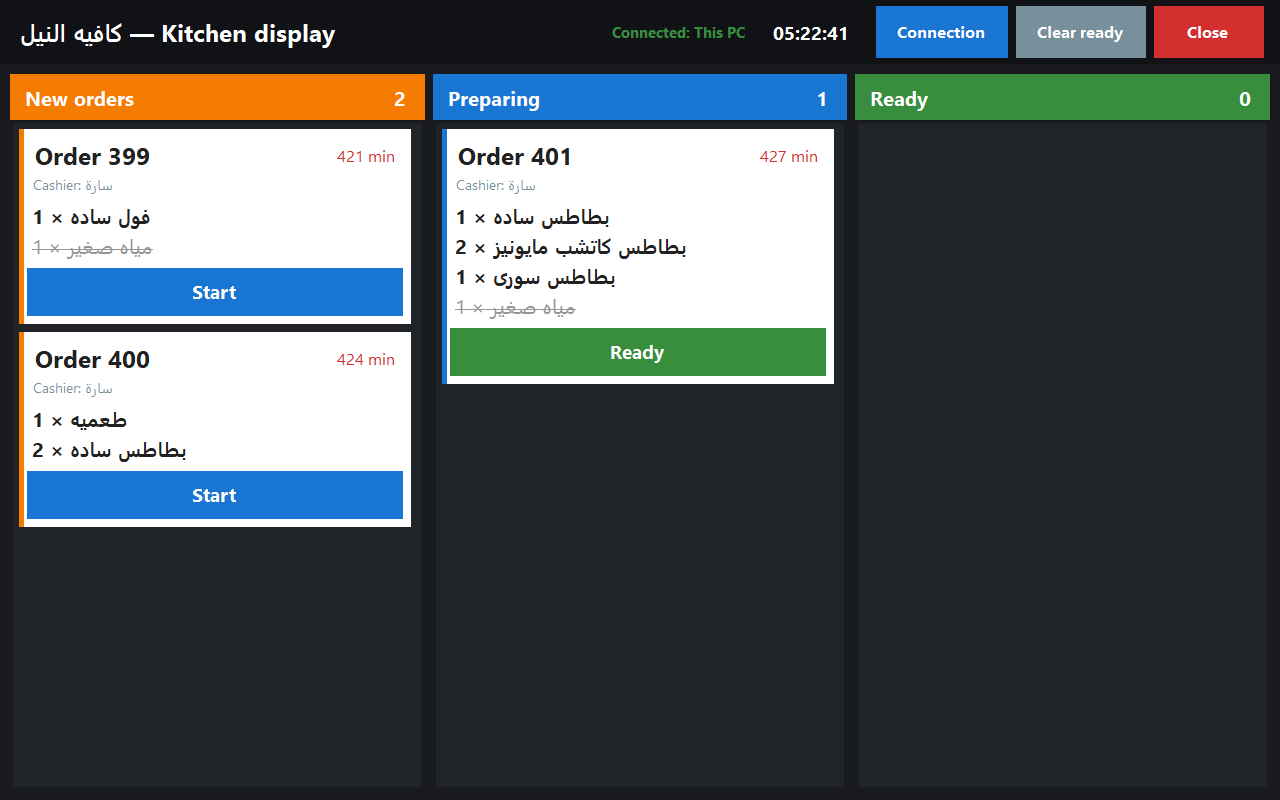
Café and restaurant: tables, sizes, the kitchen
- Tables and held orders: up to 60 table buttons plus takeaway; a busy table turns orange with its running total, and more items on the same table join the same order.
- Sizes and add-ons: a large cappuccino with an extra shot is one tap each, with the price difference added by itself.
- The kitchen: a screen with New, Preparing and Ready, or a ticket on a second printer. Only the items that need cooking reach it, so a bottle of water does not bother the chef — screen or tickets compares the two.
- Service charge on the receipt, and split payment between cash and card.
- Online: a menu on posmasr.com with the till's prices, ordering from the table by QR code, and an online shop with cash on delivery — see the menu and table ordering article.
Kitchen, tables, sizes and add-ons are in Gold on the desktop and the Business plan online. The online menu, table ordering and the online shop are online only: included in Business and Chain, and sold as monthly add-ons on the Cashier and Shop plans. Chain also sends you printed table QR codes. More in PosMasr for cafés, PosMasr for restaurants and the online version for restaurants and cafés.



Clothes, bakery, butcher, mobiles, wholesale
- Clothes and shoes: one product with its sizes and colours, each with its own barcode, price and stock. Type the sizes and the colours once and “generate combinations” makes every pair; a size that sold out can hide itself from the selling screen.
- Mobiles and electronics: the same for colours and capacities, with an A4 invoice on request.
- Bakery and pastry: by weight and by the piece in the same receipt, the scale, a 3-day expiry warning, and the kitchen for special orders.
- Butcher and greengrocer: everything by the kilo, and the scale's barcode read in one scan.
- Warehouse and wholesale: large and fractional quantities, clients on credit, and two price levels — wholesale and retail — that switch by themselves when a wholesale client is picked (Gold or Business; see wholesale and retail pricing).
A bakery or grocery that delivers can take orders in the online shop, cash on delivery; an accepted order becomes an ordinary sale.


Which package or plan has what
Each package includes everything above it in the table. On the desktop it is a one-time licence per till PC; online it is a monthly plan per shop.
| What you need | Desktop | Online |
|---|---|---|
| Selling, receipts, barcodes, products with pictures, discounts, returns, the ready catalogue | Bronze | Basic (up to 300 products) |
| Customers and credit, shifts and cash control | Silver | Cashier |
| Stock, receiving, stock-take, expiry, suppliers, labels, scale | Silver | Shop |
| Kitchen, tables, sizes and add-ons, wholesale and retail prices | Gold | Business |
| Watching the shop from the phone | Platinum | Every plan, Basic included |
| E-receipts, e-mail reports | Platinum | Business |
| Online menu, table ordering, online shop | Online only | Business and Chain; add-on on Cashier and Shop |
| Several branches with one report | Online only | Chain |
Every feature, package by package, is on the compare page, the full list of what the program does is on the features page, and chains have their own page: PosMasr for chains. Not sure where you stand? Start small and move up when you are ready — your data comes with you.
Quick answers
I picked the wrong type on the first day. What now?
Nothing is lost. Pick another type in Settings → General, or turn single features on and off in Settings → Features. Your products and sales stay exactly as they are.
My café also sells packaged snacks with barcodes. Which type?
Café. Barcodes work in every type, so the scanner reads the snacks while the kitchen, tables and add-ons serve the drinks. The type is a starting point, not a box.
Does a pharmacy need the Gold package?
Usually not: expiry, stock, suppliers, labels and credit are in Silver (the Shop plan online). Gold helps only if it also sells wholesale.
My supermarket has a bakery corner. Can one shop mix two types?
Yes. Pick grocery, which already turns on sale by weight and the scale, and add the kitchen from Settings → Features if you take special orders (the kitchen needs Gold or Business).
Is PosMasr Cloud the same program for all these shops?
Yes: the same types in “Set up your shop”, the same switches, the same till screens. The plan decides which features are available, as in the table above.
Try it with your own kind of shop
The desktop trial opens every feature for 7 days; PosMasr Cloud gives 14 days of the Business plan, no card. Pick your type on the first run and see what it switches on.