Why not just type the weight?
Because three things go wrong, every day, in every shop that sells by weight:
- Speed. Look at the scale, look at the screen, tap the product, open the quantity pad, type 1, dot, 2, 5, OK. Six touches per item, while the queue grows. With a connected scale it is one touch.
- Mistakes. 1.25 becomes 12.5, 0.850 becomes 8.50, a missing dot turns 125 grams into 125 kilos. Some of it is caught at the till, some of it is caught by the customer at home, and some of it is never caught — it just shows up as stock that does not match.
- Trust. The receipt says 1.234 kg × 180 = 222.12 exactly as the scale showed. No rounding by hand, no 'about a kilo and a quarter'. Customers who see the same number on the scale and on the receipt come back.
There are two ways to get the weight into the till without typing it. They are not the same thing, and most shops need only one of them.
Two ways: a label scale, or a scale on a cable
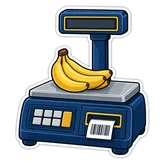
1. The label scale (prints a barcode)
The supermarket way: the scale stands in the produce section, the worker weighs the bag, picks the item on the scale's keys, and it prints a sticker with an EAN-13 barcode that starts with 2 and carries the item number and the weight or the price. At the till the cashier just scans the sticker like any product. PosMasr has read these since 1.4 (Settings → Features → scale barcode prefix). We covered the code itself in the barcode types guide.
- Fits: produce in a supermarket, self-service, several scales far from the till
- Needs: a label scale with its items programmed, sticker rolls, any barcode scanner
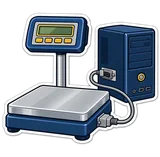
2. The connected scale (a cable to the PC) — new in 3.2
The butcher's way: the scale sits next to the till and talks to the PC over a serial cable — RS-232 (the 9-pin DB9 plug) or a USB-serial cable that Windows shows as a COM port. No stickers, no scanning: the cashier puts the cut on the scale, taps 'beef' on the screen, and PosMasr asks the scale for the weight and adds the line. Cheaper scale, no consumables, fewer steps.
- Fits: butchers, delis, spice and nut shops, bakeries selling by the kilo — one scale next to the till
- Needs: a scale with an RS-232 port, a cable, PosMasr 3.2

What PosMasr 3.2 reads
You pick the protocol in the Scale tab, or leave it on Auto and let the program try all of them on whatever arrives. This is exactly what the 3.2 parser understands:
| Protocol | What the scale sends | Scales |
|---|---|---|
| CAS | ST,GS,+ 1.234kg — continuous, or as a reply to W | CAS PD-II, ER, AP and the Korean-style clones |
| Mettler Toledo | continuous STX frame, or SICS: S S 1.234 kg as a reply to S | Ariva, BBA, IND indicators |
| DIGI | lines with 1.234 kg | DS-782 / 788 / 673 |
| Generic | a number + kg/g, or a bare number (you pick the unit) | Rongta and the Chinese 'RS-232 price computing scales', platform indicators |
| Auto | tries all of the above on whatever arrives | when you are not sure — start here |
What does that mean in the shop? Almost every bench scale sold in Egypt with a serial socket is one of these four families or a clone that copies one of them. CAS and its clones are the most common in butchers and delis; DIGI in older supermarkets; Mettler Toledo in the bigger chains and factories; and the cheap Chinese 'price computing' scales usually send a bare number that the Generic parser reads.
What you need
- A scale with an RS-232 port. Not every scale has one — the very cheap price-only scales often do not. Ask for 'RS-232' or 'PC connection' when buying, and get the seller to show you the socket.
- A cable. If the PC has a 9-pin COM port (many tills and older desktops do), a straight DB9 cable. If not, a USB-to-serial cable (Prolific or FTDI chip) — Windows shows it as 'COM3', 'COM4'… in Device Manager. Some scales come with their own cable that ends in USB and does the same thing.
- The same speed on both sides. 9600 baud, 8 data bits, no parity, 1 stop bit (written 9600 8N1) is the default of practically every scale and of PosMasr. Change it only if the scale's manual says otherwise.
- Output switched on in the scale's menu. Most scales say nothing until you enable 'continuous output' or 'send on request' (also called 'PC mode', 'print mode' or 'COM output') in their setup menu. This is the step everybody forgets — a scale that is wired but silent looks exactly like a broken cable.
- PosMasr 3.2 or newer. Settings → Support → Check for updates now, if you are on an older version.
Set-up in 5 minutes
- Plug the cable in, switch the scale on, and enable its output in its own menu (see above).
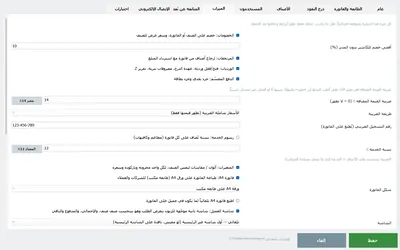
- Settings → the Scale tab → tick Read the weight from the scale. This also switches on fractional quantities (kg, g) if they were off.
- Port: press Refresh and pick the COM port that appeared when you plugged the cable in. Speed: leave 9600. Protocol: Auto, or your brand from the table.
- Put something on the scale and press Test the scale. You get two lines: the weight the program understood, and the raw bytes the scale sent. If the weight is right, save and you are done.
- Make the products by weight: open the product, set its unit to kg or g. On the sales screen tapping that product now reads the scale (it waits up to 2.5 seconds for a stable reading) and adds the line with the weight — in grams for gram items, in kilos for the rest.
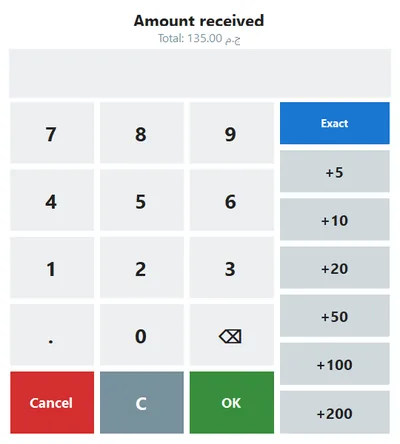
- Re-weigh any time: select the cart line and press Ctrl+W (it is in the F1 list). If the scale does not answer, the normal quantity pad opens with the reason in its status line and a Weigh on the scale button to try again — the cashier is never stuck.
'No data' and 'the weight is still moving' — what they mean
The Test button and the quantity pad tell you exactly why a reading failed. Each message has one or two usual causes:
| Message | Meaning | Fix |
|---|---|---|
| No data from the scale — check the port, speed and cable | Nothing at all arrived on the port within the wait. | Wrong COM port (press Refresh, try the other one); output not enabled in the scale's menu; a cable that is loose or a 'null-modem' cable when a straight one is needed (or the reverse); the scale is off. |
| Data arrived but was not understood — try another protocol or speed | Bytes came in, but not in a shape the chosen protocol knows. The raw-bytes line shows garbage or a format you did not pick. | Garbage = wrong speed (try 4800 or 2400, or 19200 on some Toledo units). Readable text = wrong protocol: switch to Auto. |
| The weight is still moving — wait for it to settle and try again | The scale reported the reading as unstable (US / ? / motion) for the whole wait — the platter was still swinging or someone was touching it. | Wait a second and press Weigh on the scale. If your scale never reports stable (some cheap ones), untick 'Accept a stable weight only' in the Scale tab. |
| The scale reads zero — put the item on it | The scale answered fine, with nothing on it. | Put the item on first, then tap the product. |
| Cannot open the scale port | Windows would not give the port: another program has it, or the USB-serial driver is missing. | Close the scale vendor's utility or the customer-display software using the same port; install the cable's driver (Prolific / FTDI); unplug and replug. |
Rough prices in Egypt
What we see in shops and online in Egypt in September 2026 — they move with the dollar, so treat them as a guide, not a quote.
| Item | Typical models | Rough price |
|---|---|---|
| Bench price-computing scale with RS-232, 15–30 kg | CAS PD-II / ER Plus / AP-1, Rongta RLS1000, DIGI DS-673, generic Chinese | ≈ 2,500 – 7,000 EGP |
| Label-printing scale | CAS CL5200 / CL3000, DIGI SM-100 / SM-110, Rongta RLS1100, Mettler Toledo bPlus | ≈ 6,000 – 15,000 EGP |
| Platform scale (100–300 kg) with an RS-232 indicator, for wholesale | CAS, Mettler Toledo IND, generic indicators | ≈ 4,000 – 12,000 EGP |
| USB-to-serial cable (Prolific / FTDI) | — | ≈ 100 – 350 EGP |
| Sticker rolls for a label scale (58 × 40 mm, per roll) | — | ≈ 40 – 80 EGP — the running cost the connected scale does not have |



Which scale for which shop
| Your shop | Go for | Why |
|---|---|---|
| Butcher / poultry | Connected bench scale next to the till | One counter, one scale, every item by weight. No stickers on wet paper, one tap per cut. |
| Deli / cheese & cold cuts | Connected bench scale | Dozens of small weights an hour; typing them is where the mistakes live. |
| Spices, nuts, dried fruit | Connected bench scale (a 6–15 kg one with 1–2 g steps) | Gram items: set the product unit to g and the weight lands in grams. |
| Supermarket produce | Label scale in the produce section | The scale is far from the till and several customers weigh at once; the sticker travels with the bag and any scanner reads it. |
| Bakery / sweets by the kilo | Either — a connected scale if the till is at the counter, a label scale if the boxes are packed at the back | Depends on where the weighing happens relative to the till. |
| Wholesale / warehouse | Platform scale with an RS-232 indicator, Generic protocol | Sacks and cartons by the kilo straight into the wholesale invoice. |
| Grocery with a few loose items | A cheap bench scale with RS-232 — or none, and type the weight | If it is ten weighings a day the quantity pad is fine. |
How PosMasr handles it
- Both ways at once. A label scale in produce and a connected scale at the deli counter work on the same till — scale barcodes are split by their prefix, connected readings come over the port.
- Stable readings only, by default. The program waits for the scale to say 'stable' so the line never carries a number caught mid-swing. You can allow moving readings for scales that never report stability.
- The receipt shows the exact weight and unit price — 1.234 kg × 180.00 — and the stock, cost and profit follow the weight, not a rounded number.
- The cashier is never blocked. Scale unplugged, cable pulled, no answer: the quantity pad opens with the reason, and selling continues by hand until the cable is back.
- Test shows the raw bytes. No guessing: you see the exact text the scale sent, so the wrong speed or protocol is obvious before you call anyone.
- Keyboard-first. Ctrl+W re-weighs the selected line; F1 lists every key on the sales screen.
- No special hardware. Any scale with a serial port from any seller; we never force a brand.
Quick answers
My scale has only a USB socket. Does it work?
Usually yes: most 'USB' scales are a serial port behind a USB chip and show up as COM in Windows. A scale that only works with its maker's own app, or one that types like a keyboard, is a different animal — test before you buy.
The Test shows the right weight but the sales screen adds quantity 1.
The product is not marked as sold by weight. Open it and set its unit to kg or g; only by-weight products ask the scale.
Can I keep using my label scale and add a connected one?
Yes, both at the same time, on the same till.
Does the scale have to be 'legal for trade'?
That is a question for the weights-and-measures inspector, not the software — PosMasr prints whatever the scale reports. Buy a stamped scale for retail and keep its calibration sticker.
Which package has it?
Check the pricing page for the current package table; the feature is part of 3.2.
Bring your scale, we'll test it with you
Try PosMasr free for 14 days with the scale you already have. Send us its model on WhatsApp and we'll tell you the cable and the protocol before you buy anything.