Why the barcode matters at the till
A barcode is just a number printed in a way a machine can read. That's it. But that one number is the difference between a cashier who types a price from memory (and gets it wrong twice a day) and a till that adds the right product with the right price in a fifth of a second — including its stock, its cost, and its expiry date.
The good news: a scanner is the cheapest, most reliable piece of hardware you will ever buy for a shop, and it needs zero setup. It plugs into USB and behaves like a keyboard that types the number and presses Enter. The only thing to get right is matching the scanner to the codes you'll actually meet — that's what this guide is about.
1D barcodes — the striped ones
These hold a short number in vertical bars of different widths. Every laser or CCD scanner reads them, and so does every 2D scanner. They cover 95% of what passes over a till in Egypt.
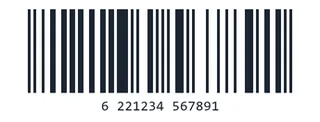
EAN-13 the retail standard
The barcode on almost every packaged product: 13 digits. Egyptian products start with 622 (the GS1 Egypt country prefix), then the manufacturer's number, the product number, and a last check digit that catches misreads. Juhayna, Chipsy, Molto, Domty — all EAN-13.
- Where: supermarkets, groceries, pharmacies, every packaged good
- Scanner: any (laser, CCD, 2D)
- PosMasr: reads, stores per product, prints on labels
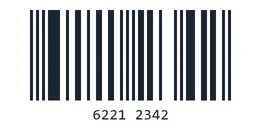
EAN-8
The little brother: 8 digits for packs too small for a full EAN-13 — gum, a single cigarette pack, small sweets, a lipstick. Same family, same scanners.
- Where: small packs
- Scanner: any
- PosMasr: reads
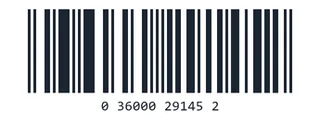
UPC-A / UPC-E
The American version: 12 digits. You meet it on imported goods — cosmetics, supplements, electronics accessories, anything that came from the US market. Technically an EAN-13 with a leading zero, so every scanner reads it and PosMasr treats it as the same code either way (with or without the zero). UPC-E is the squeezed 6-digit form on tiny US packs.
- Where: imported goods
- Scanner: any
- PosMasr: reads (zero or no zero)
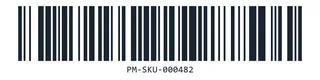
Code 128 what PosMasr prints
The workhorse for anything that is not a factory product: letters and digits, any length, very compact. Your own item codes on unpackaged goods (spices, fabric, phone cases, homemade sweets), shelf labels, internal SKUs, delivery notes. When PosMasr prints a label for a product without a barcode, this is what it prints.
- Where: your own labels, logistics, warehouses
- Scanner: any
- PosMasr: reads and prints (Labels window, any label printer)
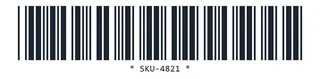
Code 39
The older cousin of Code 128: capital letters, digits and a few symbols, wider and less dense. Still common on staff ID cards, membership cards, workshop job tickets, older asset labels and some government forms. Every scanner reads it out of the box.
- Where: ID cards, workshops, old labels
- Scanner: any
- PosMasr: reads (as a product barcode or a customer card)
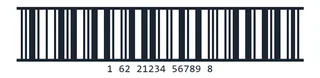
ITF-14 (carton code)
The big barcode with the thick frame on cartons and outer cases: 14 digits — the product's EAN-13 with a packaging digit in front. Printed large so it scans on corrugated cardboard in a warehouse. Useful if you sell by the case or receive stock by scanning the carton.
- Where: cartons, wholesale, warehouses
- Scanner: any (a long-range laser helps on shelves)
- PosMasr: reads (store it as the wholesale unit's barcode)

GS1-128
Code 128 with a rulebook: the numbers in brackets are application identifiers — (01) the product, (17) the expiry date, (10) the batch, (21) a serial. You see it on medicine cartons, food distribution cases, and shipping labels. A scanner reads it like any Code 128; the software decides what to do with the pieces.
- Where: pharma cartons, food distribution, shipping
- Scanner: any
- PosMasr: reads
GS1 DataBar
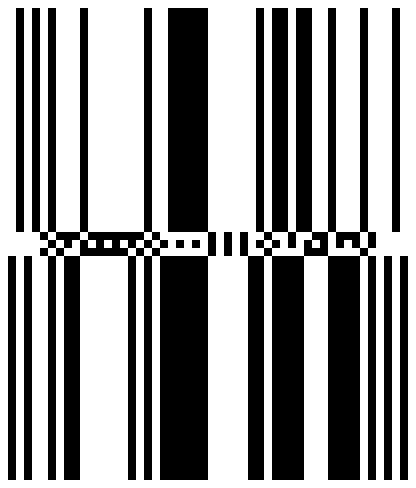
A newer, smaller family designed for loose fruit and vegetables, coupons and tiny pharmacy items — it can carry weight, price and expiry in a stamp-sized symbol. Rare in Egyptian shops today but it appears on some imported produce. Needs a scanner made after ~2010 with DataBar enabled (most 2D scanners have it on).
- Where: imported produce, coupons
- Scanner: 2D, or a recent 1D with DataBar on
- PosMasr: reads (the scanner sends the digits)
Scale barcodes — the sticker the scale prints
Weight / price-embedded EAN-13
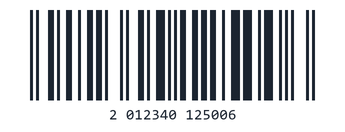
In a supermarket the scale prints an EAN-13 that starts with 2: then the item number, then the weight or the price of that particular bag of tomatoes, then the check digit. Every scanner reads it — the trick is the till understanding that '2 01234 01250' means item 1234, 1.250 kg and not a product with that whole number. PosMasr has this built in: set the prefix once (default 2) and it splits the code, finds the item and puts the right weight and price on the receipt.
- Where: supermarkets, butchers, delis, bakeries with a label scale
- Scanner: any
- PosMasr: parses weight and price (Settings → Features → scale prefix)
2D codes — squares and dots
These hold far more than a number: a whole web address, a serial, a date, a batch — thousands of characters in a stamp. They are read by imagers (a tiny camera), never by a laser. If you buy only one scanner in 2026, make it a 2D one: it reads every striped code above and everything below, from paper or from a phone screen.
QR Code on every tax receipt
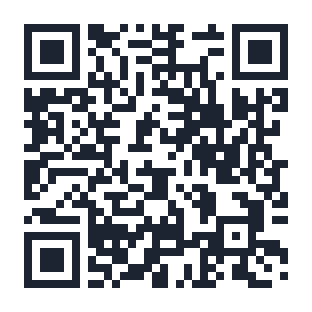
The square everyone knows. In an Egyptian shop it shows up in three places: the tax authority's e-receipt QR that must be printed on every receipt once you're on the ETA system (the customer scans it to verify the receipt); the InstaPay / wallet QR the customer scans to pay you; and menus, Wi-Fi cards and loyalty cards. PosMasr prints the ETA QR on the receipt automatically and shows your payment QR on the customer display and, if you like, on the receipt.
- Where: e-receipts, payments, menus, tickets
- Scanner: 2D only (or a phone camera)
- PosMasr: prints the ETA QR and your payment QR; reads QR product codes
Data Matrix on medicine packs
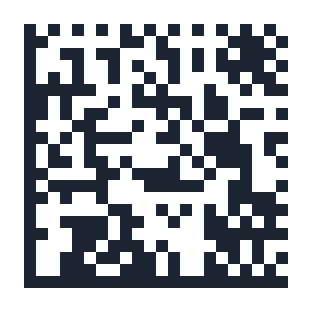
The small dense square with an L-shaped solid border. This is the one pharmacies must care about: Egypt's drug track-and-trace programme puts a GS1 Data Matrix on every medicine pack with the product code (01), expiry (17), batch (10) and a unique serial (21). It is tiny — often 8 mm — and packed with data, so only a 2D imager reads it. Also on electronics boards, surgical tools and some cosmetics.
- Where: medicines, electronics, cosmetics
- Scanner: 2D only
- PosMasr: reads; the GTIN inside matches the product's barcode / ETA code
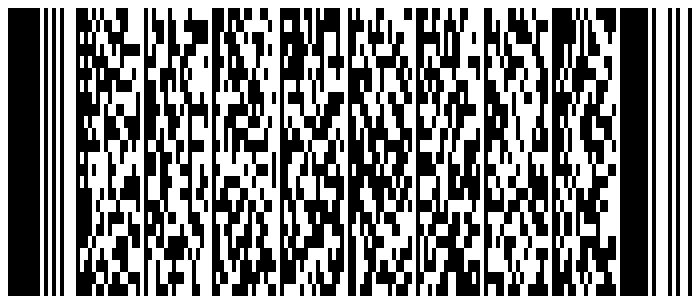
PDF417
A stack of little barcodes that looks like a smudged rectangle. Used on shipping labels, boarding passes, some visas and driving licences abroad, and on the back of a few loyalty cards. You will rarely scan it at a shop till, but a 2D scanner reads it if you do.
- Where: shipping, travel documents
- Scanner: 2D only
- PosMasr: reads
Scanner types in the Egyptian market
Four families, from cheapest to most capable. Prices are what we see in shops and online in Egypt in 2026 — they move with the dollar, so treat them as a guide, not a quote.
| Type | Reads | Typical models here | Rough price | Best for |
|---|---|---|---|---|
| 1D laser the classic gun with the red line | EAN, UPC, Code 128/39, ITF, GS1-128 from paper. Not QR / Data Matrix, and not phone screens. | Honeywell Voyager 1200g / MS5145 Eclipse, Zebra LS2208, Datalogic QuickScan QD2131 | ≈ 1,200 – 3,000 EGP | groceries and boutiques that only sell packaged goods |
| 1D CCD / linear imager the cheap USB ones | Same striped codes; reads phone screens badly or not at all. | Netum, Xprinter, Kriser, Henex and generic 'XB-xxxx' models | ≈ 350 – 900 EGP | a first till on a tight budget |
| 2D imager a camera, reads everything | Every 1D code above plus QR, Data Matrix, PDF417, DataBar — from paper, screens, curved bottles, even damaged labels. | Honeywell Voyager 1450g / 1470g, Xenon 1900 / 1950g, Zebra DS2208 / DS4308, Datalogic QuickScan QD2430, Newland HR22, Sunmi, Netum 2D | ≈ 1,500 – 6,000 EGP (generic 2D from ≈ 800) | pharmacies, supermarkets, anyone printing e-receipts or taking InstaPay |
| Presentation / omnidirectional sits on the counter, hands-free | Everything (2D models); scans from any angle as items pass. | Honeywell Solaris 7980g / Genesis 7580g, Zebra DS9308 / DS9908, Datalogic Magellan 1500i | ≈ 4,000 – 12,000 EGP | busy supermarket lanes, big pharmacies |
| Wireless (Bluetooth / 2.4 GHz) | Same as its wired sibling; the cradle plugs into USB. | Honeywell 1472g, Zebra DS2278, Datalogic QBT2430, Newland BS8060 | + 1,000 – 3,000 EGP over the wired model | scanning cartons in the back, big items, stock-takes |
One more scanner you already own: your phone. PosMasr's inventory page on the phone uses the camera to scan any 1D or 2D code for stock-takes and price checks in the aisle — no extra hardware.
Which scanner for which shop
| Your shop | Buy this | Why |
|---|---|---|
| Grocery / mini-market | One wired 2D imager (or a 1D laser if every penny counts) | Packaged goods are all EAN-13; the 2D one also reads the customer's InstaPay confirmation and future e-receipt needs. |
| Supermarket | A 2D presentation scanner per lane + a label scale | Hands-free speed, weight barcodes, cartons at the back with a wireless gun. |
| Pharmacy | 2D imager — no exceptions | Data Matrix on every medicine pack, tiny EAN-8s on small items, expiry tracking from the code. |
| Café / restaurant | Usually none — touch buttons are faster. A cheap 2D one if you sell packaged drinks or take InstaPay. | Orders are built by tapping items and modifiers, not by scanning. |
| Boutique / phone accessories / stationery | 1D or 2D imager + a small label printer | Half your items have no factory barcode; PosMasr prints Code 128 labels with the price, then you scan them like anything else. |
| Warehouse / wholesale | Wireless 2D gun with a long-range option | ITF-14 on cartons up on racks, GS1-128 on pallets, stock-takes without a cable. |
How PosMasr handles all of them
- No setup. Plug the scanner in, open the sales screen, scan. Whatever the symbology, the scanner sends the digits and PosMasr finds the product by its barcode field. No drivers, no configuration page.
- Every product has a barcode field — type it, scan it into the box, or import thousands from Excel. UPC with or without the leading zero matches the same product.
- Weight barcodes from any label scale are split into item + weight/price automatically (Settings → Features → scale prefix).
- Print your own labels — Code 128 with the name and price — on any label printer or a sheet of stickers, one per product or a whole roll (Inventory → Print label).
- QR out of the box: the ETA e-receipt QR on every receipt, and your InstaPay / wallet QR on the customer display or the receipt.
- Phone camera scanning for stock-takes and price checks on the inventory page — any 1D or 2D code.
- Cards too: a customer's loyalty or credit card with a barcode picks the customer for the receipt.
Quick answers
Does PosMasr need a specific scanner brand?
No. Any USB scanner that types like a keyboard works — that is every model listed above and practically everything sold in Egypt.
My old scanner doesn't read the QR on the tax receipt or the code on medicines. Why?
It's a 1D laser or CCD. Those physically cannot see 2D codes. A 2D imager fixes it and reads your old codes too.
The scanner reads the code but the till says 'not found'.
The product simply has no barcode saved yet. Open it in Settings → Products and scan into the barcode box once — from then on it's found instantly.
Can I make my own barcodes for items that come without one?
Yes — PosMasr prints Code 128 labels for any product on any label printer; the number is generated for you.
See it read your products in 7 free days
PosMasr works with the scanner you already have. Try it free, no subscription, and we'll help you set up the printer and the drawer too.