How orders reach the kitchen today
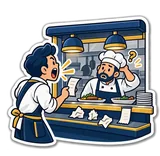
Walk into most cafés in Egypt at 9 pm and you will see one of two systems. The first is shouting: the cashier takes the order and calls it through the hatch — "two shawarma, one no pickles!" — and the cook nods. The second is the handwritten note: a waiter's pad, a torn piece of the receipt roll, or the customer receipt itself pushed through to the kitchen. Both work at 4 pm with three customers. Both collapse at 9 pm with fifteen.
What goes wrong is always the same list: an order that was never heard, a "no onions" that was heard as "extra onions", two tables' notes stuck together, the cook preparing table 4 before table 2 because that note was on top, and nobody knowing how long table 6 has been waiting. Each mistake is a remake — food, gas, ten minutes — and a customer who tells five friends.
The fix is not discipline; it is a channel. The order should leave the till as data and arrive in the kitchen the same second, printed or on a screen, in the order it was taken, with the modifiers spelled out. That is what the two options below do.
Option 1: a kitchen printer — one ticket per order
A second thermal printer sits in the kitchen. The moment the cashier finishes a sale (or holds an order on a table), a short ticket prints there: order number, table, time, cashier, and only the items that need cooking, in a big font, with the size and add-on choices under each line. Drinks and packaged snacks that the counter hands over do not clutter the ticket. The cook tears it off, clips it on the rail, and works the rail left to right.
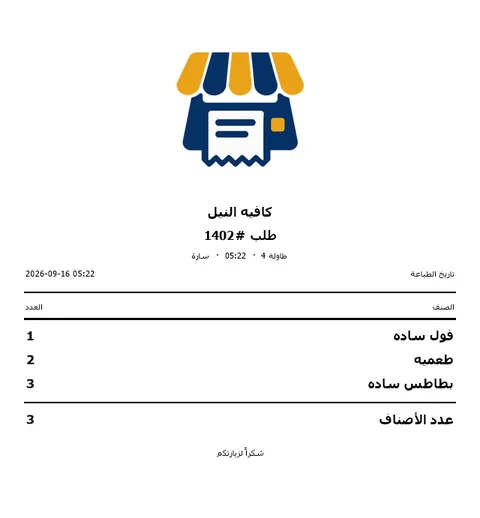
Why people like it: zero learning (a piece of paper is a piece of paper), it survives a Wi-Fi outage if the printer is on a cable, it works with greasy hands, and the ticket is a physical checklist the cook can scribble on. Why people outgrow it: paper piles up on a busy night, a lost ticket is a lost order, nobody can see the queue from the counter, and there is no timer — a ticket from twenty minutes ago looks exactly like a fresh one.
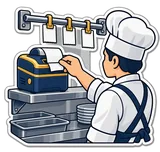
Option 2: a kitchen screen — New → Preparing → Ready
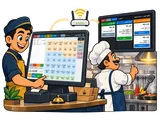
A screen in the kitchen shows the orders as cards in three columns. A new sale lands in New with a ding; the cook taps it when the pan goes on and it moves to Preparing; taps again when it is plated and it moves to Ready, where the counter can see it. Every card shows the order number, the cashier, the items with quantities and modifiers, and a counter of minutes since the order came in — the number turns into a nag as it grows, which is exactly the point. Ready orders clear themselves after ten minutes.
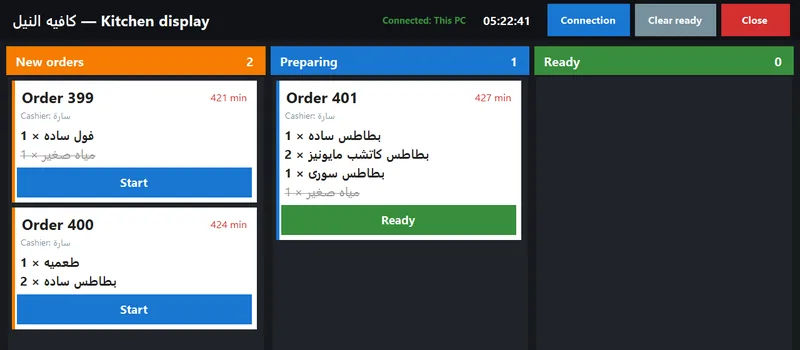
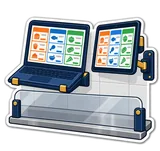
The hardware is whatever runs Windows: any old laptop, a Windows tablet, or a small PC with a cheap monitor on the kitchen wall, connected to the shop Wi-Fi (or a network cable). It runs PosMasr-Kitchen, a small program that comes in the same folder as the till; you type the till's IP address once and it connects. No server, no cloud, no monthly fee — the till PC is the server, and more than one screen can connect (grill, bar, dessert). If the kitchen is right behind the counter, you do not even need a second computer: plug a second monitor into the till PC and drag the kitchen board onto it.
Why people like it: the queue is visible to everyone, the oldest order is always first, the timers stop the "how long has that been there?" arguments, the owner sees the kitchen queue on the phone dashboard from home, and nothing gets greasy or lost. Why some kitchens resist it: it takes two days of taps to become a habit, it lives on the Wi-Fi, and a screen needs a splash guard near the fryer.
What each one costs (Egypt, September 2026)
Rough street prices; they move with the dollar. The software side costs nothing extra: the kitchen ticket printer works in every package, the kitchen screen comes with Gold and up, and kitchen screens are covered by the till's license — no license per screen.
| Kitchen printer | Kitchen screen | |
|---|---|---|
| Hardware | second 80 mm thermal printer, USB or LAN — ≈ 2,500 – 5,000 EGP (Epson ≈ 6,000 – 10,000) | old laptop ≈ 3,000 – 6,000, used Windows tablet ≈ 3,000 – 6,000, or a used small PC + 19" monitor ≈ 4,500 – 9,000; a second monitor on the till PC ≈ 1,000 – 3,500 |
| Running cost | paper: a roll every day or two on a busy night — ≈ 25 – 40 EGP per 80 mm roll | electricity only |
| Extras | ticket rail ≈ 100 – 300; a LAN cable to the kitchen | wall bracket ≈ 200 – 500; a Wi-Fi router or access point in the kitchen ≈ 700 – 1,500 if the signal is weak |
| Software | included in Gold and Platinum (2.2) | included in Gold and Platinum; no license per screen |
| Typical total | ≈ 3,000 – 6,000 EGP | ≈ 1,000 – 7,000 EGP |
In other words: the screen is usually cheaper than the printer if you have any old laptop lying around, and both together — screen for the queue, ticket for the cook's hands — cost less than one branded all-in-one terminal.

Keeping the Wi-Fi reliable
The kitchen screen's only weak point is the network, and the network fails for boring reasons — not because a screen is a bad idea. Six things that fix 90% of complaints:
- Give the till a fixed IP. The kitchen screen connects by the till's IP address; if the router hands the till a new address after a power cut, the screen looks "disconnected". In the router's DHCP page reserve the till's address (or set it manually in Windows).
- Cable what does not move. The till and a wall-mounted kitchen PC can both take an Ethernet cable; a 20-metre cable costs ≈ 150 EGP and never drops. Keep Wi-Fi for tablets and phones.
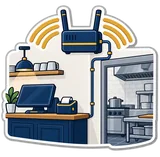
- Put the router between the two, high up. A router behind the counter next to the fridge motor and a kitchen behind a concrete wall is the classic dead zone. A second access point in the kitchen (≈ 700 – 1,500 EGP) solves it.
- Separate the shop network from the customers' Wi-Fi. Most routers offer a guest network; put the customers there so a table of twelve streaming videos does not slow the kitchen.
- Allow the program through the Windows firewall the first time it asks, on both PCs, and keep the kitchen port (default 8077) unchanged unless you have a reason.
- Put the router on the UPS with the till. A 650 VA UPS (≈ 1,500 – 2,500 EGP) keeps the till, the router and the kitchen laptop alive through the ten-second blinks that reset everything.
Which one for your shop size
| Your place | Go with | Why |
|---|---|---|
| Coffee cart / juice bar / one cook behind the counter | Nothing extra — or a second monitor on the till PC | the cook can see the till; a second monitor (≈ 1,000 – 3,500) turned towards the machine shows the board with zero network |
| Small café or fast food, kitchen in the back, up to ~10 tables | Kitchen printer | one cook, one rail, no training; a LAN printer on a cable is bulletproof |
| Busy café / restaurant, 10–30 tables, two or more cooks | Kitchen screen (+ printer if the cooks want paper) | the queue and the timers matter once two people share the pass; the owner watches it from the phone |
| Restaurant with stations (grill, pizza, cold, bar) | One kitchen screen per station | several screens connect to the same till; each station sees the whole order and works its own items |
| Delivery-heavy kitchen | Screen + printer | the ticket goes into the bag as the packing list; the screen keeps the order of the queue honest |
| Bakery / dessert shop with a production room | Kitchen printer | orders are batched, not fired; a slip on the rail is all the room needs |
How PosMasr does both
- Every product has a "needs cooking" flag, set by category by default (food = cook, drinks and snacks = ready) and changeable per product. Only orders with something to cook reach the kitchen; ready-made items on the same order show struck through so the cook sees the whole picture.
- Kitchen screen: Settings → General → Send orders to the kitchen screen. A Kitchen button appears in the top bar for a second monitor; for another PC, run PosMasr-Kitchen, choose Over the network, type the till's IP and port (8077). Three columns, a ding on new orders, minutes since the order on every card, several screens per till.
- Kitchen ticket printer (2.2): Settings → General → print a kitchen ticket for every order with items to prepare, pick any second thermal printer (or the receipt printer if you only have one). The ticket carries the order number, table, time and cashier, the cooking items in a big font, and prints on every sale and every hold.
- Sizes and add-ons (small / large, extra shot, no sugar) print on the ticket and show on the card — the "no onions" problem solved at the source.
- Tables and held orders: Hold parks the cart on a table and sends it to the kitchen at once; Tables brings it back for payment with the same number.
- The owner sees the kitchen queue on the phone dashboard (1.3) — from the shop Wi-Fi or from home — along with today's sales.
- Gold package or higher; no license per kitchen screen. The 14-day trial includes all of it, so test the screen on any laptop before buying anything.
Quick answers
Does the kitchen screen need internet?
No — only the shop's local network (Wi-Fi or cable). The till is the server; nothing goes out to the internet.
Can I use an Android tablet for the kitchen screen?
Not for the kitchen board — PosMasr-Kitchen is a Windows program. A used Windows tablet or an old laptop is the cheap route.
What happens to orders if the Wi-Fi drops?
The till keeps selling and keeps every order; the screen shows "disconnected" until the network is back. If you also enabled the kitchen printer on a cable, tickets keep printing meanwhile.
Can the drinks station and the grill each have their own screen?
Yes — several kitchen screens connect to the same till. Each shows the whole order; the cook works the items that belong to that station.
Do I need the Gold package?
For the kitchen screen, yes: it comes with Gold and Platinum. The kitchen ticket printer works in every package.
See the order land in the kitchen tonight
Install the trial on the till, run PosMasr-Kitchen on any laptop in the kitchen, and ring up one shawarma. 14 days free, no subscription, and we help you set it up on WhatsApp.