What a till is made of
Strip the marketing away and a point of sale is six things: a computer with a screen, a receipt printer, a barcode scanner, a cash drawer, the software, and — only for some shops — extras like a label scale or a customer display. Everything else in the catalogue (pole displays, card-reader slots, "POS keyboards", branded stands) is optional at best.
The good news for the budget: three of the six can be things you already own or buy used, and PosMasr works with all of them — any Windows PC, any thermal printer with a driver, any USB scanner, any drawer. We never force special hardware, so the price list below is the real market, not a bundle we sell.

The three budgets
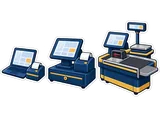
Prices are what we see in shops and online in Egypt in September 2026; they move with the dollar, so treat every number as a guide. The software line is the PosMasr price today (one-time, per till, no subscription).
| Item | Bare minimum | Comfortable till | Supermarket lane |
|---|---|---|---|
| Computer and screen | the PC or laptop you already own — 0 | used small PC + 15.6" capacitive touch monitor — ≈ 8,500 – 16,000 | generic all-in-one terminal — ≈ 13,000 – 25,000 |
| Receipt printer | 58 mm USB thermal — ≈ 1,200 – 2,500 | 80 mm with auto-cutter and drawer port — ≈ 2,500 – 5,000 | 80 mm with auto-cutter and drawer port — ≈ 2,500 – 5,000 |
| Barcode scanner | generic 1D USB — ≈ 350 – 900 | wired 2D imager — ≈ 1,500 – 4,000 | 2D presentation scanner — ≈ 4,000 – 12,000 |
| Cash drawer | none (a box, for now) | RJ11 drawer — ≈ 1,200 – 3,000 | RJ11 drawer — ≈ 1,200 – 3,000 |
| Extras | — | — | label scale ≈ 8,000 – 20,000 + customer display monitor ≈ 2,000 – 4,500 |
| Software (PosMasr, one-time) | Bronze 2,950 (Silver 5,900 with credit and stock) | Silver 5,900 (Gold 9,900 for a café kitchen and tables) | Silver 5,900 or Platinum 14,900 (e-receipts, phone) |
| Hardware total | ≈ 1,600 – 3,400 EGP | ≈ 13,700 – 28,000 EGP | ≈ 30,700 – 69,500 EGP |

Item by item: what the numbers mean
Budget 1 — the bare minimum (≈ 1,600 – 3,400 EGP of hardware)
This is a kiosk, a canteen, a small grocery or a first month of a new shop. You use the laptop or desktop you already have (Windows 7 or newer, any CPU from the last ten years, 2–4 GB RAM), a 58 mm thermal printer — Xprinter XP-58, Rongta RP58 or the unbranded ones — and a generic 1D scanner from the Netum / Henex / "XB" family. No drawer yet: cash goes in a locked box, and PosMasr still counts it for you. It prints proper receipts, tracks what sold, and you upgrade piece by piece when the shop earns it. The one thing to check on the printer: that it has a Windows driver on the CD or the vendor's site (all the ones above do).
Budget 2 — the comfortable till (≈ 13,700 – 28,000 EGP)
This is what most cafés, pharmacies, boutiques and mid-size groceries should aim for, and what we install most often. A used Dell / HP / Lenovo small PC (i3 or i5, SSD, ≈ 3,500 – 8,000) under the counter, a 15.6" capacitive touch monitor (≈ 5,000 – 9,000) on top, an 80 mm printer with auto-cutter (Xprinter XP-Q200 / XP-80C, Rongta RP80, Gprinter GP-80; Epson TM-T20 / T82 at ≈ 6,000 – 10,000 if you want the brand), an RJ11 cash drawer that opens from the printer, and a 2D imager (generic 2D from ≈ 800, Honeywell 1450g / Zebra DS2208 at ≈ 3,000 – 5,000) that also reads QR codes from phones and the Data Matrix on medicine. Skip the touch monitor and use a used 19" with a mouse and this budget drops by 5,000 – 8,000 with no loss for a scanner-driven shop.
Budget 3 — the supermarket lane (≈ 30,700 – 69,500 EGP per lane)
A lane is a place where speed and tidiness pay for themselves. A generic Windows all-in-one (Core i3 / J4125, 8 GB, SSD, 15" capacitive) keeps the wiring clean and is easy to duplicate for lane two and three. A 2D presentation scanner (Honeywell Solaris 7980g, Zebra DS9308, Datalogic Magellan 1500i) reads hands-free as items slide past. A label scale at the produce counter (30 kg, printing EAN-13 with the weight) is what turns a grocery into a supermarket — generic Chinese ones from ≈ 8,000, CAS / Digi / Rongta from ≈ 12,000 — and PosMasr splits its barcodes into item + weight automatically. A 19–22" customer display on a pole facing the queue costs less than a scanner and stops the "how much was that?" conversations. Same 80 mm printer and drawer as budget 2.
Each of those items has its own guide: thermal printers, barcodes and scanners, screens and PCs, cash drawers.
What to skip — and what never to skip
| Skip it (for now) | Why |
|---|---|
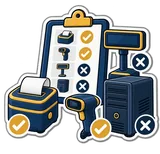
| A branded all-in-one for a single café | a used PC and a touch monitor do the same job for a third of the price and are easier to repair |
| A wireless scanner at the till | +1,000 – 3,000 EGP for a cable you never needed; wireless is for the storeroom |
| The touch screen in a scanner-driven shop | grocery and pharmacy cashiers scan and press Enter; a mouse is fine |
| A label printer on day one | PosMasr prints labels on the receipt printer; buy a proper one when the unlabelled items pile up |
| A "POS keyboard", a pole display, a card-reader slot | the touch grid replaces the keyboard, a monitor replaces the pole, and the bank gives you its own card machine |
| A monthly subscription, if you run one till and are always in the shop | a one-time license costs less than a year of most subscriptions and works with no internet at all; if you want the shop on your phone and no backups to remember, PosMasr Cloud starts at 499 a month |
Used vs new: where the used market is your friend
| Item | Buy used? | What to check |
|---|---|---|
| PC / laptop | Yes, always | boots to Windows 10, has an SSD (or budget 800 for one), 4 GB RAM, working USB ports; corporate off-lease Dell / HP / Lenovo are the safest |
| Plain monitor | Yes | no dead pixels, the right cable (VGA/HDMI) for your PC |
| Touch monitor | Carefully | test every corner of the touch; resistive ones wear out where everyone taps |
| Thermal printer | Carefully | print a test page: faint stripes mean a worn head; check the cutter and the drawer port |
| Scanner | Yes | almost nothing wears out; scan a phone screen to see if it is 2D |
| Cash drawer | Yes | steel, opens on the printer's kick, the RJ11 cable is included |
| Label scale | No | calibration, a worn print head and legal stamping make a used scale a gamble |
A realistic all-used comfortable till — PC, 19" monitor, 80 mm printer, drawer and a 2D scanner — lands around 8,000 – 13,000 EGP. That is the sweet spot for most small shops in 2026.




The software line
The software is the one line that does not get cheaper used, and the one that decides whether the rest of the hardware earns its keep. PosMasr is a one-time license per till PC, no monthly subscription, works offline on Windows 7 and up.
| Package | Price, once | Fits which budget | What it adds |
|---|---|---|---|
| Bronze | 2,950 EGP | the bare minimum | selling, receipts, barcodes, products with pictures, discounts, returns, daily reports, backup, the ready catalogue |
| Silver | 5,900 EGP | the bare minimum with credit, or the comfortable till | + cashier accounts and rights, shifts and cash control, customers and credit, stock, receiving, stock-take, expiry, suppliers and expenses, labels, scale, customer display |
| Gold | 9,900 EGP | the comfortable till in a café or restaurant | + kitchen and tables, sizes and add-ons, price levels (wholesale / retail), the second-till link |
| Platinum | 14,900 EGP | the supermarket lane | + the phone dashboard, ETA e-receipts, e-mail reports, the accountant feed |
How PosMasr keeps the setup cheap
- Runs on what you have. Windows 7 and up, any CPU from the last ten years, 2–4 GB RAM, no database server. The old office PC is a till.
- Any printer with a driver, 58 or 80 mm. Settings → Printer picks the width; the Tests tab prints a test page and finds the drawer command by itself.
- Any USB scanner, 1D or 2D, no configuration; weight barcodes from a label scale are split automatically.
- Labels on the receipt printer until you need a label printer; the customer display on any spare monitor; the kitchen screen on any old PC or tablet.
- One payment, then nothing. No subscription, no per-receipt fees, nobody can switch it off remotely. Upgrading a package later costs only the difference.
- Try before you buy anything: the 14-day trial is the full Platinum package. Run it on your current PC first, then decide what hardware is actually missing.
Quick answers
What is the absolute cheapest way to start today?
Your existing PC or laptop, a 58 mm printer (≈ 1,200 – 2,500) and a generic scanner (≈ 350 – 900), with the Bronze package (2,950): about 1,600 – 3,400 EGP of hardware plus the licence, and it prints real receipts from day one.
58 mm or 80 mm printer?
58 mm is cheaper and fine for short receipts; 80 mm has an auto-cutter, a drawer port and room for a logo and the tax QR. If you plan on a drawer, go 80 mm now.
Do I need a bigger package for a cash drawer?
No — the drawer, the printer and the scanner work in every package, Bronze included. Silver adds stock, credit, cashier accounts, the scale and the customer display; Gold adds the kitchen and tables.
Can I buy the hardware from you?
Yes, we supply full sets priced on request — but you never have to. Anything sold in Egypt with a Windows driver works.
Two tills — do I pay twice?
The second license is 40% off. Linking the second PC to the first over the shop network, so they share products, stock and clients, comes with Gold and up.
Start with the PC you have — free for 14 days
Install PosMasr on your current computer, plug in whatever printer and scanner you own, and see what is actually missing before you spend a pound.