Why a drawer that opens by itself
You can run a till with a drawer you open by hand. Many kiosks do. But an automatic drawer does three things a manual one can't: it only opens when a cash sale is confirmed (so every opening has a receipt behind it), it stays locked between sales, and it forces the cashier to record the sale before the money moves. That last point is the real reason shop owners buy one — it is not about convenience, it is about the till total matching the drawer at the end of the day.


The three kinds
| Type | How it opens | Needs | Verdict |
|---|---|---|---|
| RJ11 — through the printer the standard | A phone-style RJ11 cable from the drawer into the DK / DRAWER socket on the receipt printer. The program tells the printer to fire a 24 V pulse; the printer passes it to the drawer's solenoid. | A receipt printer with a drawer socket (almost every 80 mm model) | Buy this. Cheapest, no extra box, and PosMasr's default mode. |
| USB / serial trigger | A small box (or a cable with electronics in the plug) sits between the drawer's RJ11 and the PC's USB or COM port. The program opens the port and raises a line or sends a byte. | Nothing else — useful when there is no printer, or the printer has no drawer socket, or it's a network printer far away | Second choice. Works, costs a few hundred pounds more, and Windows COM ports can be finicky. |
| Manual / key-only | A key or a push button. No cable. | Nothing | Only for a stall or a kiosk where the owner is the cashier. No link to the sale. |
One important detail on the RJ11 kind: the socket on the printer and the network (LAN) socket next to it look almost identical. The drawer one is the narrower, 6-pin RJ11; the network one is the wider 8-pin RJ45. Plugging the drawer into the LAN socket is the single most common 'it doesn't open' cause we see.
Sizes and build

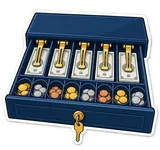
- 4B/8C (330 mm). Four note slots, eight coin cups. Compact; fits under a small counter. With 5, 10, 20, 50, 100 and 200 pound notes you'll be doubling up two denominations in one slot.
- 5B/8C (410 mm). Five note slots, eight coin cups — the size to buy for Egypt. Most 410 mm drawers also have a slot at the front for cheques, vouchers and large notes to slide under the tray.
- Steel body, ball-bearing slides. Cheap drawers use plastic rollers that start sticking after a year of 300 openings a day. Ask for metal ball-bearing slides; you can hear the difference in the shop.
- The lock. The usual lock has three positions: locked shut, normal (opens on the pulse), and locked open (for cleaning or when the shop is closed and the drawer is empty). Some have a fourth: manual open.
- Removable tray and coin cover. The tray lifts out so you can count it away from the counter or swap trays between shifts. A hinged coin lid keeps the coins in when you carry it.
- Flip-top drawers. The lid opens upward instead of the drawer sliding out — for narrow counters where a 41 cm slide would hit the customer.
How it connects

- Plug the drawer's RJ11 cable into the printer's DK / DRAWER socket (the narrow one). The cable comes with the drawer.
- Connect the printer to the PC as usual (USB or LAN) and make sure it prints a receipt from PosMasr.
- Turn the drawer key to the normal position (usually the vertical one).
- In PosMasr: Settings → Cash drawer → Connected to the printer, save, then Tests → Test drawer. It should pop.
Two tills, two printers, two drawers: each drawer hangs off its own printer, and each till opens its own. Two tills sharing one printer can share one drawer through it, but then both cashiers reach into the same box — which defeats the shift counts.


How PosMasr opens it
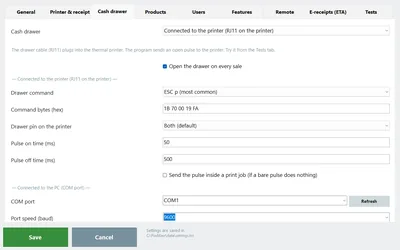
- Settings → Cash drawer → how it's connected: No drawer, Connected to the printer (RJ11) — the usual — or Connected to the PC (COM port) for a USB / serial trigger.
- Drawer command. ESC p is the default and opens 95% of drawers. If not, DLE DC4 (real-time), BEL (old printers), or a custom hex string from the printer's manual.
- Drawer pin on the printer: pin 2, pin 5, or both. The RJ11 socket can drive two drawers; most printers wire the single drawer to pin 2. Leave it on Both (default) — PosMasr fires both and whichever is wired opens.
- Pulse on / off time (ms). How long the solenoid is energised and how long the printer rests after. Defaults of 50 / 500 ms suit almost every drawer; a heavy old drawer that just 'clicks' may need a longer on time.
- Send the pulse inside a print job. Some drivers swallow a bare pulse but pass one wrapped in a tiny print job. Tick it if the drawer opens with the receipt but not from the button.
- COM mode: the port, the speed (baud), and the trigger — ESC/POS bytes, raise DTR, raise RTS, or all of them (default) — with a line pulse length. Tests → Detect drawer port tries every COM port in turn; listen for the one that opens it.
- Tests tab: Test drawer sends your current settings once; Drawer diagnostic sends every command with a pause between them so you can hear which one works, then you pick it. Set it up once and forget it.
- 'Open the drawer on every sale' opens it when a cash payment is confirmed. Card sales don't open it, and neither do credit sales — no cash moved. The Open drawer button under the receipt opens it by hand for change or a refund.
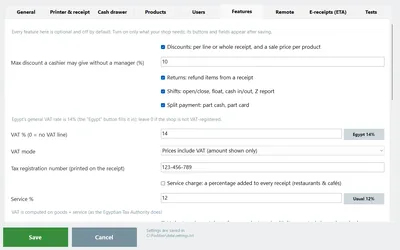
- Rights and shifts. 'Open the drawer without a sale' is a right you can take away from any cashier (Settings → Users); the manager's password overrides on the spot. Shifts open with a float, log every cash in / out with a note, and close by counting the drawer — PosMasr prints expected vs counted and the difference.
'The drawer won't open' — the checklist
Go down the list in order; nine out of ten cases stop at one of the first four.
- Is the key in the normal position? Locked shut looks exactly like broken.
- Is the RJ11 in the printer's DRAWER socket, not the LAN socket? Pull it out and look: the drawer socket is the narrow one. Push until it clicks.
- Does the printer print? Power on, paper in, cover shut. The pulse rides on the printer: a printer that won't print won't kick either. Tests → Test print first.
- Is the mode 'connected to the printer' and the right printer selected? Settings → Cash drawer, and Settings → Printer & receipt must point at the printer the cable is in — not 'Default' if the Windows default is a PDF printer.
- Run the Drawer diagnostic. Tests → Drawer diagnostic. Listen. When it pops, note which command it was and set it under Drawer command.
- Tick 'send the pulse inside a print job' and test again. Fixes most Xprinter / generic driver cases where the button does nothing but the receipt opens it.
- Only clicks but doesn't slide out? The solenoid fires but the drawer is jammed: overfull tray, a coin behind the tray, a bent slide, or the lock half-turned. Empty it and try by hand.
- Try another cable. RJ11 cables get crushed under the drawer. A phone cable of the same kind is a fine test (it may be wired 4-pin; borrow a real drawer cable if it fails).
- Still nothing? Try the drawer on another printer, or the printer with another drawer, to find which side is dead. A drawer solenoid can be replaced for very little; a printer's drawer port rarely dies alone.
Rough prices
Indicative September 2026 prices in Egypt; they move with the dollar and vary by seller and build quality.
| Item | Rough price | Notes |
|---|---|---|
| Generic 4B/8C RJ11 drawer (330 mm) | ≈ 1,200 – 2,000 EGP | Small counters; check the slides. |
| Generic 5B/8C RJ11 drawer (410 mm) | ≈ 1,500 – 2,800 EGP | The one most shops buy; sold with the POS bundles. |
| Branded drawer (Posiflex, Star, Epson-bundled, Bixolon) | ≈ 3,500 – 7,000 EGP | Heavier steel, better slides and locks; chains and busy supermarkets. |
| USB / serial drawer trigger | ≈ 300 – 700 EGP | Only if you can't go through the printer. |
| Spare RJ11 drawer cable | ≈ 50 – 120 EGP | Keep one in the drawer itself. |
| Manual / key-only drawer | ≈ 800 – 1,500 EGP | Not much cheaper than an RJ11 one — buy the RJ11. |
The drawer, like the printer and scanner, is sold separately from the PosMasr license; we can supply the set and connect it, or you can buy anywhere — any RJ11 or COM drawer works.
Security tips
- Bolt it. Most drawers have holes underneath for screwing to the counter. An unbolted drawer is a handle for the whole till.
- The key does not live in the lock. Two keys come with the drawer: one with the owner, one in the safe. The lock is for closing time, not for the cashier.
- Take 'open without a sale' away from cashiers. Then every opening is either a cash sale with a receipt or a manager typing their password. PosMasr's rights per cashier do exactly this.
- Run shifts and count. Open with a float, record every cash in / out with a note, close by counting. The Z report shows expected vs counted — a difference that repeats on one cashier's shifts tells its own story.
- Card and credit sales don't open the drawer. Keep it that way; a cashier who 'needs' the drawer open on a card sale is worth a question.
- Skim the float. Move large notes to the safe during the day (cash out with a note), so the drawer never holds more than a few hundred pounds of change plus the morning's takings.
- Watch it from your phone. The owner portal's dashboard has a drawer card with today's cash, and the daily summary on Telegram or e-mail tells you the shift result without asking anyone.



Quick answers
Does PosMasr need a specific drawer brand?
No. Any RJ11 drawer through any printer with a drawer socket, or any USB / serial-triggered drawer. The diagnostic finds the command that works.
My printer has no drawer socket. Am I stuck?
No: a USB / serial trigger box between the drawer and the PC, then Settings → Cash drawer → Connected to the PC, and Detect drawer port in Tests.
It opens with the receipt but not with the Open drawer button.
Tick 'send the pulse inside a print job' in Settings → Cash drawer. Some drivers ignore a pulse on its own.
Can the drawer stay closed on card payments?
It already does. Only confirmed cash payments open it; card and credit never do.
Can PosMasr tell me the drawer was left open?
Not through a Windows printer driver — it's one-way. Use the shift counts and the cashier rights instead.
Hear your drawer pop in the free trial
Install PosMasr, plug the drawer into the printer, run the diagnostic. If it still sulks, send us the printer and drawer names on WhatsApp — we've probably met them.