The week that eats the opening
A grocery with 600 lines on its shelves needs 600 rows in the till. Typing one row — name, category, price, cost, barcode — takes about a minute when you are fast and the barcode scanner is next to you. That is ten hours. Nobody has ten hours in the week the shelves are being filled, the fridge is being installed and the signboard is late.
So the corner gets cut, and it gets cut in one of two ways — both expensive:
- Three nights after closing. The owner types until 2 am for a week. It works, and it costs a week of the only thing he does not have at opening: attention. Half the rows end up with no cost price, so the profit report is decoration.
- Or 'miscellaneous' and a number. One product called Item, the cashier types the price by hand, and everything works — until you want to know what sells, what is running low, what a kilo of sugar actually costs you and who took what from the shelf. A till used this way is a drawer with a screen on it.


What the ready catalogue is
It is a list of more than fifty thousand products that Egyptian shops actually sell — 52,548 as of version 4.1, in 59 Arabic categories — and every entry carries three things (and 18,493 of them a fourth: the product picture):
| In the catalogue | What it means in your shop |
|---|---|
| The product name, written the way a customer and a cashier say it | The cashier finds it by typing two letters, and the receipt is readable |
| The barcode printed on the pack | Scan and sell from day one, and scan to receive stock from the supplier |
| The category it belongs in | The sales screen comes out already arranged in buttons, not one long list |
| No price — on purpose, since 4.1 | What a pack sells for in your shop is yours to say; the “no price” filter lists what is waiting for yours |
The lists are grouped by trade, because a café and a pharmacy have almost nothing in common: groceries and supermarkets (packaged food, drinks, dairy, detergents, household), cafés (hot and cold drinks, the usual sizes), restaurants (dishes, sides, drinks) and pharmacies (the over-the-counter and personal-care lines a small pharmacy actually keeps). More detail on the catalogue page.
| Your shop | The list you get | The first thing to change in it |
|---|---|---|
| Grocery / mini-market | Packaged food, drinks, dairy, detergents, household — the biggest list of the five | Hide the brands your street does not buy, then set your prices per category |
| Supermarket | The same list plus the deeper pack sizes and the cleaning and baby aisles | The cost price on your fast movers — it is what makes the profit report real |
| Café | Hot and cold drinks in the usual sizes, ready to become buttons | Your own menu wording and your sizes; add the add-ons you charge for |
| Restaurant | Dishes, sides and drinks, with the cooking flag already set for the kitchen | Delete what is not on your menu — a restaurant list is shorter than a grocery's |
| Pharmacy | Over-the-counter and personal-care lines a small pharmacy actually keeps | Expiry dates as you receive stock — that is where a pharmacy's money leaks |
| A specialised shop (parts, fabrics, phones) | No useful list — two such shops rarely share a product | Go the CSV route from Excel instead, or use variants for sizes and colours |



How a shop starts with it
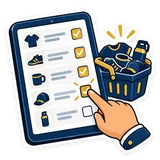
Since 4.0 you can do step 2 yourself: the Pick from the catalogue button in the Products tab opens the list, you type to find and tick what you sell, and a new till offers it by itself right after it asks what kind of shop you are. Or it happens with us, during setup: you tell us the trade and we load the matching list while we are installing. Either way, the steps below are yours.
- Pick your trade. Grocery, supermarket, café, restaurant or pharmacy — the same question the setup wizard asks anyway. About 5 minutes, most of it talking.
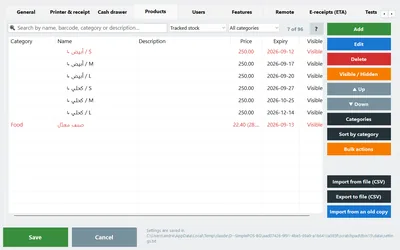
- Tick it in the program, or we load it with you. It arrives as a normal product list in Settings → Products, exactly as if you had typed it: every row editable, exportable to Excel and deletable. About 10 minutes.
- Type your prices and hide what you do not sell. The products come in without a price: the “no price” filter lists them, and editing several at once gives a whole shelf the same price in one go. Use hide for everything you do not stock — hidden is better than deleted: the day you do stock it, one tick brings it back with its barcode.
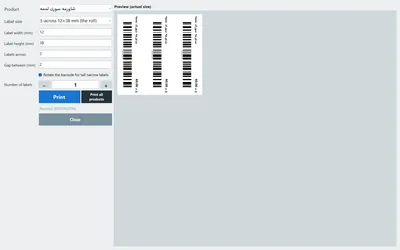
- Print labels for what has no barcode. The loose and local lines — baladi bread, home-packed spices, the bakery tray — get a barcode generated and a label printed from the same screen, three across on a roll. Then the scanner handles the whole shop. About 10 minutes for a first batch (which barcode is which).
- Start selling. The sales screen is already arranged in categories, the scanner works, stock and profit have real numbers behind them from the first receipt.
Days of typing vs under an hour

| Opening day | Typing it yourself | Starting from the catalogue |
|---|---|---|
| Time before the first scan | Three evenings, ≈ 12 hours | Under an hour, before you open |
| Barcodes | Scanned pack by pack, and whatever is missing stays missing | Already there for the packaged lines |
| Categories | Invented as you go, then fixed later | Come ready, and the sales screen with them |
| Prices | Yours from the start | A starting number you overwrite — per product or per category |
| What usually goes wrong | Half the rows with no cost price, duplicate rows, typos in names | A few products you do not stock — one 'hide' fixes that |
| Cost | Free, paid in your own week | Free with every package |
Where it comes from — honestly
A catalogue of fifty thousand Egyptian products is not something a company types in an office. It is built from the shops themselves, and you deserve the exact terms:
- Shops share their product list. The copy of your products that PosMasr keeps (names, barcodes, categories, prices) is what feeds the catalogue we give back to everyone. That copy exists for you first: if the PC dies or is stolen, we hand your list back.
- Never your sales, your customers, or which shop sells what. No receipt, no customer, no supplier, no user, no password and no secret key is part of it. The catalogue talks about products, not about shops: it never carries your shop's name, phone or address, and it never says who sells what.
- It is open to the shops that share. Since 4.0, picking from the catalogue and the barcode lookup in the product screen work for shops that share their list: a copy at PosMasr on, Upload automatically once a day ticked, and Do not use my products in the shared catalogue not ticked. The catalogue exists because shops share, so it is fair that it goes to the shops that do.
- You can stop at any time, and keep what you have. Tick Do not use my products in the shared catalogue, or stop the copy altogether, in Settings → Backup. Everything already in your program stays — the products, and the pictures already applied to them; what stops is new picking from the catalogue and the barcode lookup. We delete what we hold on request. The full wording is on the privacy page.
- No money, with every package. The catalogue is not an add-on and not a subscription; it comes with every package, Bronze to Platinum, alike — the only thing it asks is your product list — see the packages.



When a product is not in it
It happens, and it should: a local bakery's tray, a regional brand, a new pack size that landed last month. Add it once, the way you always would — name, price, and either scan its barcode or let PosMasr generate one and print the label. It takes under a minute, and the Products tab keeps your place in the list while you do it.
And the product you added is the reason the next shop finds it ready. That is the whole deal: every shop types a handful of lines that were missing, and nobody types six hundred. If a whole family of products is missing from your trade, tell us on WhatsApp — that is the fastest way to get it in for everyone.


Quick answers
Can I pick the catalogue from inside the program?
Yes, since 4.0: Settings → Products → Pick from the catalogue (manual section 31). And a pack that is not in your list yet fills itself in when you scan its barcode in the product screen — name, category, description and picture, never the price (everything new in 4.0). Since 4.1 you can also scan it right at the till and add it with your price (scan to add), and the catalogue works with no internet.
Will it overwrite the products I already entered?
No. Products are matched by code, barcode or name: what exists is kept, what is new is added, and a second row with the same barcode or name is refused. If you would rather look before anything lands, ask us to import it as a CSV so you see the plan first.
Does the catalogue come with prices?
No — since 4.1 the products come in without a price. Egyptian prices move faster than any list, and your price is yours to set. The names, the barcodes and the categories are the parts that save you the week; the prices you type yourself, starting with your fast movers.
I sell something unusual — used phones, car parts, fabrics. Is there a list for me?
Probably not a useful one, because those shops rarely share two products in common. You are better off with a CSV from Excel or the variants feature — tell us what you sell and we will point you at the faster route.
Do I have to share my products to use the catalogue?
To keep picking from it, yes — since 4.0 the catalogue and the barcode lookup are open to the shops that share their list, because that is what the catalogue is made of. Sharing is product data only, never sales, customers, users or passwords. If you opt out, the products you already have stay in your program, pictures included; it is your call, and it is one tick.
Open with a full till, not an empty one
Start the 14-day trial, tell us on WhatsApp what your shop sells, and we will load the matching list with you before you open.