1. The till works without a mouse
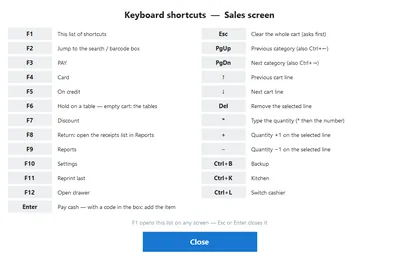
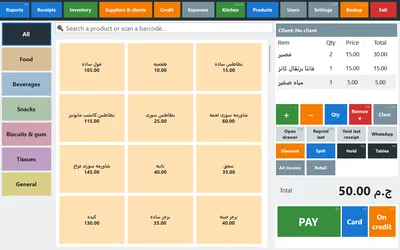
Start with the change you feel in the first hour. Every button on the sales screen now prints its own key in small muted text in its corner, and F1 (or the ? button) lists the keys of the screen you are standing on — sales, reports, inventory, credit, stock-take, the kitchen board. Nobody memorises anything: the key is written on the thing it presses.
Why a shop cares: at the Ramadan or evening rush a hand that never leaves the keyboard is two or three seconds faster per receipt, and a new cashier learns the till by reading it instead of asking. A 150-pound keyboard turns any PC into a proper till.
| Key | On the sales screen | Why you'd use it |
|---|---|---|
| F1 | The shortcut list of whatever screen you are on | The answer to 'what was the key for…' without calling anyone |
| F2 | Jump to the search / barcode box | Search by name when the product has no barcode |
| F3 / F4 / F5 | Pay cash / card / on credit | The three buttons pressed a hundred times a day |
| F6 / F7 / F8 | Hold the cart on a table / discount / returns | Cafés and restaurants live on F6; F8 opens the receipt list |
| F11 / F12 | Reprint the last receipt / open the drawer | The customer who says 'give me the receipt again' |
| * then a number | Type the quantity of the selected line | Twelve bottles of water in one go, not twelve taps |
| Ctrl+W | Weigh the selected line on the connected scale | Butchers and delis: re-weigh a line without deleting it |
2. Managing products, properly
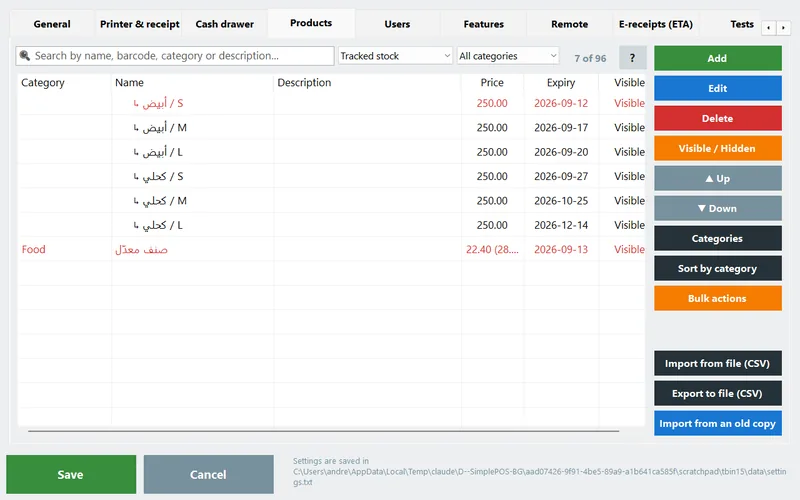
A list of 40 products is a list. A list of 500 is a problem, and the Products tab is now where you solve it.
- Categories you can fix. A Categories dialog renames, merges, deletes and reorders them — and that order is the order of the buttons on the sales screen. Why you care: 'Drinks' and 'Beverages' typed twice become one category in a click, and your best-selling category moves to the first button.
- A filter that finds the holes. Above the list: no barcode, no price, no cost, hidden, visible, tracked stock, low stock, expiring, no picture, variants only, duplicate barcode and duplicate name, plus a category drop-down; the header reads 'N of M'. Why you care: 'no price' and 'no barcode' tell you exactly what is left before the shop is ready.
- Bulk actions on a multi-selection. Move to a category, show/hide, cooking on/off, price up or down by a percentage or an amount (rounded to 0.25 / 0.5 / 1), wholesale = retail ± %, delete. Why you care: the supplier raised the whole drinks category by 10% — one dialog, not forty edits.
- Editing several products at once 4.0. Select two or more rows and press Edit: the normal editor opens with the values they share, and a grey 'several values' placeholder where they differ. Only the fields you actually touch are applied — everything else keeps each product's own value. Why you care: giving thirty products the same category and unit stops being an evening's work.
- Duplicate protection. A second product with the same barcode or the same name is refused in the editor, and skipped — and reported — by the CSV importer and the old-copy importer. Why you care: two rows for one product is how stock and profit quietly go wrong.
Starting from nothing at all is its own story: the ready catalogue means a new shop never types these hundreds of products. It has its own article, and a page.
3. The hardware in your shop
One rule here we do not break: no special hardware. Buy what is sold on the street, from whoever you like, and the program adapts to it — not the other way round.

Customer displays — three kinds
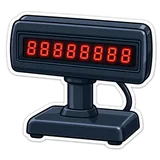
What it does: a second monitor showing the whole cart, a 2-line VFD/LCD pole display (2×20), or an 8-digit LED amount display — or a monitor plus one of the small ones. Line 1 is the item, line 2 the total; after payment, PAID and the change. Why a shop cares: the customer reads the price while you scan, so 'this was 40 not 60' ends at the counter, not at the door. More in the customer displays article.

Manager cards
What it does: any USB magnetic-stripe or RFID reader in keyboard-wedge mode. Settings → Users → the user → Login card → swipe within 20 seconds; the list only ever shows ****1234. A swipe signs that user in, and on the manager prompt that approves a void, a return, a discount or the drawer, a manager's card does what the password does. Why a shop cares: the manager stops typing a password in front of the queue — and in front of the cashier watching the keyboard. Details in the manager cards article.
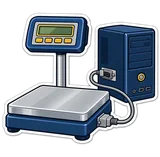
- Scales on a serial cable. The scale next to the till talks to the PC over RS-232 (or a USB-serial cable): tap the by-weight product and the weight lands in the cart, and Ctrl+W re-weighs a line. CAS, Mettler Toledo, DIGI and the Chinese price-computing scales (Rongta and the like) are read out of the box. Why a shop cares: a cashier who types 12.5 instead of 1.25 costs you a kilo of meat; a cable does not. Full guide in the connected scales article.
- The drawer on a network printer. If the receipt printer sits on the LAN or Wi-Fi with the drawer hanging off its RJ11 port, enter the printer's IP and port 9100 and the kick goes straight to the printer, past the Windows driver. Why a shop cares: a printer shared between two tills, or one mounted away from the PC, no longer means a drawer that never opens (the drawer in the manual).
- The stock list on the receipt printer. Inventory → Print stock (Ctrl+P) prints the list exactly as you filtered it: one line per product with quantity and unit, grouped by category, running-low rows marked !, totals at the bottom — on 58 or 80 mm paper. Why a shop cares: whoever goes to the wholesaler walks out with the shortage list in his pocket, with no A4 printer in the shop.



4. Your shop from anywhere
PosMasr has had a phone dashboard since 1.3, and the hard part was never the dashboard — it was getting your phone to reach it. Egyptian ISPs put shops behind carrier-grade NAT, so port forwarding and DDNS stopped working for most people. 3.2 stops fighting that.
PosMasr Link: the till dials out
What it does: the till keeps one outgoing encrypted connection open to link.posmasr.com and answers your requests down that same line. You open https://link.posmasr.com/<your code>/ from any phone anywhere — the code and a QR for it are on the Remote monitoring tab, and New address makes a fresh one whenever you want. Who can log in does not change: the same manager login, the same five-strikes lock-out.
Why a shop cares: no static IP, no port forwarding, no phone call to whoever set up the router. You sit at home at 11 pm and look at today's sales, the latest receipts, what is running low and what is about to expire.

Two tills that pair themselves — and cover for each other
What it does: on the primary you just pick 'primary'. On the second PC you pick 'secondary' (or press Find the primary till and pair): it finds the primary on the shop's network by itself, the primary shows a 6-digit code for two minutes, you type it, done. From then on the two talk over HTTPS with the primary's own certificate pinned, every request is signed with a shared secret key, and a small pill on both sales screens says connected, N receipts waiting or offline.
And if the primary dies? Every till listens for it. After 90 seconds of silence the lowest-numbered secondary promotes itself and carries on selling. When the old primary comes back it hears the newer state, steps down, pushes over the receipts the new primary missed and pulls the current lists. Why a shop cares: a dead power supply used to close half the shop; now the queue does not notice.

5. The quiet ones
None of these deserves its own launch. Together they are most of the reason 3.2 feels calmer.
| What it is | What it does | Why a shop cares |
|---|---|---|
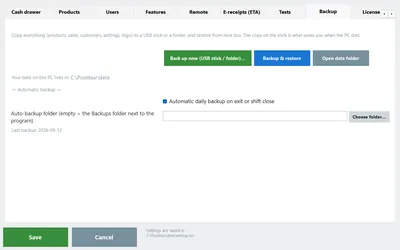
| A Backup tab, and a Backup button on the sales screen | Back up now to a folder or a USB stick, restore, and the daily automatic backup — one tab, plus Ctrl+B on the sales screen for the manager | The backup you actually take is the one that is one key away (manual, and the backup habit) |
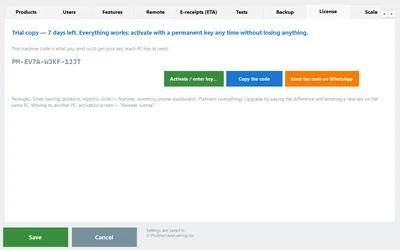
| A License tab: trial days and activation | The machine code with a Copy button, the trial days left, and the box for the key | Nobody discovers on a Thursday evening that the trial ended this morning (manual) |
| The close report by e-mail | From the shop's own e-mail account (Gmail app password, Outlook, Zoho): the daily summary, the Z report, the low-stock and expiring lists — plain text, once a day | The owner reads the close before bed, from an address that is his, not ours (the 10-minute close) |
| Updates that install themselves | Ask me (the default), Automatic (downloaded in the background, installed at the next exit) or Never. Install now checks the Setup's SHA-256 fingerprint and refuses a file that does not match | Nobody is left on a year-old version, and a tampered download cannot install itself (manual §28) |
| Send diagnostics to support | One text file — version, Windows, machine code, settings with every password removed, the last 300 log lines, printers, drawer, display and scale, and your note — uploaded in a click, with a ticket number back. No sales and no products are in it | 'The printer prints squares' becomes a five-minute answer, not an hour of questions |
| Receipt search | A Receipts button in the top bar opens the list directly, with a search box (Ctrl+F) that finds a receipt by number, customer, cashier or amount as you type | The customer back with a return three days later, found by the amount he remembers (manual) |
| Categories that do not print a receipt on their own 4.0 | Tick No receipt on its own next to a category: a sale made only of those categories is saved and shown but nothing leaves the printer; one item from any other category prints the whole receipt | A bag of bread and a bottle of water stop eating a roll of paper a week |





Which of these matters to your shop
| Your shop | Turn on first | Why |
|---|---|---|
| Grocery / supermarket | Keyboard shortcuts, the products filter, print stock, a customer display | Hundreds of products and a queue: speed and a clean list are the whole job. |
| Butcher, deli, spices, nuts | The serial scale and Ctrl+W | The weight is the price; a cable removes the typing and the arguments. |
| Café / restaurant | Shortcuts (F6 tables), the kitchen screen, a second till | Held orders and the rush; if one till dies at 9 pm the other keeps selling. |
| Pharmacy | The products filter (expiring, no barcode), the close report by e-mail | Expiry is money sitting on the shelf, and the owner is rarely behind the counter. |
| An owner who is not in the shop | PosMasr Link and the e-mail close report | Today's sales on the phone at any hour, and the close in your inbox. |
How to get 3.2
- Back up, then update. Ctrl+B on the sales screen takes ten seconds, then Settings → Support → Check for updates now. Updating means running the new Setup over the old one; your data folder is not touched and your license stays as it is.
- Nothing switches itself on. The customer display, the scale, the e-mail report, PosMasr Link and till pairing are off until you turn them on; the shortcuts and the products tools are simply there. A shop that updates and changes nothing gets yesterday's till, only faster on the keyboard.
- Check the package. Some of these (the phone dashboard and PosMasr Link, the customer display, the daily report) sit in the higher packages — the current table is on the pricing page, and upgrading is the difference in price, not a new licence.
Quick answers
Will updating change anything my cashiers have to relearn?
No. The screens are the same screens; the keys are additions written on the buttons that were already there, and every new device or service is off until you switch it on.
Does PosMasr Link send my sales to your servers?
No. The relay carries your request to your own till and the answer back; the data lives on your PC as it always did. The product copy and the shared catalogue are a separate, switchable thing — see the privacy page.
Does the automatic update reinstall my settings or products?
No. An update replaces the program, never the data folder.
Which of this needs internet?
Only PosMasr Link, the e-mail report, the update check and sending diagnostics. Selling, the scale, the displays, the drawer, the reports and the second till all work with the internet completely down.
Try the whole thing for 14 days
Download PosMasr, run it on the PC you already have, and tell us on WhatsApp what your shop sells — we will switch on the parts of 3.2 that suit it.