What a manager card is
A plain card (or a key fob) that identifies a person to the till. When the program asks 'this needs a manager', the manager swipes or taps instead of typing a password. The program looks up who owns that card, checks they have the right, writes their name on the action, and continues. Supermarket chains have worked this way for decades — the supervisor with the card on a lanyard who walks over to a lane, swipes, and walks away.
The actions that usually need it: voiding a receipt or a line, a return, a discount above the cashier's limit, opening the drawer without a sale, and getting into settings or reports. These are exactly the rights PosMasr keeps for the manager by default (rights per cashier), and today the manager unlocks them by typing their password on the spot. The card is a faster and safer way to do the same thing.

Two reader families: magnetic stripe and RFID

Magnetic stripe readers (MSR) — the card is swiped
The black stripe on the back of a card holds up to three tracks of data. Track 1 is letters and digits (a name, up to 79 characters), track 2 is digits only (up to 40 — the one every reader reads), and track 3 is rarely used. A USB reader (the MSR90 / MSR100 class, sold under many names) reads all three when you pull the card through the slot. Any card that already has data on its stripe works as a manager card: an old loyalty card, a gym card, an expired hotel key, or numbered cards from a card printer — ask for pre-encoded cards, because a blank stripe has nothing on it and a reader cannot write.
RFID / NFC readers — the card is tapped
No stripe and no contact: the reader powers a tiny chip in the card through the air and reads its fixed serial number. Two frequencies, and they do not mix. 125 kHz (EM4100 / TK4100 chips) is the cheap building-access family: the blue and black key fobs and the thick white 'proximity' cards. 13.56 MHz (MIFARE Classic and friends) is the transport-card family: thin white cards, also fobs and stickers. A 125 kHz reader ignores a MIFARE card and the other way round, so buy the reader and the tags together in the same frequency. Tapping has no moving parts and no wear, and a fob lives on the manager's key ring, which is the safest place for it.

Both act as a keyboard
This is the part that makes them cheap and universal. Almost every USB magstripe or RFID reader shows up in Windows as a keyboard (a 'keyboard wedge'). No driver, no software: you plug it in, swipe or tap, and it types the card's code followed by Enter into whatever box has the cursor — exactly like a barcode scanner does. Open Notepad, swipe, and you will see the digits appear. That is the whole test.
- A magstripe reader types the track data with its markers, something like
;1234567890123=2512?. The program stores whatever came out and matches it next time. - An RFID reader types the chip's serial, usually 10 decimal digits (some models type 8 hex characters — a switch or a config tool on the reader chooses). Either is fine as long as the same reader is used to register and to check.
- Keyboard layout matters. If the till is on an Arabic layout the reader's letters can come out as Arabic characters. Keep the till on the English layout — your barcode scanner needs that too — or choose readers that type digits only.
- One USB port each. The reader sits next to the scanner; a cheap USB hub is fine for both.
Prices in Egypt
Indicative September 2026 prices; they move with the dollar and vary between sellers.
| Item | Rough price | Notes |
|---|---|---|
| USB magnetic stripe reader (MSR90 class, 3 tracks) | ≈ 400 – 900 EGP | Bidirectional swipe; the metal-bodied ones last longer on a busy counter. |
| USB RFID reader, 125 kHz or 13.56 MHz | ≈ 250 – 600 EGP | The small black box with a beep; sold in access-control and CCTV shops as well as computer shops. |
| Blank cards or fobs (EM4100 / MIFARE / pre-encoded magstripe) | ≈ 5 – 15 EGP each | Buy a pack of ten: a card per manager and supervisor, and spares for the day one is lost. |
| Lanyard / card holder | A few pounds | Worth it — a card in a pocket gets left at home. |
So the whole thing — a reader and ten cards — is under a thousand pounds, less than one bad refund. Where to buy: the computer-market streets and POS shops in Cairo, Alexandria and the governorate capitals, the access-control (intercom / CCTV) shops for RFID, and the marketplaces.
Why cards beat shared passwords
- Speed. A swipe is one second. Typing a password with a queue watching is ten, plus the two attempts when it is mistyped.
- No password sharing. A password typed on the cashier's keyboard is seen; a password told to the supervisor 'just for today' is told to everyone. A card is in a pocket, not in a head. The manager can hand a card to the evening supervisor without giving away the manager password.
- A lost card is revoked in seconds. Clear it from the user in Settings and it is a piece of plastic. A leaked password means changing it and telling everyone who needs to know — and wondering who else knows.
- Every override is logged to a person. When each supervisor has their own card, the void or return says who approved it — not 'the manager password', which could be anyone who learned it.
- The card can be taken away. A supervisor who leaves hands in the card with the keys. Nobody has to remember to change a password that day.

What the card is not
It is not the bank terminal.
When a customer paid by card and wants money back on that card, the refund is done on the bank's terminal — the bank's device, the bank's rules. PosMasr records the return (a return receipt with its own number, stock back on the shelf, the refund method noted), and the manager approves that return with the manager card. Two different cards, two different jobs.
It is not a customer loyalty card.
Customers and credit accounts live in PosMasr's clients list; the manager card identifies staff only. (An old loyalty card can physically become a manager card, which is a different thing.)
It is not a lock, it is a key.
A card proves that the card was present, not that its owner was. Treat it like the drawer key: on a lanyard, not on the counter. For the really sensitive places — settings, the reports — you can keep asking for the password as well, which is the 'both' option in the table below.
Cashier login by card
The same reader does a second job: signing cashiers in. Instead of picking a name and typing a password, the cashier taps their card at the sign-in screen and the till opens under their name. Shift handover takes a second, nobody asks 'what was my password again', and — because every receipt in PosMasr carries the seller's name — the receipts, the voids and the shift's Z report are tied to the right person without anyone remembering to switch users. Give each cashier a card of their own; the manager's card simply carries more rights.

Password, card, or both
| Password only | Card only | Both | |
|---|---|---|---|
| Time per override | ≈ 10 seconds, in view of the queue | 1 second | Card for daily overrides; password for settings and reports |
| Risk of sharing | High — it is typed in front of people and gets 'lent' | Low — it has to be physically handed over | Lowest |
| Lost / forgotten | Forgotten: reset by the manager | Lost: cleared in seconds, a spare card registered | Either one still lets the person work |
| Who approved it | Whoever knows the password | Whoever holds the card | The person — a card and a secret together |
| Cost | Nothing | ≈ 300 – 1,000 EGP once | The same |
| Good for | One owner who is always at the till | A shop with shifts and a supervisor who is not the owner | Two or more tills, several supervisors, cash-heavy trade |
How PosMasr handles it
- Any keyboard-wedge reader. Magstripe or RFID, 125 kHz or 13.56 MHz — if it types in Notepad, it works with PosMasr. No driver, no setting for the reader itself.
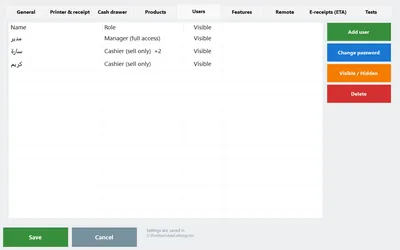
- Register a card (3.1). Settings → Users → pick the person → Register card → swipe or tap. Whatever the reader typed is saved on that user. One card per person; a spare can be registered on the day.
- Login by card (3.1). On the sign-in screen, swipe — the till opens under that user. The name-and-password way still works for anyone without a card.
- Card authorization wherever a manager password is asked (3.1). Void, return, a discount above the cashier's limit, open the drawer without a sale, settings: the same prompt that asks for the manager password accepts a swipe from a card whose owner has that right. The action is recorded under the card owner's name, like it is today when the manager types their password.
- Lost card. Settings → Users → the person → Clear card. From that second the old card does nothing; register the spare and carry on.
- Rights stay per person. A card does not add rights; it identifies. The supervisor's card unlocks only what the supervisor's account is allowed to (rights per cashier, 2.0). Before 3.1, and on any till without a reader, the manager password on the spot works exactly as it does today.
Quick answers
Which reader should I buy, magstripe or RFID?
RFID at 125 kHz if you are starting from zero: cheaper, fobs on the key ring, nothing wears out. Magstripe if you already have a box of old loyalty or hotel cards, or your staff already carry a card with a stripe.
Can my phone be the card?
Not reliably. Phones randomize the number they show to NFC readers, so the till would see a different code each time. A 5-pound fob is the better idea.
The reader types Arabic letters or nothing at all.
Switch the till's keyboard layout to English (Alt+Shift) and try in Notepad. If Notepad shows the code, PosMasr will. If nothing appears, try another USB port — the front ports on cheap cases again.
Can the cashier swipe the manager's card while the manager is away?
Only if the manager left it on the counter. A card is a key: keep it on you. For settings and reports you can keep asking for the password as well.
Can the same card work on two tills?
Register it on each till (a reader on each). With a second till set up as a secondary (2.2), users come from the primary, so register it there.
Set up cashier accounts and rights today, free, for 14 days
Install PosMasr, add a cashier under Settings → Users, take the void right away and watch the manager prompt appear. Then add the reader when 3.1 lands — the accounts carry over.