Controls, not suspicion
Two facts every shop owner eventually learns. First: you cannot watch the counter twelve hours a day, and a camera only shows you what you already suspected. Second: a till with the right settings watches for you — quietly, every receipt, without making anyone feel accused. The controls below cost nothing, take an hour to set up, and most of them also protect the cashier: when the drawer is short, the shift report says by how much and who was logged in, instead of everyone being blamed.
Everything starts with one rule: every cashier logs in under their own name. Shared logins make every report meaningless. In PosMasr each cashier has an account (Settings → Users), every receipt records who sold it, and 'Switch cashier' in the top bar hands over without closing the program.

1. The unrecorded sale
The oldest one. The customer pays 35 EGP, the goods go in the bag, no receipt is rung up, and 35 EGP has no reason to be in the drawer at shift end. Variants: a sale added up on a calculator 'because the program is slow', or the product tapped and then the cart cleared after the customer leaves.
The signal: stock goes down without sales — the stock-take shows shrinkage on the fast items that sit right by the counter. Or the receipts-per-hour on one cashier's shifts are oddly low for the queue you see. The controls: a customer display facing the customer (they see every line before paying — a sale that is not rung up has an empty screen), a 'no receipt = free' sign that turns customers into auditors, and a monthly stock-take on the counter items.
2. Fake voids and returns
The sale is rung up properly, the customer pays and leaves. Then the receipt is voided — and the cash it represented is now 'extra' in the drawer, to be pocketed at a quiet moment. Or a return is recorded for goods that never came back, and the refund is taken. Both look normal one at a time; the pattern shows in the count.
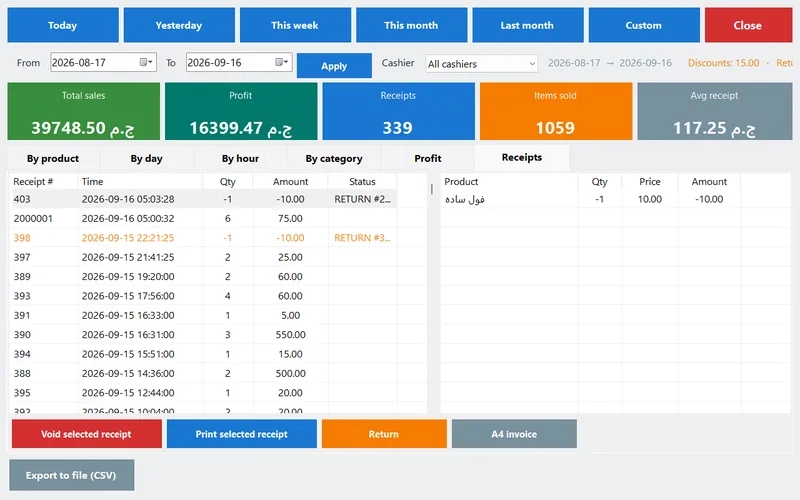
The signal: voids and returns clustered on one cashier, or right after the busy hour, or always for round amounts. The controls: in PosMasr, voiding and returns are manager rights by default; a cashier who needs one triggers a quick manager-password prompt — so every void has a second pair of eyes at that moment. The Reports header shows the count and value of returns for any period, filterable by cashier, and the Receipts tab lists every receipt with its status, so a voided or returned one is visible for ever, not deleted. A return prints its own numbered receipt and puts the stock back — which means a fake return also inflates stock, and the next stock-take shows it.
3. Discount abuse
The customer pays 100; the receipt says 80 with a 20% 'discount'; the 20 stays out of the drawer. Or the discount is real but goes to friends and family — which is not theft in the cashier's mind, and is still your margin.
The signal: the discounts total in the Reports header is higher on some shifts than others for the same kind of day. The controls: PosMasr's Discounts feature has a ceiling per cashier — above it the manager's password is needed. Set it low (5% or a few pounds) and put real promotions on the product as a sale price instead, which needs no cashier decision at all. Discounts also print on the receipt, so the customer who paid full price and got a 'discounted' receipt is your witness.
4. Drawer skimming
Simply taking cash from an open drawer — 20 EGP at a time, on a day the count is 'roughly right anyway'. It only works where nobody counts the drawer against what the till expected, or where the float is never the same twice.
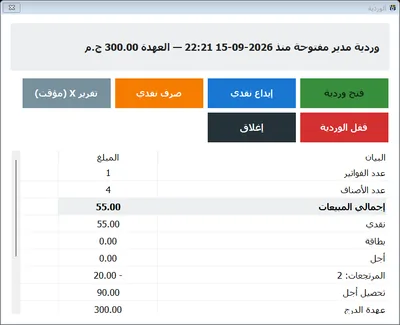
The signal: small, repeated shortages on the same person's shifts; a drawer that opens a lot between sales. The controls: PosMasr Shifts: open the shift with a fixed float, record every cash-in and cash-out with a note (the supplier paid from the drawer, the change run to the bank), and close by counting. The program prints the Z report: expected cash vs counted and the difference, with cash / card / credit, discounts, returns, VAT and every movement. A shortage of 40 EGP once is a mistake; 40 EGP three Tuesdays in a row is a conversation. Every cash movement is on the report, so 'I took it for the supplier' has to be written down at the time; and a mid-shift X report lets the owner check the drawer at lunch without closing anything.

5. Credit-account games
The most expensive one, because the amounts are bigger. A cash sale is recorded as credit on some customer's account, and the cash is taken — the customer never knows until they see a balance they never owed. Or a customer pays their account, the payment is not recorded, and the cash disappears; they find out weeks later, with a receipt in hand and a very awkward conversation.
The signal: credit balances growing faster than usual; customers disputing statements; 'credit' receipts for customers who always pay cash. The controls: credit is a manager right in PosMasr — give it only to the cashier who deals with account customers, and keep Record payment for yourself or do it from your phone (Manage page). Every credit receipt prints the customer's name and new balance, so the customer sees it at once. Print all balances weekly and glance through it; a statement per customer settles disputes in a minute. And in the Z report, credit sales and credit collections are separate lines, so a shift's cash cannot hide inside 'credit'.
Signal → the report to open
| What you notice | Pattern | Open this in PosMasr | Then |
|---|---|---|---|
| Fast counter items short at the stock-take | 1 — unrecorded sales | Inventory → Stock-take → Print differences; Reports → by hour, filter by cashier | Customer display; 'no receipt = free' sign; monthly count |
| Returns / voids more often on one shift | 2 — fake voids / returns | Reports → header (returns count & value) with the cashier filter; Receipts tab (status column) | Keep void & return as manager rights; ask the reason each time |
| Discount total higher on some shifts | 3 — discount abuse | Reports → header (discounts) filtered by cashier; Receipts tab for the individual receipts | Lower the discount ceiling; move promotions to sale prices |
| Drawer short by small amounts, repeatedly | 4 — skimming | Shift → Z report (expected vs counted, movements); X report mid-shift | Fixed float; cash-out only with a note; count at every hand-over, signed |
| Credit balances growing; customers disputing | 5 — credit games | Credit → Print all balances; Statement per customer; Z report credit lines | Credit right to one cashier; payments recorded by you (phone Manage page) |
| Sales today look low for the crowd you saw | 1 or 2 | Phone dashboard: today's total with cash/card/credit split, receipts count, latest receipts with the cashier's name, sales by hour | Compare with the same weekday last week (Reports → by day) |
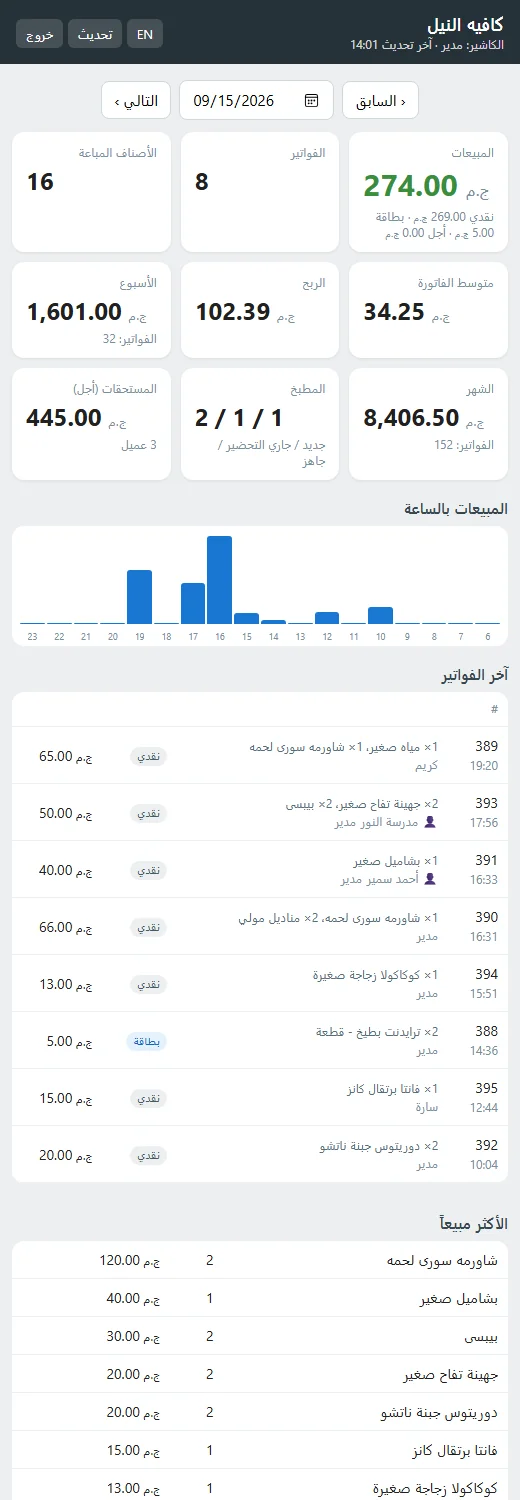
The owner's phone is the control that needs no schedule. The dashboard shows today's sales split cash / card / credit, the receipt count, the latest receipts with who sold them, sales by hour and the drawer card — refreshing on its own. The Manage page has reports by cashier and every receipt with its lines, for any period. A daily summary on Telegram or e-mail at closing time does the same for owners who would rather not open anything.


Setting up the controls in PosMasr — one hour, once
- Accounts: Settings → Users: one account per cashier, sell-only. Give extra rights one by one (reports, inventory, void, returns, credit, expenses, close another's shift, exit) only to the people who need them; the manager password still unlocks anything on the spot.
- Shifts: Settings → Features → Shifts & Z report. Agree a fixed float, and make the printed Z report part of the hand-over: signed by the cashier leaving and the one arriving.
- Discounts: if you use them, set the cashier ceiling low; put promotions on products as sale prices.
- Customer display: a second monitor facing the customer (Settings → Features → Customer display). The cheapest deterrent for pattern 1, and customers like it.
- Remote monitoring: Settings → Remote monitoring → run the web server, allow it in the firewall, open the address on your phone and add it to the home screen. Strong manager password; HTTPS if you open it from outside the shop.
- Monthly stock-take on the counter items at least (how, in one evening). It is the only control that sees pattern 1.
- Tell the team. Controls that people know about prevent; controls they discover afterwards only punish. 'Every receipt has your name, the drawer is counted every shift, and the owner sees the day on his phone' — said once, kindly, is enough.
Which controls for your shop
| Your shop | Must have | Nice to have |
|---|---|---|
| Family grocery, the owner at the till most of the day | One account per person; monthly counter stock-take | Shifts when a non-family cashier covers the evening |
| Supermarket, two tills, several cashiers | Shifts with Z report per till; void/return as manager rights; customer display; phone dashboard | Daily Telegram summary; weekly cycle counts |
| Pharmacy | Accounts; credit right to one person; weekly balances print | Shifts; discount ceiling at zero (prices are regulated anyway) |
| Café / restaurant | Shifts; kitchen ticket or screen (what the kitchen made must match what was sold) | Customer display; discount ceiling |
| Wholesale store with credit clients | Credit right restricted; payments recorded by the owner (phone); weekly balances print; A4 invoices | Shifts; e-receipts (every invoice is also at the Tax Authority) |
How PosMasr handles it — in one list
- Per-cashier accounts with hashed passwords; every receipt carries the seller's name; rights granted or removed one by one; manager password unlocks on the spot.
- Shifts: float, cash in/out with notes, X report mid-shift, close by counting, printed Z report with expected vs counted and every line.
- Reports for any period with a cashier filter: totals, discounts, returns, by hour, by day, and a Receipts tab where every receipt keeps its status.
- Discount ceiling per cashier; sale prices on the product instead of judgement at the till.
- Credit as a right, statements per customer, printable balances, and payments recordable from the owner's phone.
- Owner dashboard on the phone (today, latest receipts with the cashier, by hour, drawer card) and a daily summary on Telegram / e-mail.
- Customer display and stock-take for the one pattern no report sees directly.
Quick answers
Can a cashier delete a receipt so it never shows?
No. Voiding needs the right (or the manager's password) and the receipt stays in the Receipts tab marked as voided. Sales files are plain text, one per day, in the data folder — and in every backup.
Can the cashier see the reports or change prices?
Only if you grant that right. By default a cashier sells; reports, inventory, products, settings and credit are manager-only, and the management buttons are simply hidden.
Does the drawer count catch card sales?
The Z report lists cash, card and credit separately: expected cash counts only cash sales plus movements, so card totals are checked against the card terminal's end-of-day slip, not the drawer.
Will all this make my cashier feel watched?
Framed as 'your name on your receipts, your drawer counted at hand-over' it is the opposite: it protects them from being blamed for someone else's shift. Most cashiers prefer it once they have seen a dispute settled by a Z report.
See your shop's day from your phone — free for 7 days
Accounts, shifts, the Z report and the owner dashboard are all in the trial. Set them up once; they work every shift after that.