1. The ready catalogue, inside the program
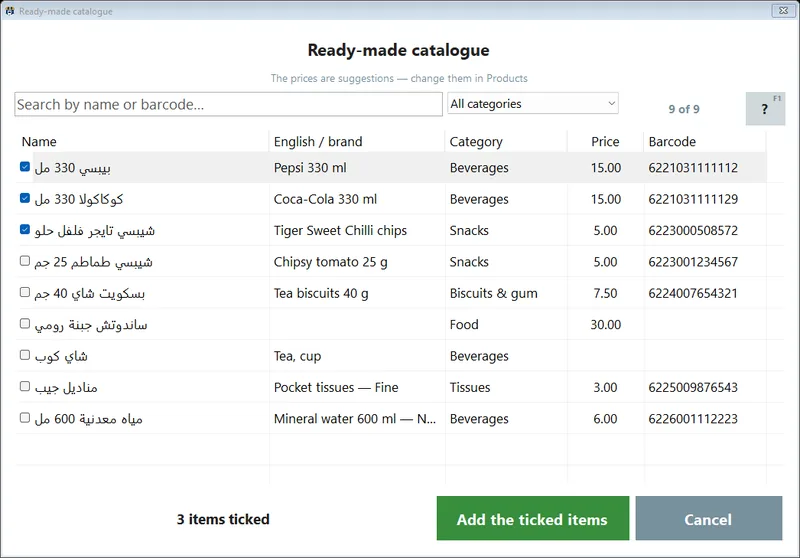
Until now the ready catalogue reached a shop through us: you told us your trade and we loaded the list while installing. In 4.0 it is a button. Settings → Products → Pick from the catalogue opens a list of 52,525 products that Egyptian shops sell — 3,475 of them with a product picture (since 4.1: 52,548 and 18,493 — see the update). A new till offers it by itself right after it asks what kind of shop you are.
- Type to find, tick, add. The box at the top narrows the list by name or barcode as you type, a drop-down picks one category, and you tick what you sell. Why you care: a grocery ticks its shelf in one sitting instead of three nights.
- Nothing is ever doubled. A product you already have — same barcode or same name — is skipped, and the program tells you how many went in and how many were skipped.
- Offline after the first download. The list is downloaded once and kept on the PC; the pictures and details of what you add come into your own program and stay there, instead of being loaded from our server every time.
- The prices are yours. Since 4.1 the picker adds products without a price — the catalogue has none — and you type your own in the normal product screen, or for many at once (section 4). See the update at the end.



Why a ready list matters at all — the week of typing it replaces, and what to fix first in yours — has its own article, and the catalogue has its own page.
2. Scan a barcode, and the product fills itself in
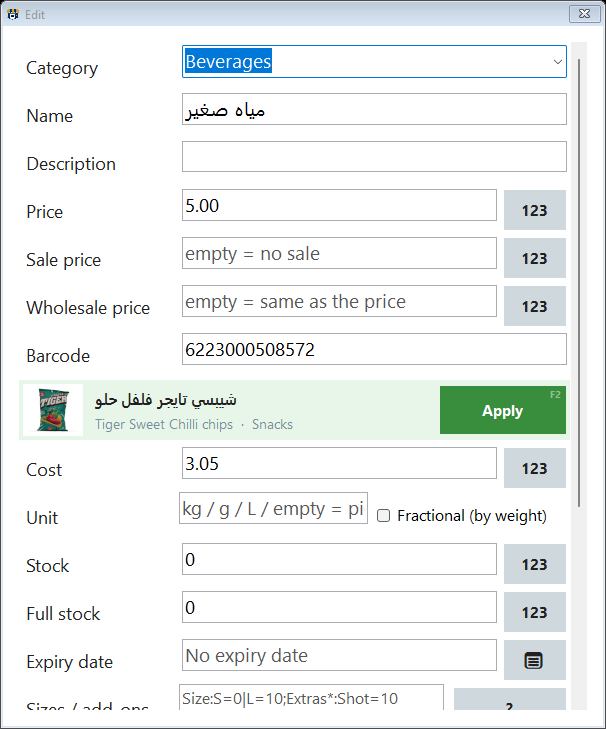
The second half of the catalogue is in the product screen itself. A supplier brings a new pack; you open Add, scan its barcode into the barcode box, and if the catalogue knows it the rest of the screen fills in. Editing an existing product works too, more carefully: nothing changes until you say so.
| Field | Adding a product | Editing a product |
|---|---|---|
| Name and category | Filled in at once | Shown in a strip with an Apply button — taken only if you press it |
| Description | Filled in from the English name and the brand | Through the same Apply strip |
| Product picture | Filled in when the catalogue has one | Shown in the strip; applied only if you press Apply |
| Price, cost, wholesale price | Never touched | Never touched |
| Stock and expiry | Never touched | Never touched |



3. Share your list, use the catalogue
Where do fifty thousand products come from? From shops. Every product in the catalogue is there because a shop shared its product list with PosMasr. So from 4.0 the catalogue is open to the shops that share theirs — picking from it, and the barcode lookup above. It is the same deal for everyone: you give your list, you get everyone's.
You are sharing when, in Settings → Backup:
- A copy at PosMasr is on — the products list (the default) or the full backup;
- Upload automatically once a day is ticked;
- and Do not use my products in the shared catalogue is not ticked.
- What is shared: product data only — names, barcodes, categories, prices and costs. Never your sales, your customers, your users or your passwords.
- Products, not shops: the catalogue never says which shop sells what, and never carries your shop's name, phone or address.
- Stopping costs you nothing you already have. Turn sharing off whenever you like: the products already in your program stay, with the pictures already applied to them. What stops is new picking from the catalogue and the barcode lookup, until you share again.
The exact wording is on the privacy page, and the switches are explained in the manual.



4. Fewer clicks on the Products tab
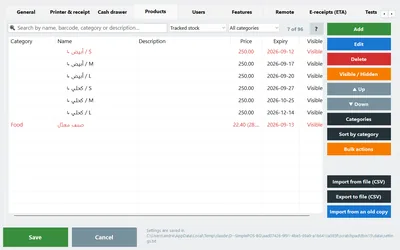
- Edit several products at once. Select two or more rows and press Edit: the normal product screen opens on all of them, with the values they share and a grey 'several values' where they differ. Only the fields you touch are saved — everything else keeps each product's own value. Why you care: thirty products from the catalogue get your category, unit or price in one go.
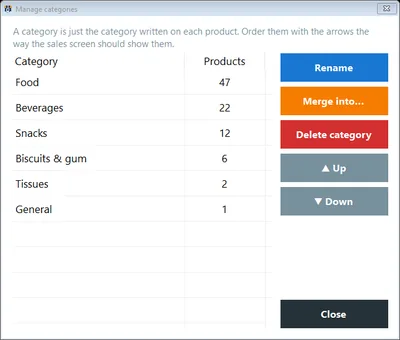
- Categories that print no receipt on their own. Tick No receipt on its own next to a category in the Categories dialog: a sale made only of those categories is saved and shown, but no paper comes out; one item from any other category prints the whole receipt. Why you care: a bag of bread and a bottle of water stop eating a roll a week.
5. Bring your products from another program
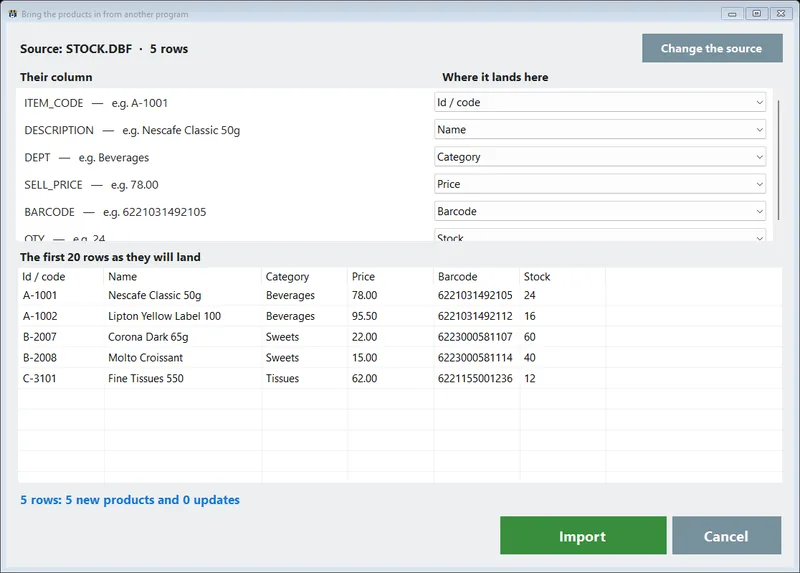
The catalogue is for a shop starting from nothing. A shop moving from another program already has its list — so 4.0 reads it. Settings → Products → Import from another program takes four sources:
| Source | What it reads |
|---|---|
| A file | CSV, TSV or TXT with any column names; the separator and the Arabic encoding are worked out for you |
| Excel | .xlsx and .xls, sheet by sheet (or Save As CSV when the PC has no Excel data provider) |
| A database | Access or dBase/FoxPro on the PC, or a server (SQL Server, MySQL/MariaDB, SQLite…) through ODBC — one table or view |
| An older PosMasr copy | An old data folder, a backup or a products.txt from any version |
You map each of their columns onto ours from a drop-down that arrives with a guess, see the first twenty rows exactly as they will land, and only then import. Matching products are updated, not doubled; a run touching more than 200 products takes a local backup first; and the map is remembered, so next month is one click. The whole story is on the import page.
6. A daily copy and a feed for the accountant
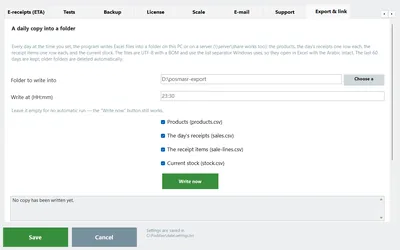
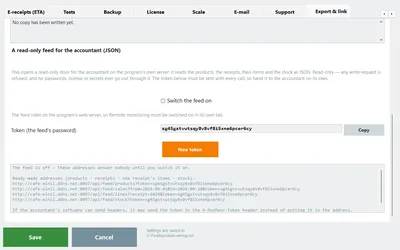
Settings → Export & link is for the people around the shop who want its numbers without sitting at the till.
- A daily copy into a folder. At the time you set, the till writes the products, the day's receipts, the receipt items and the current stock as files Excel opens with the Arabic intact — into a folder on the PC or a server share, one dated folder a day, the last 60 days kept.
- A read-only feed for the accountant. The accountant's software reads the products, the receipts between two dates, one receipt's items and the stock — reading only, with a token you generate, off until you switch it on (Platinum package).
7. A copy at PosMasr
The Backup tab has a boxed section at the bottom. Products list only is on from the start and uploads once a day, so if the PC dies or is stolen we can hand your list back. The full backup — settings with every password removed, customers and suppliers, users, the last 400 days of sales, the logo, never the license file — is there when you want it. Restore from PosMasr… brings a copy back on a PC with an activated license. And this is the same copy that opens the catalogue to you (section 3).
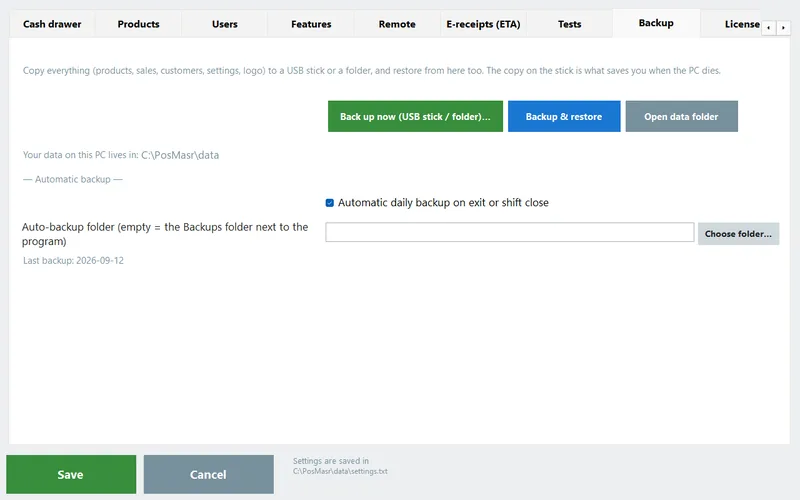
The habit that keeps a shop safe whatever happens — the local copy, the USB stick, the copy away from the shop — is in the backup article.
8. The quiet ones
| What it is | Why a shop cares |
|---|---|
| Every settings screen scrolls to its end and shows all its text | On a small till screen nothing is cut off at the bottom — the last option in a tab is as easy to reach as the first |
| Illustrations across the program | Screens that tell you at a glance what they are for — friendlier for a new cashier |
Which of these matters to your shop
| Your shop | Start with | Why |
|---|---|---|
| A new grocery or supermarket | Pick from the catalogue, then edit several at once for your prices | Hundreds of packaged lines with barcodes — the list is the whole opening job |
| A shop already open, new stock arriving every week | The barcode lookup in the product screen | Each new pack is a scan, not a typed name and a hunted category |
| Moving from another program | Import from another program | Your list is already typed — map it once and it lands |
| A bakery counter, a café with water and bread | Categories that print no receipt on their own | The small sales stop costing paper |
| A shop with an accountant | The daily folder copy, or the read-only feed | The numbers reach the accountant without anyone copying them |
How to get 4.0
- Back up, then update. Ctrl+B on the sales screen, then Settings → Support → Check for updates now. Updating runs the new Setup over the old one; your data folder is not touched and your license stays as it is. Updates are free for the package you own.
- Check Settings → Backup. The products-list copy at PosMasr is on by default; keep Upload automatically once a day ticked and the catalogue and the barcode lookup are yours. The daily folder copy and the accountant's feed stay off until you set them up.
- Pick, then scan. Open Pick from the catalogue once for your trade, and from then on let the barcode box fill in whatever new pack arrives.
Quick answers
Can the barcode lookup change my prices?
No. It fills the name, the category, the description and the picture. The price, the cost, the wholesale price, the stock and the expiry date are never changed by it.
Does it need the internet?
Only for the first download of the catalogue. After that, picking and the barcode lookup read the copy kept on your PC, so they work with the line down.
Why do I need to share my list to use the catalogue?
Because the catalogue is made of shared lists — it is open to the shops that give back. What is shared is product data only, never sales, customers, users or passwords, and the catalogue never says which shop sells what. More in how the catalogue works.
If I stop sharing, do I lose the products I picked?
No. Everything already in your program stays — names, categories and the pictures already applied. Only new picking and the barcode lookup stop.
I am on 3.2. Will updating change anything my cashiers have to relearn?
No. The sales screen is the one they know; 4.0 adds to the Products tab and the settings. What 3.2 brought is still there — see everything new in 3.2.
Update: 4.1
A few weeks on, 4.1 builds on what this article describes:
- A bigger, cleaner catalogue: 52,548 products, 18,493 of them with a picture (was 3,475), in 59 clean Arabic categories.
- On your PC, encrypted, offline: the catalogue is downloaded once as one encrypted file whose key is issued to your PC only; picking, the lookup and scan-to-add then need no internet.
- Scan to add at the till: a pack you do not have yet opens with its catalogue picture and name and an empty price box — Enter adds and sells, F2 only adds.
- No prices from the catalogue: the picker now adds products without a price; you type yours.
- Pictures on the sales buttons that keep the name and price readable, a faster sales screen, and a direct switch in Settings → Products.
Everything in 4.1 is listed in the changelog.
Open with a full till in under an hour
Try PosMasr 4.0 free for 14 days on the PC you already have, and tell us on WhatsApp what your shop sells — we will help you pick your list.