Why one shop sells at two prices
A retail price pays for the shelf: the rent per metre, the cashier's time per item, the bag, the change, the customer who touches five packs and buys one. A carton sold to another shop uses none of that — it goes from your stockroom to their car in one minute, paid in one go. So it is normal, and right, for the carton price to be lower. What is not right is deciding the discount on the spot, differently every time, from memory.
Three things go wrong with prices-from-memory: the cashier gives the wholesale price to a retail customer who asked nicely; the wholesale customer gets a different price each visit and starts negotiating every time; and at month end you cannot tell how much you sold wholesale or what you earned on it.
Two price levels in PosMasr (2.2)
- Switch it on once: Settings → Features → Price levels. Off by default; nothing changes for shops that don't need it.
- Give each product a wholesale price: the product editor gains a wholesale price field. Leave it empty and the product costs the same at both levels — so you can price just the 40 items that actually sell by the carton.
- Hundreds of products? Export to Excel (CSV), fill a column named
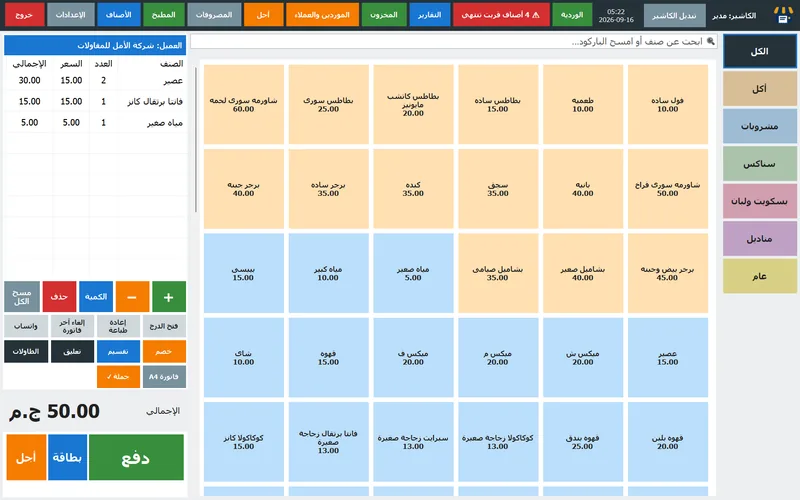
price2(or its Arabic headerسعر الجملة) and import it back. Blank cells keep the current value. - On the sale: a Retail / Wholesale button appears under the cart. Tap it before ringing up and every item lands at its wholesale price. It goes back to retail by itself after the receipt, so the next walk-in customer is never charged wrong.
- Wholesale clients: tick wholesale client on the client's card (Suppliers & clients → Clients). Pick that client on a sale and the cart switches on its own — the cashier does not even have to know. The receipt prints 'Wholesale prices' so nobody argues later.
When wholesale makes sense — and when it doesn't
| Situation | Wholesale price? | Why |
|---|---|---|
| A kiosk or small shop takes sealed cartons every week | Yes | Zero shelf cost, regular volume, and your supplier's carton price gives you room. |
| A school, office or café buys 100+ units of a few lines | Yes | Big, predictable orders; they need an invoice and often pay later — see below. |
| A regular customer asks for 'the wholesale price' on 3 pieces | No | Three pieces still cost you the shelf. A loyalty gesture is a discount with a ceiling, not the wholesale level. |
| A competitor 200 m away wants to buy from you cheaply | Carefully | You are funding their shelf against yours. Price it so a carton earns you more than selling it yourself would, or say no. |
| A single product you barely make margin on (cigarettes, phone credit) | No | There is no room to give. Leave the wholesale field empty for those. |


The margin arithmetic — a worked example

Take a juice pack you buy at 100 EGP a carton of 12 (so 8.33 each — we'll use 100 per unit to keep the numbers round). Retail at 130 is a 30% mark-up, which is a 23% margin on the selling price. What should the carton price be? Work backwards from what you must cover:
| Per unit | Retail | Wholesale | Note |
|---|---|---|---|
| Purchase cost | 100 | 100 | From your supplier's invoice — enter it on the product so the Profit tab is right |
| Selling price | 130 | 112 | Wholesale = cost + 12%; never below cost + your handling |
| Gross profit per unit | 30 | 12 | Margin on price: 23% vs 10.7% |
| Units sold per week (typical) | 12 | 120 | One carton a week over the counter vs ten cartons to two kiosks |
| Profit per week | 360 | 1,440 | Same product, same stockroom, four times the profit — if the volume is real |
| Shelf time | 7 days | 0 days | Wholesale stock never risks expiry on your shelf |
The figures are an example, not a rule. The rule is: set the wholesale price from the cost, not from the retail price. 'Retail minus 15%' looks tidy and quietly goes below cost on low-margin lines. In PosMasr the Profit tab (Reports → Profit) shows revenue, cost, profit and margin per product for any period, so after one month of wholesale you can see which lines actually earn.
An invoice the trade customer can actually use
A kiosk owner is happy with the thermal receipt. A school, a company or a café with an accountant is not: they need an A4 invoice with your details and tax number, their name, an items table and a signature line. PosMasr prints one from the same sale:
- Settings → Features → A4 invoice, pick the A4 printer (any office inkjet or laser).
- An A4 invoice button appears under the cart and in the receipts list — so you can print it at the sale or a week later when the accountant calls.
- It carries the logo, shop details and tax number, the client, an items table, service / VAT / total due, the payment method and signature lines. Long invoices span pages.
- Tick automatic when a client is on the sale and every wholesale receipt gets its A4 without anyone pressing anything.
- No A4 printer? The detailed tax slip on the thermal printer has the same content — tax numbers, net, VAT, total, signature — on 80 mm paper.
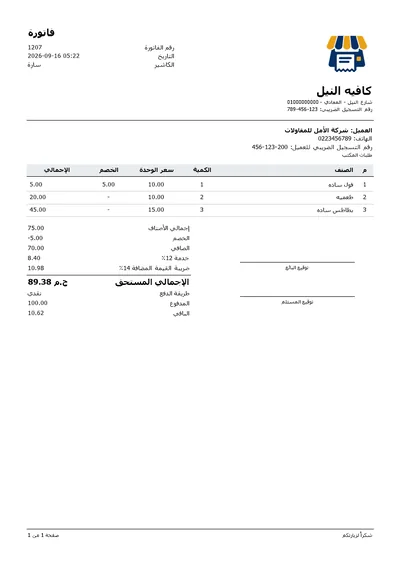
If VAT applies to you, switch on the VAT line (14% is one tap; included in prices or added on top) so the invoice shows it separately — trade customers who are VAT-registered will ask. If you are on the e-receipt system, the receipt goes to the Tax Authority automatically with the QR on it; check the latest ETA notices for what your size of business must do.
Credit for wholesale clients — without losing track
Trade customers pay on Thursday, or at month end, or 'when the truck comes'. That is normal; what is not acceptable is a notebook nobody can read. In PosMasr:
- With the client picked on the sale, press Credit instead of Pay: the receipt goes on their account and prints with their name and new balance.
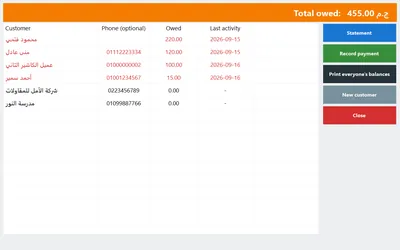
- The Credit screen shows who owes what; Statement lists every receipt and payment for one client, printable; Record payment when they pay, in full or in part.
- The Clients tab shows this month's purchases, the balance and the last activity per client — your wholesale list at a glance.
- From the phone, the Manage page does the same: balances, statements and recording a payment when the client transfers on InstaPay while you are away.
- Print all balances once a week and go through it. A wholesale client who is two weeks late is a supplier problem for you next week.



Which setup for your shop
| Your shop | Turn on | How to price |
|---|---|---|
| Grocery that supplies kiosks | Price levels + Suppliers & clients | Wholesale on the 30–50 carton lines only; mark each kiosk as a wholesale client; credit weekly |
| Stationery / bookshop | Price levels + A4 invoice | Wholesale on copybooks, pens, paper; A4 invoices for schools and offices; VAT line if registered |
| Cosmetics / perfumes | Price levels + variants | Each size is a variant with its own wholesale price; salons as wholesale clients |
| Pharmacy | Usually nothing | Medicine prices are regulated; wholesale between pharmacies is a distributor's job, not a till's |
| Café / restaurant | Nothing | No cartons leave a café; use discounts for the corporate order instead |
| Dedicated wholesale store | Price levels + A4 + credit + a second till if busy | Wholesale is the default customer; retail is the exception you tap for walk-ins |
How PosMasr handles it
- Two prices per product (retail + wholesale), empty wholesale = same price; loaded by hand or from Excel (
price2). - Retail / Wholesale button per receipt, resetting to retail after every sale; wholesale clients switch the cart automatically and the receipt says so.
- A4 invoice with tax number, items table, VAT and signatures — at the sale or later from the receipts list; or the detailed thermal slip.
- Credit accounts with statements, payments and a printable balances list; the credit right can be limited to one cashier.
- Profit per product for any period, so you see whether the wholesale lines earn.
- Sell by weight and by carton: fractional quantities with units for loose goods; for cartons, simply sell 12 at the wholesale price (or create a 'carton of 12' product with its ITF-14 barcode if you want its own button — it then has its own stock).
Quick answers
Can I have more than two price levels?
No — retail and wholesale. For a third tier (a very big client) use a discount with a manager approval, or set that client's prices via the discount ceiling per cashier.
The wholesale customer wants the retail price on one item. What happens?
Tap the Retail / Wholesale button back to retail for that receipt, or ring that item on a separate receipt. The button is per receipt, not per line.
Does the wholesale sale count in the same reports?
Yes — same sales, same stock, same profit report. Filter by client in the Clients tab (this month's purchases) to see wholesale volume per customer.
I have a second till. Do both know the wholesale prices?
Yes — the secondary pulls products, prices and clients from the primary every minute, including the wholesale flag on clients.
Put both prices on your products — free for 7 days
Import from Excel with a wholesale column, mark your trade customers, and print them a real invoice this week. One-time license, no subscription.