Do I even need a label printer?
Honest answer: many shops don't. If everything you sell comes in a factory pack with an EAN-13 on it (a grocery, a mini-market, most of a pharmacy), the scanner reads that and you never print a label. A café builds orders by tapping buttons. The label printer earns its place when you sell things that have no barcode or no fixed price on the pack.
| Your situation | Verdict | Why |
|---|---|---|
| Everything has a factory barcode (grocery, mini-market, cosmetics) | Skip it | Scan what's printed on the pack; PosMasr stores the barcode per product. |
| Café / restaurant | Skip it | Orders are tapped, not scanned. Maybe one for packaged desserts, later. |
| A few dozen unlabelled items (a small stationer, a gift corner) | Not yet | Print their labels on the receipt printer from PosMasr, or use a sheet of stickers — no new hardware. |
| Hundreds of unlabelled items: boutique, shoes, phone accessories, toys, hardware, spices, bakery | Buy one | A label per item at receiving time turns the whole shop scannable; stock and profit per item follow. |
| You repack or weigh (nuts, cheese, detergents by the kilo) | Buy one — or a label scale | Each pack needs its own price sticker; PosMasr also reads scale barcodes with the weight. |
| Pharmacy | Usually yes | The split label (half on the box, half on the record) and price labels for cosmetics and imported items without a local code. |
| Variants: the same shirt in 4 sizes and 3 colours | Buy one | PosMasr gives every variant its own barcode and stock; a label on each piece is the only way to tell them apart at the till. |



Direct thermal vs thermal transfer

| Direct thermal | Thermal transfer (ribbon) | |
|---|---|---|
| Consumables | Labels only | Labels + a ribbon roll (wax / wax-resin / resin) |
| Label life | 6–12 months indoors; fades in sun, heat, and against oily hands | Years; resists water, rubbing, freezers |
| Cost per label | Lowest | Slightly more (the ribbon) — still pennies |
| Printer price | ≈ 2,500 – 4,500 EGP | ≈ 5,000 – 14,000 EGP |
| Right for | Price labels on shelves and products that sell within months: shops, pharmacies, bakeries | Labels that must last: asset tags, cosmetics jars, frozen goods, outdoor, chemicals |
For a retail shop printing price labels, direct thermal is the answer nine times out of ten — same technology as the receipt printer, no ribbon to fit, nothing to run out except the roll. Most transfer printers can also run in direct mode without a ribbon, so a TSC or Zebra is not a mistake, just more money.
Label sizes you'll find in Egypt
Sizes are written width × height in millimetres. The diagram is to scale — print it if you want to hold a size against your products.

| Size (mm) | Where you see it | Fits | Availability in Egypt |
|---|---|---|---|
| 40 × 30 | The most common shop label: boutiques, phone shops, stationers | Name, price, a clear barcode | Everywhere, cheapest |
| 58 × 40 | Supermarket scales and bigger price tags; a lot of Xprinter 365B users | Name on two lines, price large, barcode, weight or date | Everywhere |
| 50 × 30 | General retail, spice and nut shops | Same as 40 × 30 with more room for the name | Common |
| 40 × 25 / 30 × 20 | Small items: cosmetics, jewellery, hardware bits, cables | Short name, price, a compact barcode — scan quality drops below 30 mm wide | Common |
| 60 × 40 | Shelf-edge tags, cartons, bakery boxes | Big price, ingredients or expiry line | Common |
| 12 × 38, 3 across | Jewellery tags and the classic 'three little labels' roll many older programs used | A rotated barcode along the strip and the price | Available; PosMasr has the preset |
| Split 25 + 25 | Pharmacies: one half on the medicine box, the other on the record or invoice | Two identical halves torn down the middle | Pharmacy suppliers; PosMasr preset |
Roll or fanfold, and what the label is made of
- Roll. Labels on a paper liner wound on a 25 mm (1 inch) core for desktop printers; a 40 × 30 roll holds about 700–1,000 labels. This is what every shop uses.
- Fanfold. The same labels zigzag-folded in a box, fed through the slot at the back of the printer. Holds thousands, never needs re-rolling, and is the norm for shipping labels and courier counters. Check your printer has an external feed slot (the 365B and 420B do).
- Paper vs synthetic. Plain thermal paper is the cheap default. PP / PET synthetic labels survive water and oil (cosmetics, cleaning products, the fridge) and usually need a transfer printer. Removable adhesive exists for glassware and books that customers don't want scarred.
- Rough prices (September 2026, indicative): a 40 × 30 direct-thermal roll ≈ 60 – 120 EGP; 58 × 40 ≈ 90 – 160 EGP; a wax ribbon for transfer printers ≈ 150 – 300 EGP and lasts several rolls of labels. Buy by the 10-roll box from POS supply shops or the marketplaces.

Models seen in Egypt and rough prices
Indicative street prices for September 2026; they move with the dollar and differ between sellers. All of these install as a normal Windows printer, which is all PosMasr needs.
| Model | Type | Max width | Ports | Rough price | Notes |
|---|---|---|---|---|---|
| Xprinter XP-365B | Direct thermal | 80 mm | USB (+ Bluetooth on the 365B-BT) | ≈ 2,500 – 4,000 EGP | The Egyptian shop standard. Takes 20–80 mm labels, fanfold slot at the back. |
| Xprinter XP-420B / XP-460B | Direct thermal | 110 mm | USB (+ LAN on some) | ≈ 3,000 – 5,000 EGP | Wider: shipping labels (100 × 150) plus product labels. Courier counters and online sellers. |
| Xprinter XP-DT108B / XP-235B | Direct thermal | 80 mm | USB | ≈ 2,200 – 3,500 EGP | The budget siblings of the 365B; same drivers. |
| Gprinter GP-1324D / GP-3120TU | Direct thermal | 80–108 mm | USB (+ LAN / Bluetooth) | ≈ 2,800 – 4,500 EGP | Same class as Xprinter; often sold in supermarket bundles. |
| TSC TE200 / TTP-244 Pro | Thermal transfer (direct too) | 108 mm | USB (+ LAN / serial) | ≈ 6,000 – 10,000 EGP | The workhorse of Egyptian factories and warehouses; ribbons everywhere. |
| Zebra ZD220 / ZD230 (d or t) | Direct (d) or transfer (t) | 104 mm | USB (+ LAN on the 230) | ≈ 8,000 – 14,000 EGP | The reference brand: built to run all day for years; pharmacies chains and clinics. |
| Generic no-name 'label printer' | Direct thermal | 80 mm | USB | ≈ 1,800 – 2,800 EGP | Usually a rebadged Xprinter engine. Insist on a Windows driver and test a label in the shop. |

Which one for which shop
| Your shop | Buy this | Roll |
|---|---|---|
| Boutique / shoes / bags | Xprinter 365B class, direct thermal | 40 × 30 paper (or the 12 × 38 tag roll for small pieces) |
| Phone accessories / electronics | 365B class | 40 × 25 or 40 × 30 |
| Spices, nuts, bakery, repacked goods | 365B class — or a label scale for goods sold by weight | 50 × 30 or 58 × 40 (room for the weight and date) |
| Pharmacy | 365B class, or Zebra for a busy chain branch | Split 25 + 25 for boxes, 40 × 30 for cosmetics |
| Online seller / courier counter | Xprinter 420B (110 mm) for shipping labels too | 100 × 150 for shipments, 40 × 30 for products |
| Warehouse / factory / cosmetics jars | TSC or Zebra thermal transfer | Synthetic labels + wax-resin ribbon |
| Tiny shop, a few dozen items | Nothing — print from PosMasr on the receipt printer | The receipt roll you already have |
How PosMasr prints labels
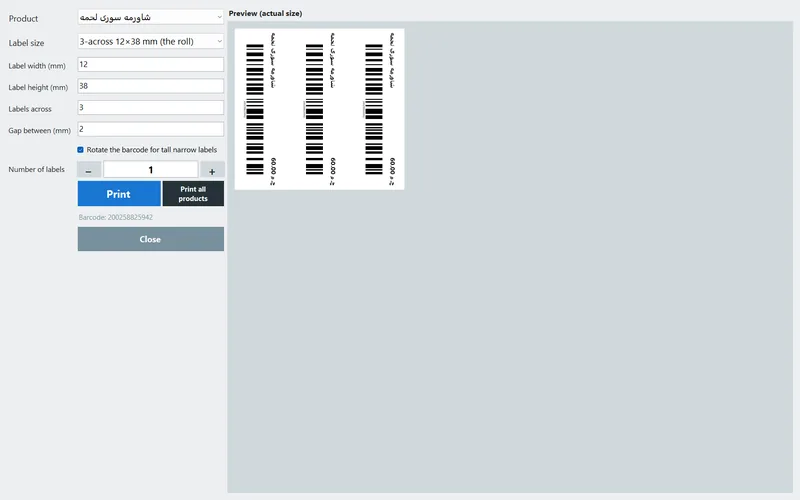
- Open it from Inventory: select a product and press Print label. Pick the product, the label size, the number of copies, and a preview shows the label at real size.
- What's on the label: the product name, the price, and a Code 128 barcode that any scanner reads (see our barcode types guide for why Code 128). A product with no barcode gets one generated and saved, so the label and the till always agree.
- Presets: the 3-across 12 × 38 mm roll (rotated barcode), the pharmacy split 25 × 25, and singles 40 × 25, 50 × 30, 30 × 20 and 60 × 40. Or Custom: type the width, height, labels across and the gap — so 40 × 30 and 58 × 40 rolls work as well.
- Any Windows label printer, or none: Settings → Printer → label printer. Leave it empty and labels print on the receipt printer — a real option for a small shop.
- Print all products prints one label per product in a single run — the button that turns a new shop scannable in an afternoon. The program tells you how many labels it will use so you can check the roll first.
- Variants and your logo: every colour / size variant has its own barcode and gets its own label; the brand name you set in Settings → General appears on labels as well as receipts.
Label printing is in every package from Silver up (see pricing); the free 14-day trial has it, so you can test your printer and roll before deciding.
Setup tips that save you a roll
- Tell the driver the label size once. In Windows → Printers → your label printer → Printing preferences, set the page size to your label (40 × 30) and the gap. If the driver still thinks it's 100 × 150, every label prints in the corner of a much bigger 'page' and the printer feeds three blanks.
- Calibrate the gap sensor after loading a new size (hold the feed button until it spits a few labels, or from the driver's tools). Skipped labels and prints that drift down the label are almost always this.
- Print one, scan it, then print the batch. A barcode that's too small for the scanner, or a name that spills over the edge, is cheaper to catch on one label than on 700.
- Darkness and speed live in the driver: if the bars look grey or the edges fuzzy, raise darkness one notch and lower the speed. Clean the head with alcohol every couple of rolls.
- Keep the barcode away from the edge. Scanners need a quiet zone; the PosMasr presets leave it, custom sizes should too.
Quick answers
Can PosMasr print labels on my receipt printer instead?
Yes. Leave the label printer empty in Settings → Printer and labels go to the receipt printer, on a roll of stickers of the same width or on plain receipt paper to cut and tape. Fine for a few labels a day.
Which barcode does PosMasr print, and will my scanner read it?
Code 128. Every laser, CCD and 2D scanner sold in Egypt reads it, and PosMasr matches it to the product instantly. More in the barcode types guide.
The printer feeds two or three blank labels after each one.
The driver's page size is bigger than the label, or the gap sensor isn't calibrated. Set the size in Printing preferences and run the calibration once.
Do I need thermal transfer for a shop?
No. Direct thermal is the norm for price labels. Transfer is for labels that must survive water, oil, freezers or years on a shelf.
Can I print a label for every product at once?
Yes — the Print all products button, with a count of how many labels it will use so you can check the roll.
Print your first label today, free for 7 days
Install PosMasr, add one product, press Print label. Works with the label printer you have — or the receipt printer until you buy one.