One system, not three
The usual set-up is three things that never meet: the attendance device with its own software, a spreadsheet for salaries, and the till. In PosMasr the cashier who sells is the same person who clocks in, has a roster and gets a payslip — so the hours can sit next to the sales, and nobody's name is typed twice. It is made for shops and restaurants of 2 to 50 people, and it stays hidden until the owner switches on Staff and then HR.

The device on the wall
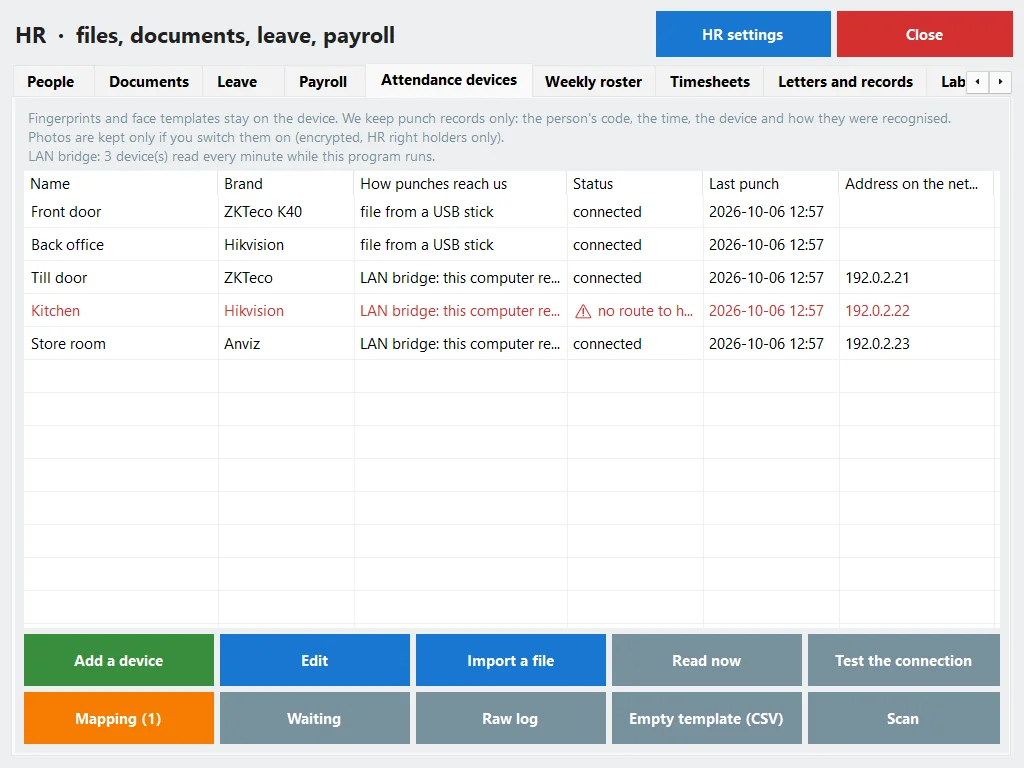
First, what we never take: fingerprints and faces stay on the device. We keep the punch — the person's code on the device, the time, which device, and how they were recognised. A code that maps to nobody is not guessed: it waits in a holding area with the name the device gave until you say who it is.
| Way | How | Needs |
|---|---|---|
| Live push (online) | You type our address into the device's menu once; it sends each punch as it happens. ZKTeco (ADMS / iclock), Hikvision, or any system through a signed webhook. | Internet at the device |
| LAN bridge | The till app, or the program on your PC, reads the device on the shop's network every minute: ZKTeco on port 4370, Hikvision, Anviz. | The till or the PC on the same network |
| A file | Export the log to a USB stick or from the vendor's software and import it, with a preview first; a second import of the same file adds nothing. | Nothing — it works with any device |
The list has 20 models with their setup steps — ZKTeco K40, MB20, F18, SpeedFace, Hikvision DS-K1T and others. For files, the ZKTeco attlog.dat layout was checked against real published files; for the other vendors' exports, read the preview before you apply it.
No device? Other ways
- The PIN or a staff card at the till — on the online till it works offline too.
- The employee's own phone (online), in the browser with no app: each new phone is approved by a manager; an optional geofence keeps only “inside” or “outside”, never the location; the selfie is off by default.
- Kiosk mode (online): a tablet at the door with a 6-digit code that changes every 30 seconds.

The roster and the timesheet
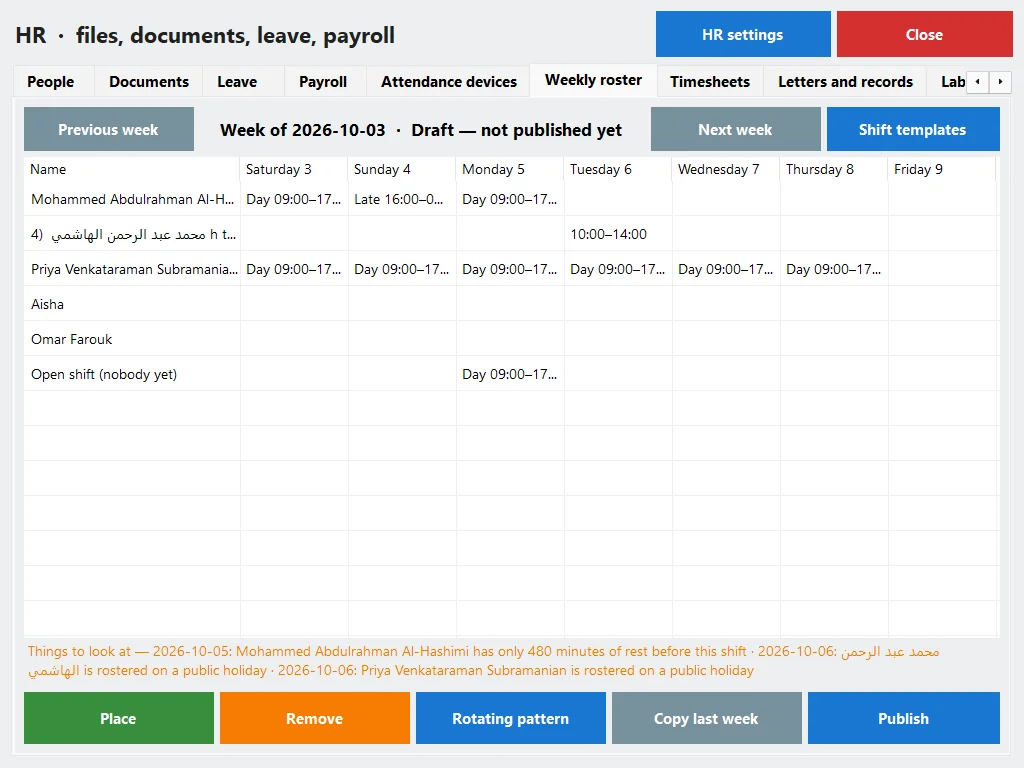
A punch only means something against a plan. Make shift templates — morning, evening, the overnight that crosses midnight, with a paid or unpaid break — and place them on a weekly roster per branch, starting on Saturday. Copy last week, use a rotating pattern such as 6-1 or 5-2, leave a shift open for anyone to ask for, then publish; online, everyone on it gets an e-mail or a Telegram message.
The roster warns and never blocks: the same person twice at once, less than 11 hours' rest between two shifts (our default, not a legal figure), more than 48 hours in the week, leave or a public holiday on the day.
The timesheet then compares each day with the roster: late, left early, absent without leave, overtime and night hours, with the raw minutes kept beside the rounded ones. The manager approves the period and locks it; a later correction needs the payroll right and, like every correction, a reason. Want to check a week by hand first? Our free shift-hours calculator does it in the browser.
Payroll the Egyptian way
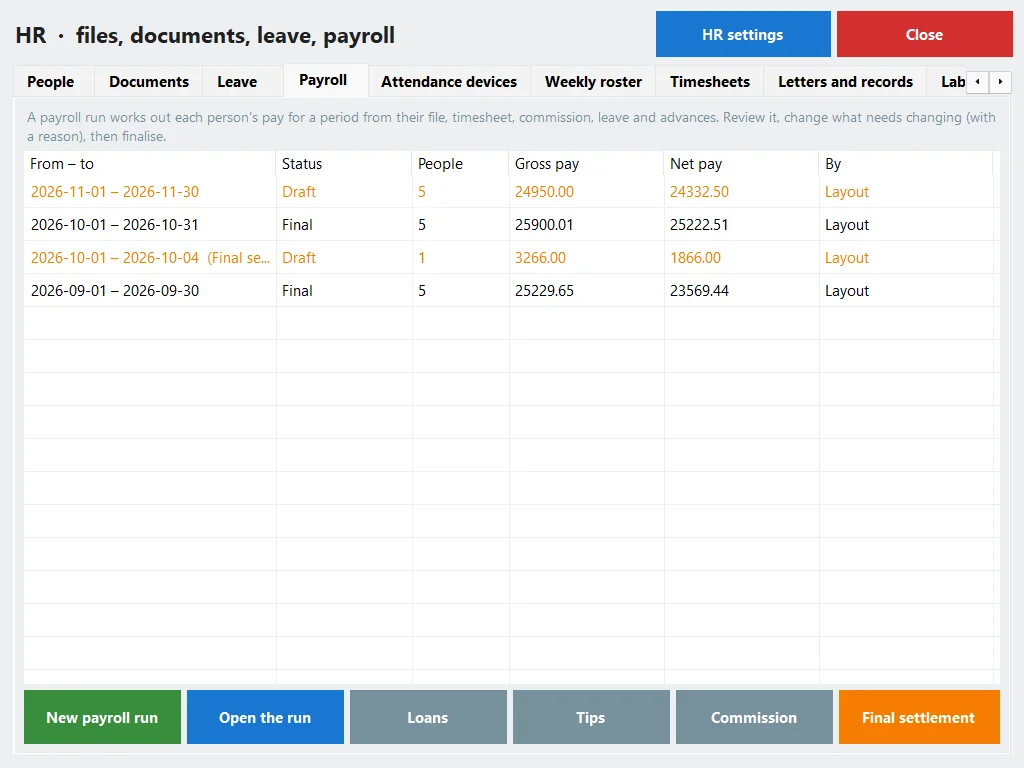
A payroll run takes, for each person, the file (basic and allowances, paid monthly, weekly, daily or hourly), the locked timesheet, the leave, the commission and the advances still owed, and works out the period. It is a calculator with dated tables you can edit, and the tax and insurance steps are shown for one person as a worked example on screen.
Income tax (Law 91/2005 as amended by Law 7/2024)
| Yearly taxable income (EGP) | Rate |
|---|---|
| Up to 40,000 | 0 % |
| 40,001 – 55,000 | 10 % |
| 55,001 – 70,000 | 15 % |
| 70,001 – 200,000 | 20 % |
| 200,001 – 400,000 | 22.5 % |
| 400,001 – 1,200,000 | 25 % |
| Over 1,200,000 | 27.5 % |
Before the bands, the employee's insurance share and the personal exemption of EGP 20,000 a year come off. For higher incomes the lower bands fall away as the law says, and the program handles that. Choose the monthly method (this month × 12) or the cumulative one (the year so far, so a raise or a bonus does not over-tax one month). An example: a yearly taxable income of 100,000 pays 0 on the first 40,000, 1,500 on the next 15,000, 2,250 on the next 15,000 and 6,000 on the last 30,000 — 9,750 for the year.
Social insurance (Law 148/2019)
The employee pays 11 % and the employer 18.75 % of the insurable wage, which for 2026 is held between EGP 2,700 and 16,700 a month (a wage under the floor is insured at the floor). On a gross of 10,000, that is 1,100 from the employee and 1,875 from you.
The Labour Law 14/2025 defaults
| Rule | Default (editable) |
|---|---|
| Working hours | 8 a day, 48 a week |
| Overtime | ×1.35 by day, ×1.7 by night |
| Work on the rest day | ×2 |
| All deductions together | No more than 25 % of the wage |
| A loan instalment | Up to 10 % of the wage, no interest |
| The weekend | Friday |
Around the run: loans with an instalment per month, tips and service-charge pools shared equally, by hours or by points per role, commission, the final settlement when someone leaves, and a payroll journal for the accountant. The run goes draft → reviewed → approved → paid, and any figure can be changed in the draft with a reason that stays on it.
Paying out: bank and cash
Each person is paid by bank, in cash, or both. The run gives a bank sheet (name, bank, IBAN, net) and a cash sheet with a signature line for each person, and payslips to print or save as PDF — online they are also e-mailed and wait on the employee's own page.

Online or on your PC
The program on your PC has the same rules and the same calculations: people, documents, leave, the roster, timesheets, attendance devices by file and by LAN bridge, payroll, letters and records, labour and sales. What it cannot have is what needs the internet to reach a phone or a device: clock-in from the employee's phone, the employee's own page and links, live push from devices, payslips by e-mail, the kiosk code and the heat map.
Which plans include it
| What | Online | On your PC |
|---|---|---|
| Employee file, documents, leave, attendance, devices, roster | Shop and up | Silver and up |
| Payroll, payslips, bank sheet, HR reports | Business and Chain | Gold and up |
Online: Shop 1,999, Business 2,500 and Chain 5,000 EGP a month (see the plans); every new shop starts with 14 days of Business, no card, so payroll is there to try. On your PC: Silver 4,900 or Gold 8,500 EGP once; on Silver the Payroll tab shows “needs the Gold package”.
First online year 20% off every plan, with the code AHLAN20.
Quick answers
Which device should I buy?
Ask us first. Every listed model is tested with a simulator only. A device that can export its log to a USB stick always works through the file.
Will you store my staff's fingerprints?
No. Fingerprints and faces stay on the device; we keep who, when, which device and how.
Is the tax figure final?
It is a calculation from the published tables as of October 2026, editable and dated. Your accountant has the last word.
Can a manager see the salaries?
Online, only with the payroll right; without it the salary figures never reach their screen, and every view is logged. In the program on your PC, HR is for the owner and the managers.
Do the public holidays update themselves?
The year's list is filled in for you; the moon-dependent ones are marked ~. Check the official announcement every year.
Put last month's device file on a timesheet
Start the 14-day trial of Business online, no card: import the file, build a week's roster and run a test payroll. Or try the program on your PC for 7 days.
First year 20% off every plan — with the code