The one test: can you take it out, today?
“Your data is safe with us” is a sentence every program can say. The only test that means something is whether you can take the data out, in a file you can open without that program, on a normal day, without asking anyone. If the answer is “send us a request and we will prepare it”, the data lives with them and you visit it.
And “the data” is more than the product list. It is who owes you what, what you owe each supplier, the cost you paid for every item, which cashier sold what and when, and years of sales that tell you what sells in Ramadan and what never moves. The product list can be rebuilt in a day; the rest cannot be rebuilt at all.
PosMasr has two editions — the one-time desktop licence, with the data on your PC, and PosMasr Cloud, with the data online on our servers — and they pass the test in different ways. Both are below, with the honest limits.


The desktop edition: where the data lives
In one folder on the till PC: C:\ProgramData\PosMasr\data on an installed copy. No database server and nothing hidden in the registry — plain files. The sales are text files in data\sales, one per day, that open in Excel or Notepad. No update and no uninstall ever deletes that folder.
That is the whole point of the desktop edition: nothing leaves the shop. It is also its duty: nobody backs that folder up for you. More on that in the backups article.
The desktop edition: the ways out
| You want… | Where | What you get |
|---|---|---|
| The product list in Excel | Settings → Products → Export CSV | Every product in one CSV that opens in Excel with the Arabic intact, and imports back as it is |
| Any report in Excel | Reports → Export CSV (Ctrl+E) | The tab you are on; on the Receipts tab, every line of every receipt in the period |
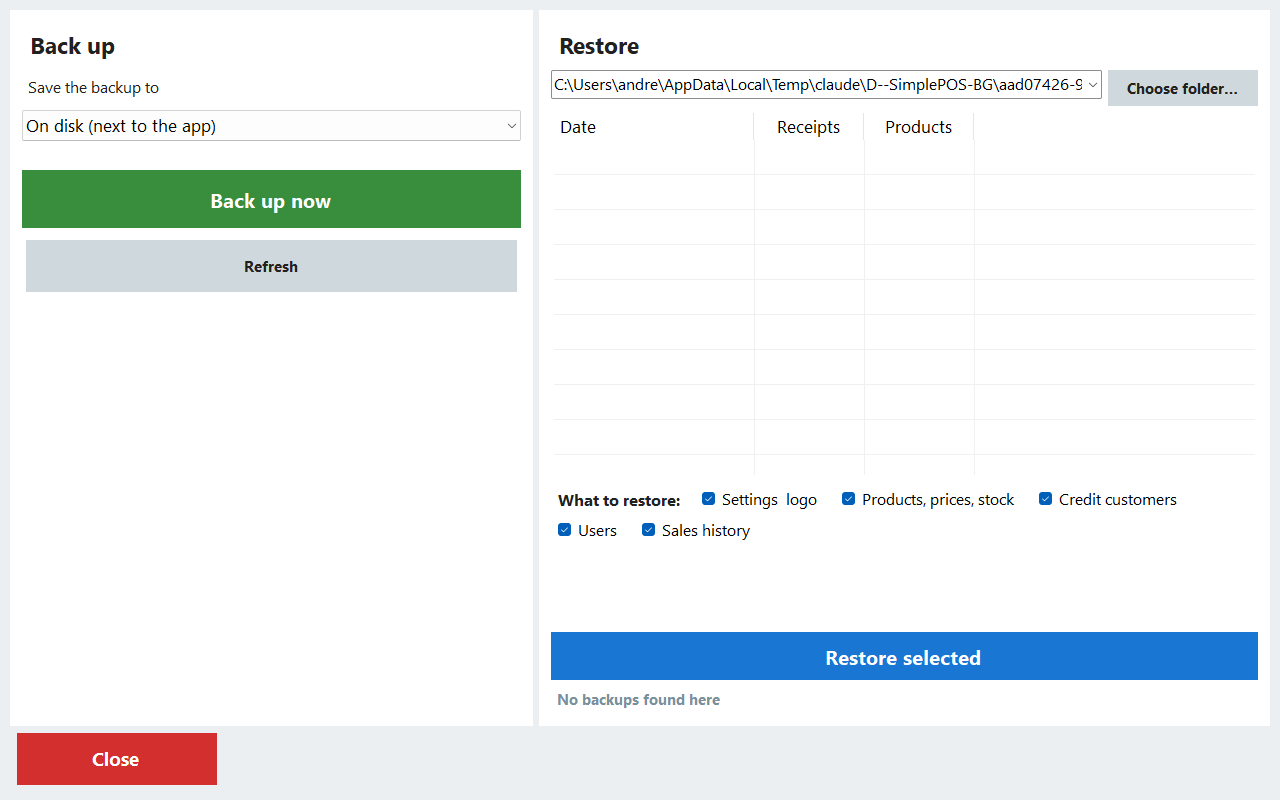
| Everything, to keep | The Backup and restore screen | A dated folder on a USB stick: products, settings, customers and credit, suppliers, users, every sale since day one |
| The accountant reads it directly | The accountant feed (Platinum) | Read-only links to the products, receipts and stock, under a token you can replace |
No internet needed, and nothing to switch off
The desktop program never needs the internet to sell, to report or to open in the morning. The licence is a key made for that PC's machine code and checked on the PC itself; it is paid once and never expires. There is no monthly payment to miss, so there is no day when the program locks you out of your own history.
One thing does involve us: moving the licence to a new PC needs a new key from us, against the release code of the old one — the steps are in Moving PosMasr to a new PC. The data itself moves with a backup and a restore, with nobody's permission.
PosMasr Cloud: Settings → Data → Download a copy
Online, the data lives on our servers, and a backup is taken every day. That does not make it ours. The owner's Settings → Data page has a Download a copy button: pick the range of receipts, press it, and you get the whole shop — settings, products, customers, suppliers, users, credit, deliveries, supplier accounts, expenses, shifts, sales and stock — in the Windows program's own backup format. The page lists your last copies with their dates.
- On every plan, from Basic to Chain — the download of a copy is not a feature you pay extra for.
- In every status — during the trial, after it, while the account is read-only, and after it is cancelled until the final deletion.
- Excel files too: Products → Import and export → Export every product (CSV), the same columns as the desktop's export; and on Business and Chain, a CSV behind every report and the accountant feed.
The page's own sentence says why the button is there: so you can leave whenever you like. More about who can see the data and how it is protected is in Is my data safe online?
If you stop paying online: the timeline
| When | What happens | What still works |
|---|---|---|
| The paid-until day passes | 7 days of grace | Everything, selling included |
| After the grace | Read-only: selling is paused | Reports, products, exports, Download a copy. Pay, and selling is back at once |
| The account is cancelled | The data is kept for 90 days, then deleted | Download a copy, until that day |
A trial that ends unpaid turns read-only at once — nothing was paid — but nothing you entered is lost. This is the honest difference from the one-time licence, which is never switched off; the full timeline is in the data-safety article.
Moving between the desktop and online, both ways
Choosing one edition today is not a promise for life. It is the same program with the same rules, and the data moves:
- Desktop → online: in the desktop program (5.1), Settings → Backup → Move to PosMasr Cloud… makes one file with the products and their pictures, customers, suppliers and about a year of sales; Settings → Data imports it, and nothing on the PC changes. The steps: Moving your desktop to the cloud.
- Online → desktop: Download a copy gives the shop in the desktop program's backup format — the way back to the one-time edition, described in 35.8 of the manual. Cashiers set new passwords on the first day, because online passwords are stored in a form the desktop cannot read.


A monthly habit that makes all of this real
An export you have never tried is a promise, not a copy. Once a month, on whichever edition you use:
- Take the full copy — the USB backup on the desktop, Download a copy online.
- Export the product list to CSV and open it in Excel. Check that the Arabic reads right and the prices are there.
- Put both files somewhere that is not the till PC: a stick that goes home, or a folder on your own phone or e-mail.
Ten minutes a month, and “what if the PC dies?”, “what if I change programs?” and “what if I stop paying?” all have the same answer: the data is already in your hands.
Quick answers
Do I need your permission, or a request, to export my data?
No. On the desktop the files are on your PC and the export buttons are in the program. Online, Download a copy is on the owner's Settings → Data page on every plan; nobody at PosMasr has to approve it.
Is the export a paid extra online?
No. Download a copy is on every plan, even read-only. The CSV behind every report and the accountant feed are part of the Business and Chain plans.
Does the desktop program stop if your company stops answering?
No. It sells, prints and reports without the internet, and the licence key is checked on the PC itself. What needs us is moving the licence to a new PC. We wrote a whole checklist for that question: What if your POS company disappears?
Can I open the online copy without PosMasr?
The full copy is a text file in the desktop program's backup format, made to be read back by PosMasr. For Excel, use the CSV exports: the products from Products → Import and export, and the reports' CSVs on Business and Chain.
Which edition keeps my data safer?
Different risks. On the desktop nothing leaves the shop, but the backup is your job. Online a backup is taken every day and a dead PC loses nothing, but the data lives on our servers. The side-by-side table goes through each risk.
Export everything on the first day of the trial
Add a few products, sell one receipt, then take them out again — a CSV in Excel on the desktop, Download a copy online. See your data leave as easily as it came in, before you trust anyone with it.