
Show me how: short walkthroughs inside the app
On the pages of your shop in the browser, Show me how plays a short walkthrough of a task. It is not in the till app and not in the demo.
1Ask
In the app title bar, press Show me how. Under How do I…? type what you want to do, for example add a product, and pick one of the answers.
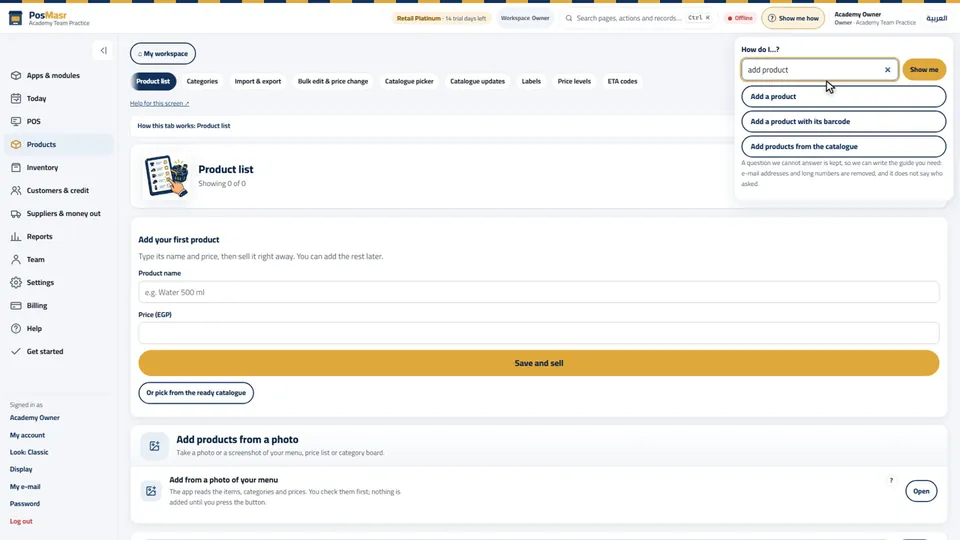
Open Show me how from the title bar and type what you want to do. 2Watch it
The walkthrough plays step by step. Press Next, Back or Done. When it plays in the sample shop, the top says Sample shop: nothing here is your data.
3Do it yourself
Press Try it myself to do the same on your own page. When it says Pointing only: press this yourself on your own page., press the button it shows.
4The first tour
A new account can take the welcome tour with Show me around.
The words on the screen
| On the screen | What it means |
|---|---|
| Pointing only: nothing is saved here | The guide shows where to press; nothing is changed. |
| Try it myself | Leave the sample shop and do it on your own page. |
If it does not work
- There is no Show me how button: you are in the till app or the demo. Open your shop in the browser.
- A step says This step is not available on your plan or on this screen. Press Next to go on.: press Next.
- Nothing matches your question: it shows the nearest walkthroughs. Your question is kept without your e-mail or long numbers, so we can write the guide you need.
