
PosMasr Desktop
Link two PCs, or a PC and Online, with Sync
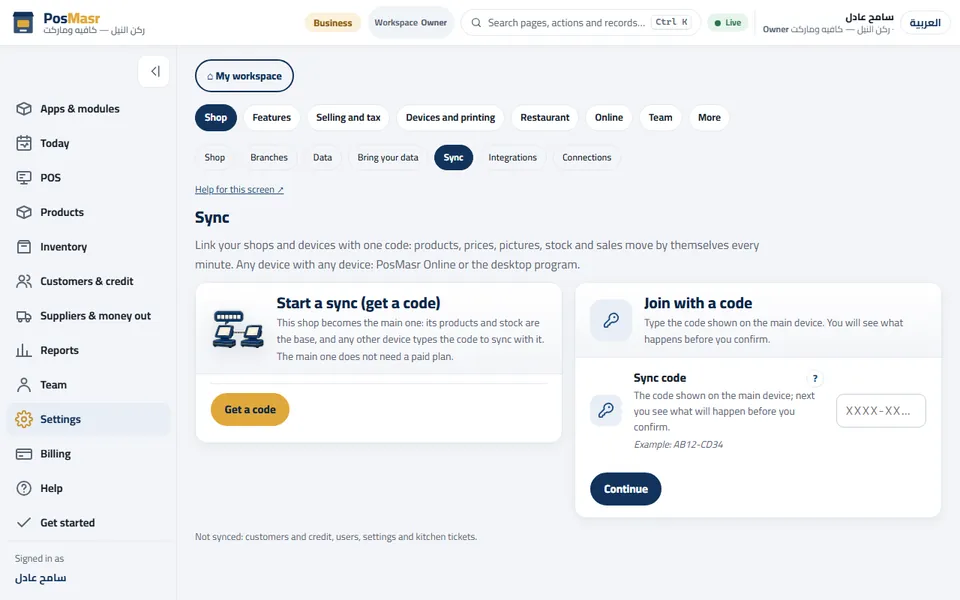
One code links your devices: products, prices, pictures, stock and sales move by themselves every minute. Any device with any device: PosMasr Online or the program.
Steps
- On the main PC: get a code. Open Settings → Sync and press Start a sync (get a code). This device becomes the main one: its products and stock are the base. The main one does not need a paid plan.
- On the other PC: join. Open Settings → Sync, press Join with a code and type the code. Read what will happen, then press I agree - start the sync. A PC in its trial can start a sync but cannot join one.
- With PosMasr Online. In the browser: Settings → Sync. Press Get a code, or under Join with a code type the Sync code and press Continue. Tick I understand what will happen and agree and press Start the sync. The shop that joins needs a paid plan.
- Every day. Sync runs by itself. Sync now syncs at once. Linked devices lists the devices; A code for one more device adds another.
- To stop. Press Leave the sync on the device that should leave.
If it does not work
- Sync is refused on this PC: it is a second till, a kitchen PC or in online mode. Use the main PC of the shop.
- The code is refused: type it as it is shown on the main device (for example AB12-CD34).
- Customers, users or settings did not move: they are not synced, nor are credit and kitchen tickets.
Related topics
Still stuck? Ask us on WhatsApp: 24/7 automatic answers, people from 9am to 9pm Cairo time. WhatsApp · +1 650 442 5630
Written for PosMasr Desktop as it is on 19 November 2026.
