
PosMasr Desktop
Activate the program from a licence card
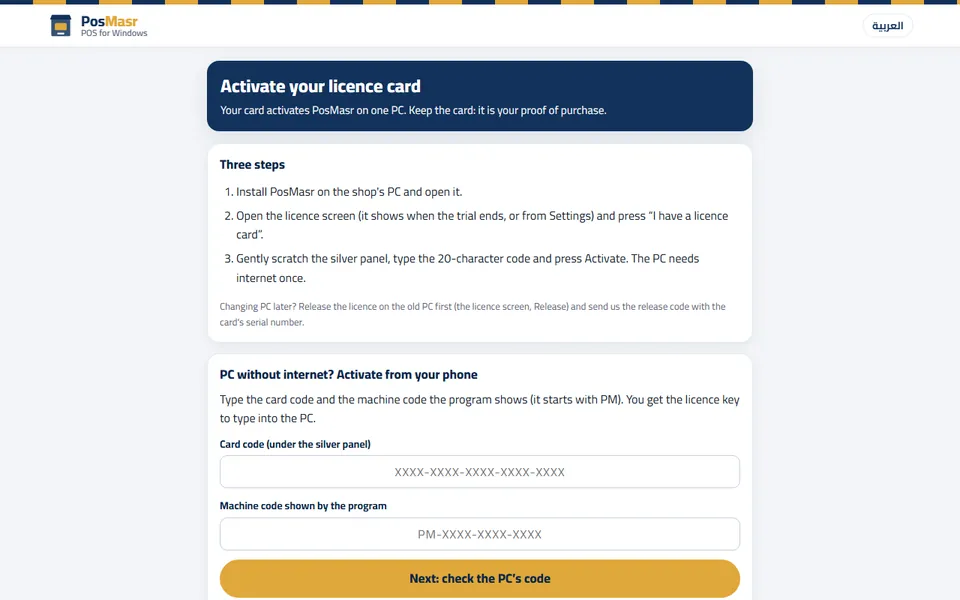
A licence card activates PosMasr Desktop on one PC. Keep the card: it is your proof of purchase.
Steps
- Open the licence screen. Install the program and open it. The licence screen shows when the trial ends, or open Settings → License → Activate / enter key….
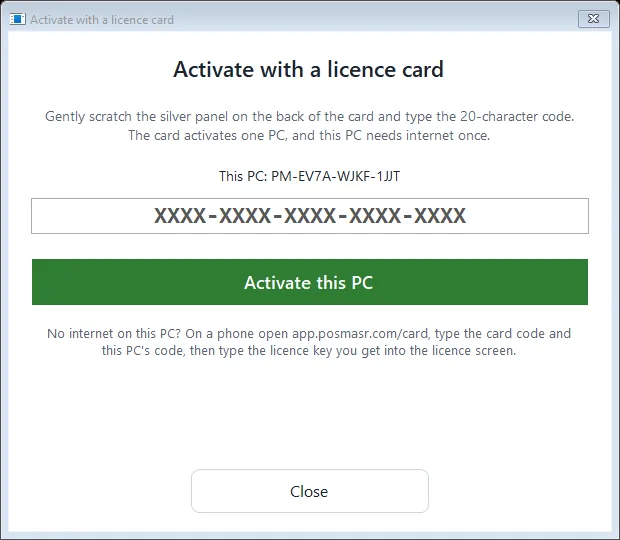
- Choose the card. Press I have a licence card.
- Type the code. Gently scratch the silver panel, type the 20-character code and press Activate this PC. The PC needs internet once. You see that this PC is activated.
- No internet on the PC?. On a phone, open app.posmasr.com/card. Type the card code and the PC's code that the program shows; you get a licence key to type into the licence screen.
- Moving to another PC. On the old PC press Release the license to move it to another PC and answer Yes. Send us the release code with the card's serial number on WhatsApp.
If it does not work
- The code is refused: check the 20 characters again against the card.
- The PC has no internet: use the phone route at app.posmasr.com/card.
- The card was used on another PC: release the licence on that PC first.
Related topics
Still stuck? Ask us on WhatsApp: 24/7 automatic answers, people from 9am to 9pm Cairo time. WhatsApp · +1 650 442 5630
Written for PosMasr Desktop as it is on 19 November 2026.
