Why Excel is a fair choice — honestly
Let's give the spreadsheet its due. It is already on the laptop. Anyone who finished school can type into it. You add a column for 'supplier' or 'colour' whenever you like, and a formula at the bottom sums the day. For a kiosk with 40 items, one person behind the counter and 30 customers a day, a sheet plus a notebook genuinely works — and we would not tell that person to spend money on software yet.
Excel is also a superb analysis tool: pivot a month of sales by category in a minute, chart it, share the file on WhatsApp. That part never stops being useful, which is exactly why the last section of this article is about keeping it.
The trouble starts when the spreadsheet stops being a record you fill in at the end of the day and becomes the till — the thing a customer waits for while you find the row.
The six moments the spreadsheet breaks




1. Speed at the counter
A sale in a spreadsheet is: find the row (Ctrl+F, type part of the name, hope it is spelled the way you remember), read the price, type the quantity in another sheet, work out the total on a calculator or in your head, take the money, work out the change. Two minutes when the shop is quiet; a queue when it is not. A POS does the same sale in three taps or one scan, and shows the change in big digits. The gap is not the software's cleverness — it is that a till is built for one job.
2. The customer wants a receipt
'Can I have a receipt?' With a spreadsheet the honest answer is a handwritten note. Companies buying for their office, anyone returning an item next week, a customer paying by InstaPay who wants proof — all of them need a printed paper with your name, the items, the total and a number. That number is also what makes a return possible later.
3. Stock goes negative
You have a 'stock' column. Who subtracts from it? You, at night, from memory. One evening you forget, and the sheet says 4 while the shelf says 0 — or worse, the sheet says −3, and it has been saying so for a week. Stock is only useful if it goes down at the moment of the sale, by itself, and warns you before the shelf is empty.
4. Two people, one file
The day you hire a second person, the spreadsheet becomes a fight. Two copies on two laptops that never agree; or one file on a shared folder that Excel locks 'for editing by Ahmed'; or an online sheet that is fine until the internet drops. And nobody can tell you afterwards who typed that 900 instead of 90.
5. No daily close
'How much should be in the drawer right now?' A spreadsheet cannot answer, because it does not know what was cash, what was card, what went out for the electricity bill and what the morning float was. A daily close — expected cash vs counted cash — is the single habit that stops small leaks, and it needs a system that recorded every sale as it happened.
6. Nothing to show the tax authority
Once a shop is registered, the Egyptian Tax Authority expects receipts it can trace — and shops are being enrolled in the e-receipt system in waves. A spreadsheet is an editable file with no receipt numbers, no timestamps and no QR; it proves nothing to an inspector. Check the latest ETA notices for your activity and governorate, but plan for a day when 'it is in my Excel' will not be an answer.
Task by task: Excel vs PosMasr
The same daily jobs, side by side. 'PosMasr' here means the program as it ships — package names are noted where a feature needs more than the Bronze package.
| Task | Excel | PosMasr |
|---|---|---|
| Sell one item | Find the row, type the quantity elsewhere, calculate | One tap on the product button or one barcode scan |
| Work out the change | Calculator or head | Numpad with quick-cash buttons; change in big digits |
| Print a receipt | No (a Word template at best) | 58/80 mm thermal receipt with your logo, numbered; A4 invoice for companies |
| Stock after a sale | You subtract it later, if you remember | Drops at the moment of sale; low-stock list; stock-take with variance (Silver) |
| Two cashiers | Two copies that disagree, or a locked file | Cashier accounts (Silver); every receipt carries who sold it; a second till on the shop network (Gold and up) |
| Daily close | A SUM at the bottom of the column | Today's totals, cash vs card vs credit; shifts with a Z report: expected vs counted (Silver) |
| Customer credit (who owes what) | A separate sheet you must remember to update | Put the receipt on the customer's name; statements; partial repayments |
| Best sellers, peak hours | Possible with a pivot, if the data was typed in cleanly | Built-in reports by product, day, hour, category, cashier — and Export CSV |
| Proof for the tax authority | None | Numbered receipts with VAT lines; ETA e-receipts with the QR (Platinum) |
| Backup | Whatever you remember to copy | One tap to a USB stick; daily automatic backup |
| Watch the shop from home | Ask someone to send you the file | Phone dashboard: today's sales, latest receipts, low stock (Platinum) |
| Flexibility (add any column you like) | Unlimited | Fixed fields — that is the point of a till |
| Cost | Already on the PC | One-time license from 2,450 EGP (launch price), 14-day free trial |
Which one for your shop
| Your situation | Stay on Excel? | Why |
|---|---|---|
| Kiosk or stall, under ~50 items, one person, no receipts asked for | Yes, for now | A sheet and a notebook cover it. Come back when a queue forms. |
| Grocery / mini-market with a scanner and packaged goods | No | Scanning into a spreadsheet is a hack; stock and expiry need to move by themselves. |
| Café / restaurant with a kitchen | No | Orders have sizes and add-ons and must reach the kitchen; a sheet cannot do either. |
| Pharmacy | No | Expiry dates, batch-level stock and the e-receipt make a sheet unworkable. |
| Boutique / phone accessories, items without factory barcodes | Not for long | Fine at 30 items; painful at 300 with colours and sizes. Variants and printed labels fix it. |
| Anyone with a second employee or selling on credit | No | You need to know who sold what and who owes what, with names and dates. |
| Registered with the Tax Authority | No | Numbered receipts today; e-receipts when your wave is called. |
The migration: one CSV file, and you keep every row
The fear that keeps people on Excel is retyping 800 products. You do not retype anything. PosMasr starts with an empty product list on purpose, and fills it from a CSV file — which is just what Excel saves when you choose 'CSV UTF-8' in Save As. The whole thing is four steps:
- Get the template from PosMasr, not from us. Settings → Products → Export to file (CSV). Even with an empty list it writes a file with the right column headers. Open it in Excel.
- Paste your columns under those headers. Name, price, category, barcode, cost, stock… copy each column from your old sheet into the matching one. The headers can be in Arabic or English — the importer understands both (for example
price2orسعر الجملةfor the wholesale price). Columns you do not have, leave empty. - Save As → CSV UTF-8. That 'UTF-8' is what keeps the Arabic names intact. Close the file.
- Settings → Products → Import. Pick the file. New products are added; a product that already exists (same code, barcode or name) is updated; and a blank cell keeps whatever value the product already has.
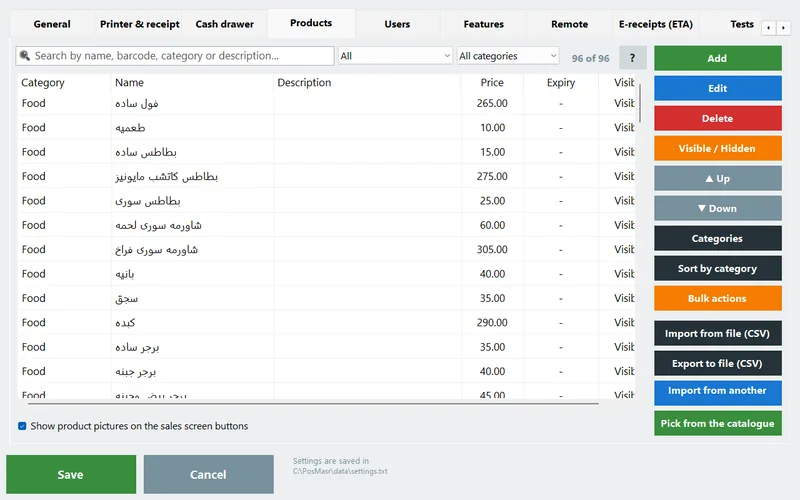
That last rule — blank keeps the current value — is the one to remember. It means a file with just two columns, name and the new price, updates 800 prices in one go after the supplier's price list changes. It also means you can migrate in stages: names and prices today, barcodes and costs next week.
Keep Excel for what it is good at

Nothing here asks you to delete the spreadsheet. It just moves from the counter to the desk. Every tab in PosMasr's Reports window — by product, by day, by hour, by category, profit, the receipt list — has an Export CSV button that saves exactly the table you are looking at, Arabic intact, in a file that opens in Excel with a double-click. The period is whatever you picked: today, this week, last month, or any from/to.
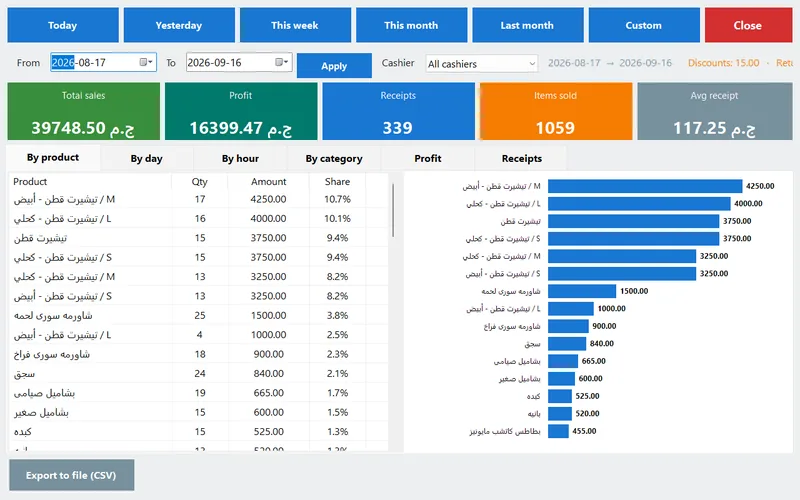
So the things Excel was genuinely good at stay in Excel: comparing this Ramadan to last Ramadan, a chart for your partner, a margin-by-supplier table, a price list you send to a wholesale customer. And the sales files themselves are plain text, one per day, in the program's data\sales folder — you can open any of them in Excel or Notepad without asking anyone.


How PosMasr handles the switch
- Import from Excel (CSV) in every package, with the template coming from Export, Arabic or English headers, update-or-add matching, and blank-keeps-value for prices-only files (manual §19).
- Export CSV on every report tab and on the product list, Arabic intact, opens straight in Excel (manual §9).
- Stock moves by itself — sales lower it, receiving raises it, a low-stock list with your own threshold, and a stock-take that saves and prints the variance (Silver).
- A real daily close: today's totals split by cash, card and credit; optional shifts with a Z report that prints expected vs counted (Silver).
- Your data stays yours: plain files on your own PC, offline, backed up to a USB stick in one tap — and a daily automatic backup if you want it.
- From the phone: the owner dashboard shows today, the week and the month, latest receipts and low stock; the Manage page runs reports over any period (Platinum, manual §17).
- Setup service (separate fee): we install, connect the printer and drawer, and enter or import your products with you, over a screen-share.
Quick answers
My sheet has columns PosMasr does not have (shelf number, supplier phone…). Do I lose them?
No — the importer simply ignores columns it does not know, and your original sheet is untouched. Keep it as the place for that extra information, or put it in the product description field.
The Arabic names came in as question marks.
The file was saved as plain 'CSV' instead of 'CSV UTF-8'. Open the sheet again, Save As → CSV UTF-8, and import again — existing products are updated, not duplicated.
Can I keep updating prices from Excel after the move?
Yes. Export the list, change the price column, import it back. Blank cells keep their values, so a two-column file (name + price) is enough.
Do I need internet for any of this?
No. Import, export, reports and backups all work offline. Only the optional phone dashboard and the ETA e-receipts use the network.
What does it cost to try?
Nothing: 7 days with every Platinum feature, no card and no sign-up. Whatever you import during the trial stays when you activate.
Bring your sheet. Keep your sheet.
Import your products from Excel in the first ten minutes of the free trial, sell for a week, and export the reports back to Excel to see the difference yourself.